https://media.notthebee.com/articles/69c162834e9de69c162834e9df.jpg
Yes, this is a true story.
Not the Bee
Just another WordPress site
https://media.notthebee.com/articles/69c162834e9de69c162834e9df.jpg
Yes, this is a true story.
Not the Bee
https://media.notthebee.com/articles/69c162834e9de69c162834e9df.jpg
Yes, this is a true story.
Not the Bee
https://media.townhall.com/cdn/hodl/2020/189/9568d7c2-0226-4824-8b36-70052e5550b1.jpg
https://media.townhall.com/cdn/hodl/2020/189/9568d7c2-0226-4824-8b36-70052e5550b1.jpg
https://s3files.core77.com/blog/images/1818845_81_142871_kHbNHRx8g.jpg
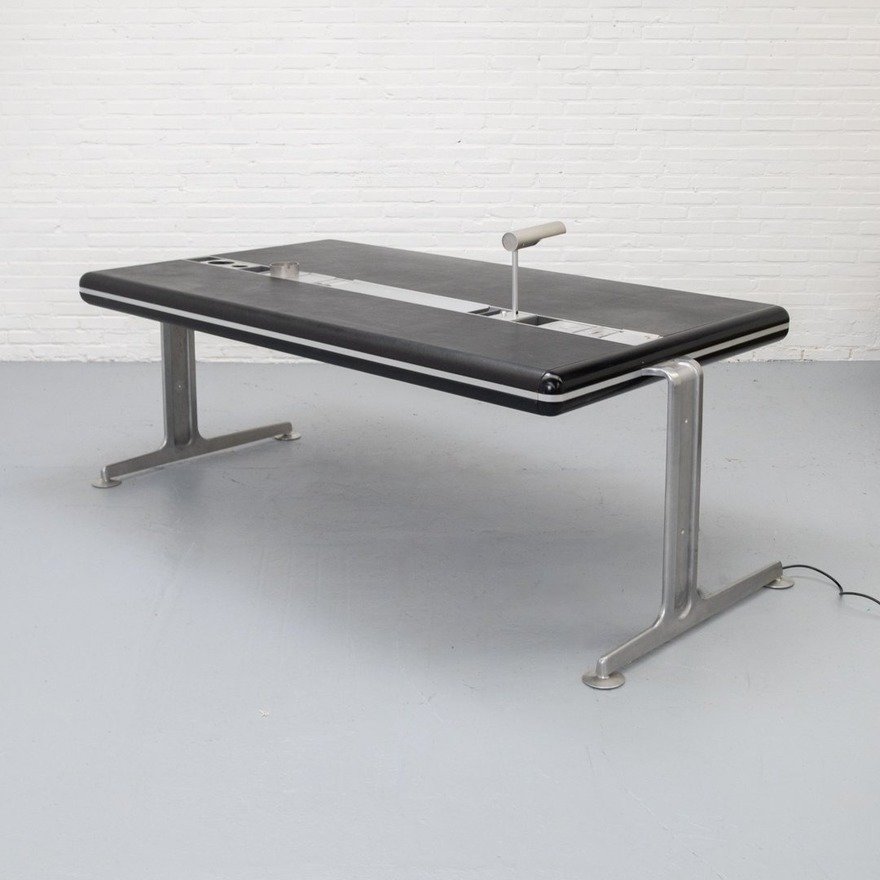
Though this was designed in the 1970s, this desk looks closer to modern-day furniture than say, a desk from the 1950s.
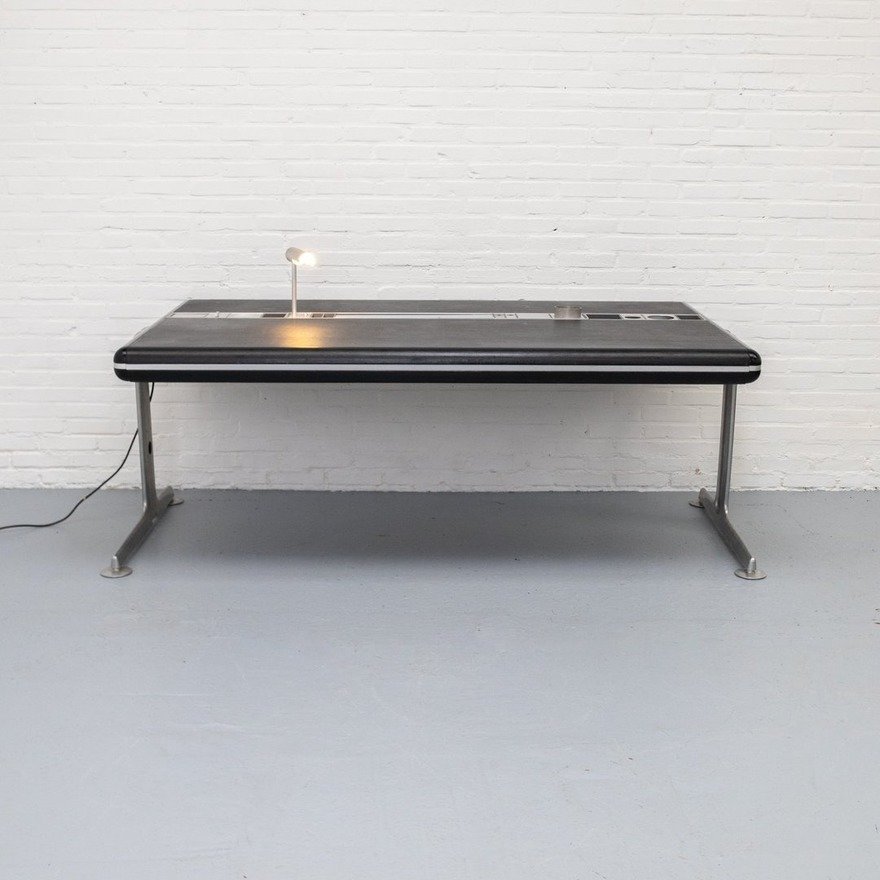
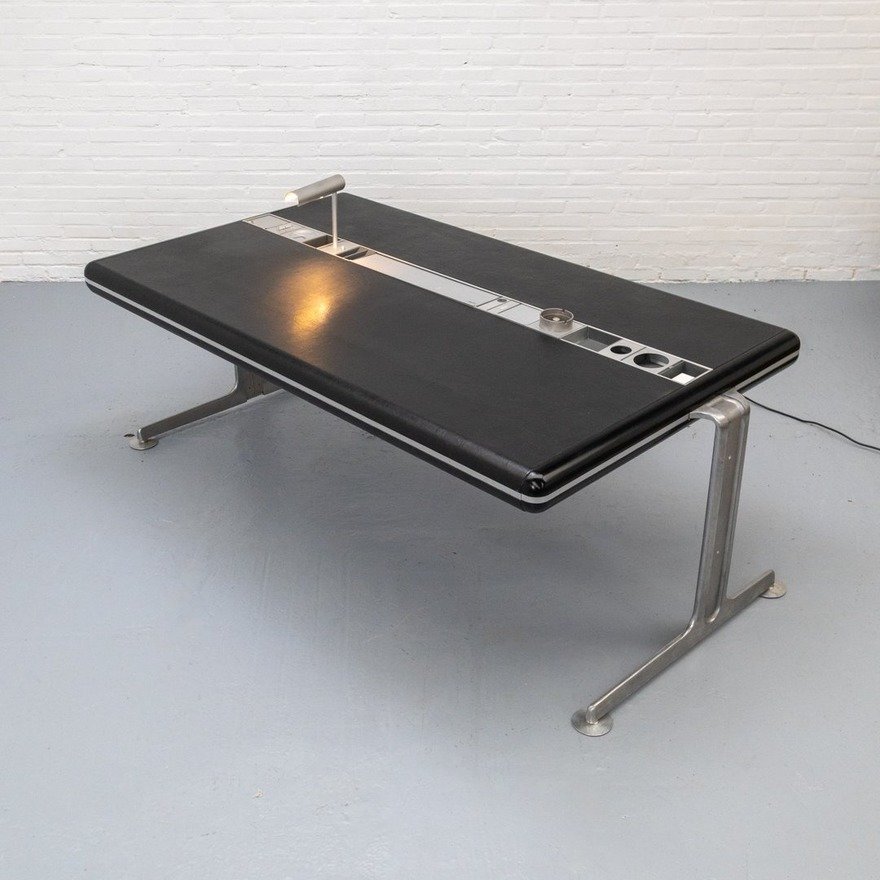
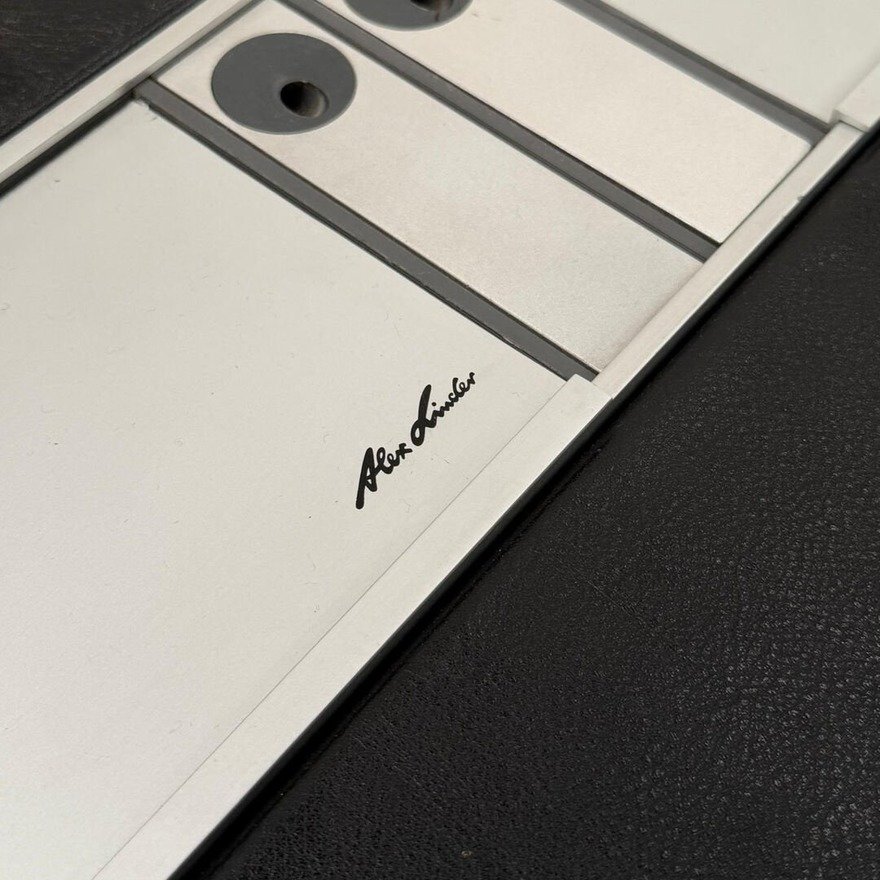
Danish designer Alex Linder’s Executive Desk has no drawers, and features a recessed aluminum rail that takes a variety of accessories: A desk lamp, a clock, a calendar, a countdown timer (presumably for meetings), little storage bins and, this being the ’70s, an ashtray.

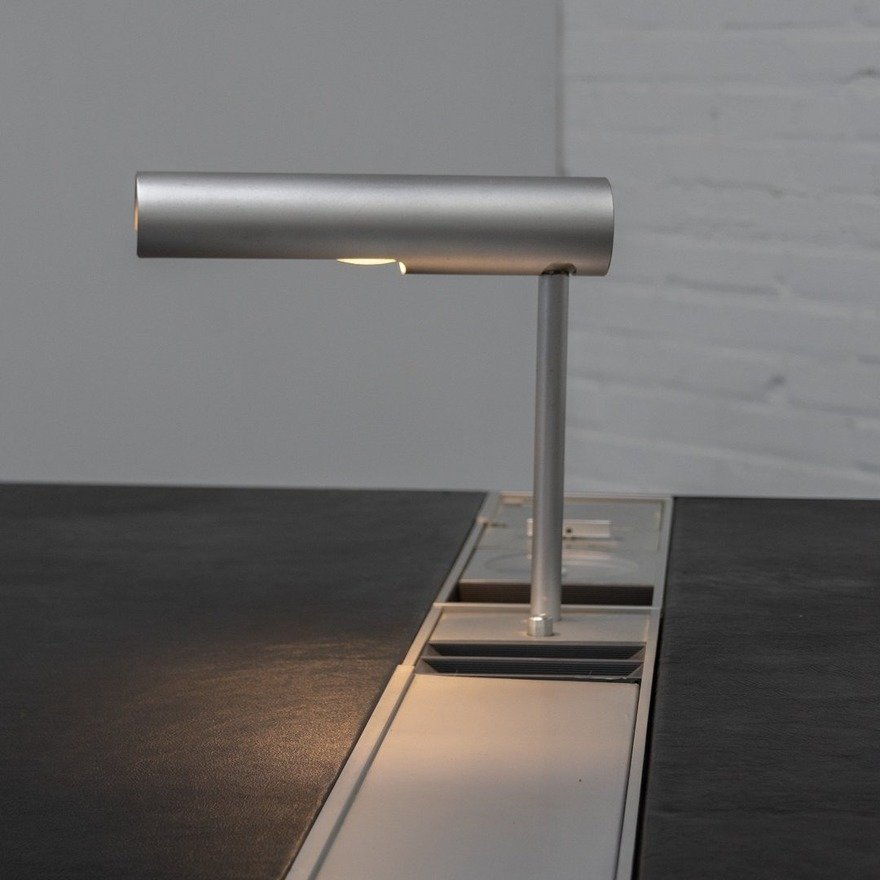
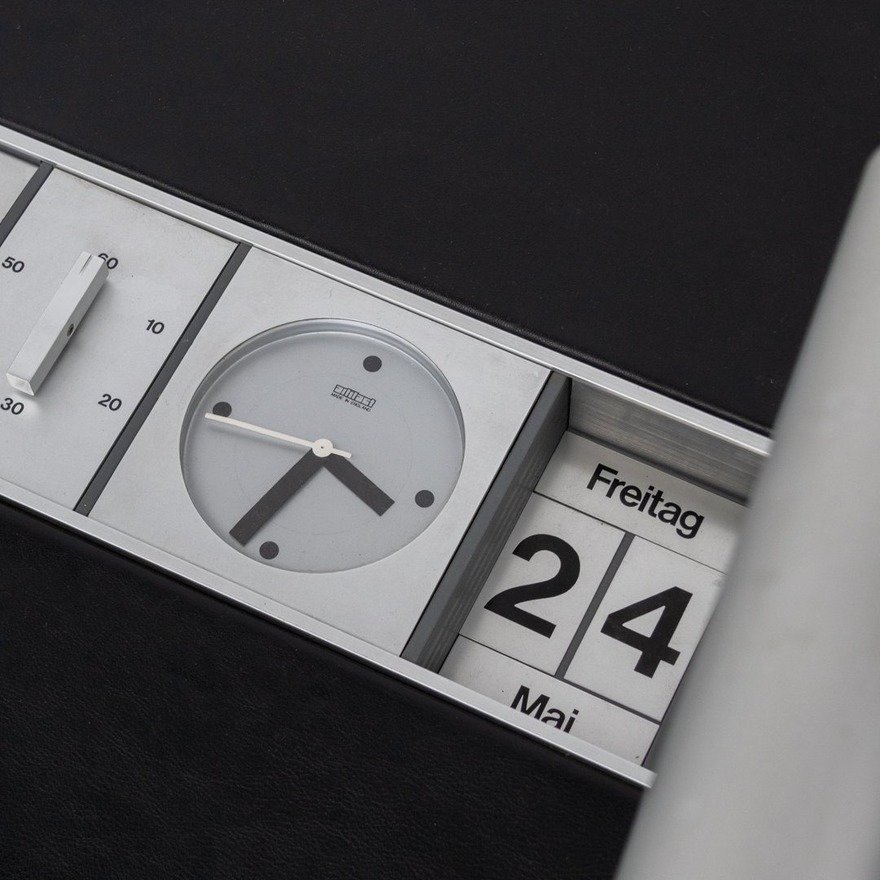

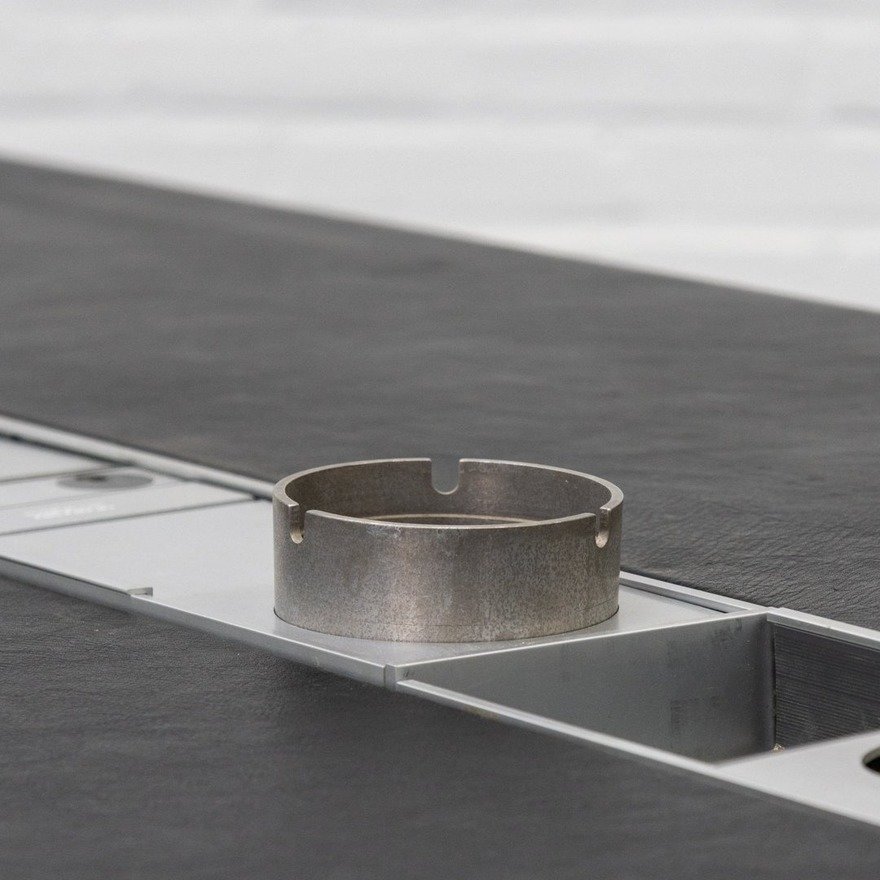
The user chooses where to place the accessories within the rail.
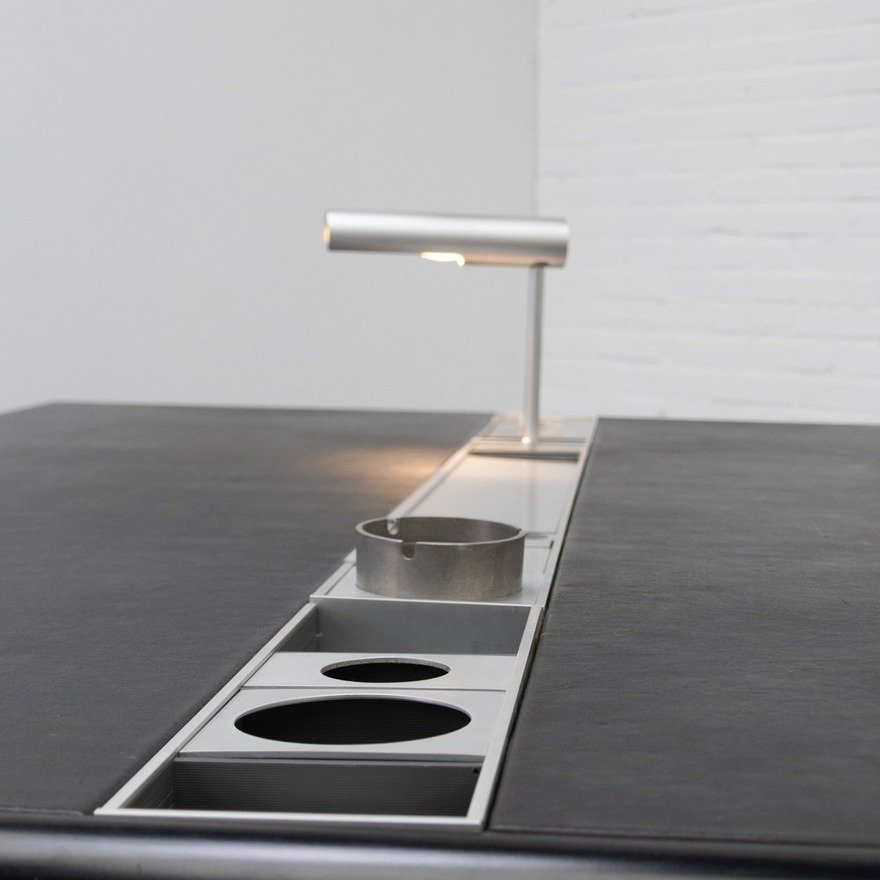
The desk surface is leather, an unusual choice both now and then.


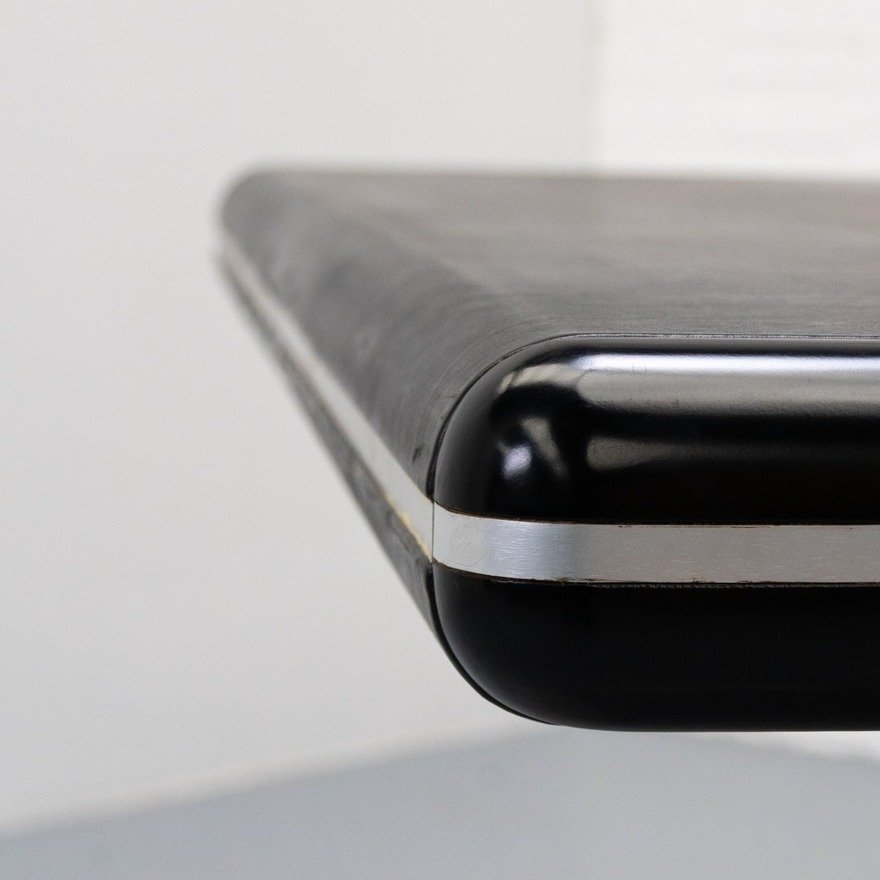
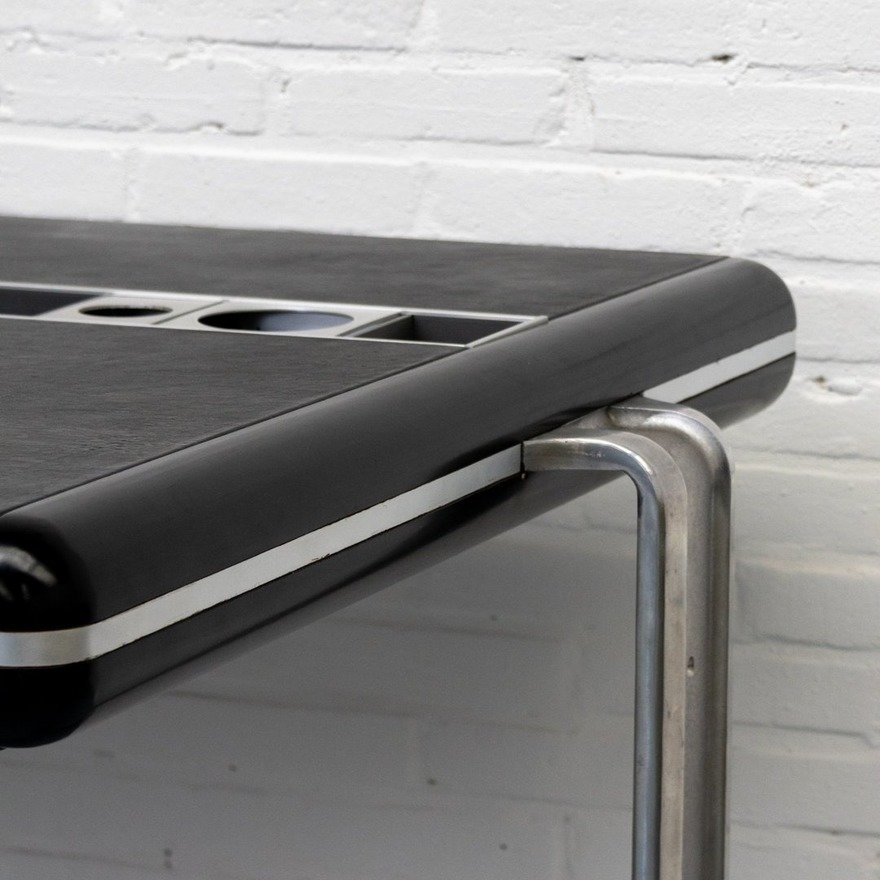
If this thing was height-adjustable and had appeared on a current-day Kickstarter, I wouldn’t bat an eye.
Core77
Laravel News Links
https://static0.howtogeekimages.com/wordpress/wp-content/uploads/wm/2026/02/bambu-lab-p2s-3d-printer-handle-logo-closeup.jpg
Bambu Lab makes the most popular 3D printers in the world, earning a reputation for ease of use, reliability, and great value. But not everyone is in love with the company’s walled garden approach, which involves locking out third-party slicers and a heavy dependence on the cloud.
How-To Geek
https://backoffice.itpathsolutions.com/wp-content/uploads/2026/03/is-your-laravel-schema-ready-for-prime-time-find-out-in-minutes-with-dbstan.webp
You push your Laravel project to production. Everything works fine for weeks. Then suddenly, performance slows down, queries start lagging and debugging turns into a detective job.
After hours of digging, you discover the real issues:
None of these are dramatic bugs. But together, they quietly damage database performance, maintainability and scalability.
That’s exactly the kind of problem DBStan was built to solve.
Instead of discovering database issues months later, DBStan analyzes your schema in minutes and flags structural, performance and architectural problems before they become production incidents.
DBStan is a Laravel database schema analyzer that performs a comprehensive read-only inspection of your MySQL database structure. It detects design issues, missing indexes, performance risks and schema inconsistencies automatically.
The package is developed by IT Path Solutions and designed for Laravel developers, database administrators and DevOps teams who want better visibility into their database structure.
Think of it like PHPStan for your database schema.
Instead of analyzing PHP code, it analyzes how your database tables, indexes and relationships are structured.
The tool runs a full Laravel database architecture analysis. It produces a categorized report to help developers improve schema quality.
| Component | Requirement |
| PHP | ^8.1 | ^8.2 | ^8.3 | ^8.4 |
| Laravel | ^9.0 | ^10.0 | ^11.0 | ^12.0 |
| Database | MySQL |
| Package Manager | Composer |
| Frontend Dashboard | Bootstrap 5.3.2 (CDN), Bootstrap Icons |
| License | MIT |
These requirements allow DBStan to work across modern Laravel projects without additional dependencies.
Even experienced developers unintentionally introduce database design issues during development.
Laravel migrations make database creation easy, but that convenience sometimes hides structural problems.
Here are a few common mistakes DBStan catches automatically.
Missing Indexes on Foreign Keys
A column like user_id without an index might work fine initially. But once your application grows, query performance starts to degrade.
Prices Stored as INT Instead of DECIMAL
Storing monetary values as integers often causes rounding problems and inconsistent calculations.
Tables Without Timestamps
Laravel relies heavily on created_at and updated_at. Missing timestamps reduces traceability and data tracking.
Overusing VARCHAR (255)
Many developers default to VARCHAR (255) for almost everything. In reality, most fields don’t need that much space.
Weak Foreign Key Rules
Foreign keys without cascading rules can leave orphaned data after deletions.
Missing Soft Deletes
Critical tables without deleted_at make recovery impossible. Accidentally removed data cannot be restored.
These kinds of schema design issues accumulate quietly over time.
A Laravel database analysis tool like DBStan scans your entire schema and surfaces these risks instantly.
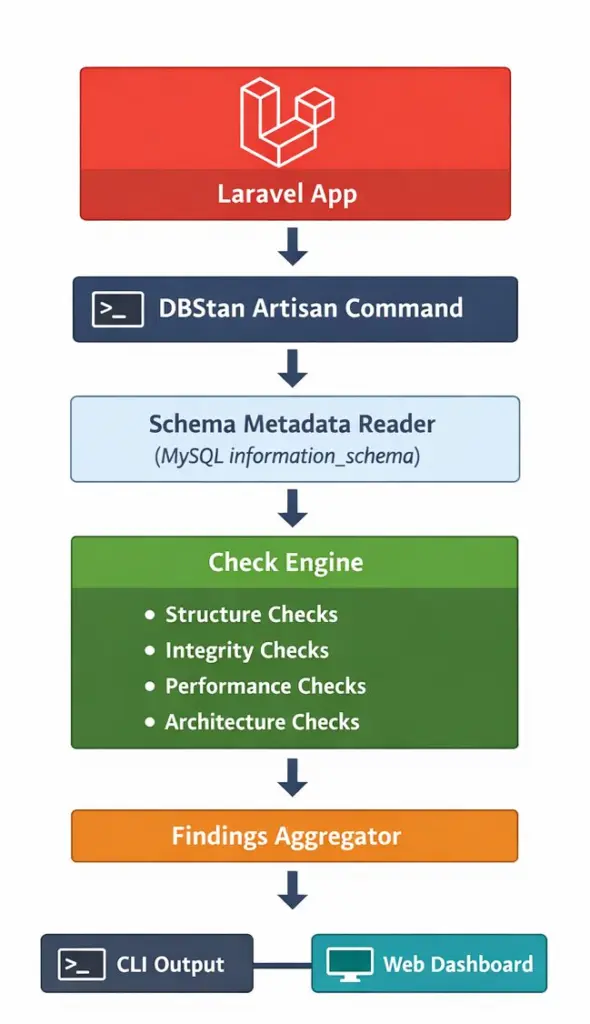
DBStan performs a read-only inspection of the database by querying MySQL metadata tables and Laravel’s database connection layer.
Internally, the analyzer collects schema information using:
This metadata is then passed through a set of modular rule checks that analyze:
Each rule produces a Finding object containing:
These findings are aggregated and displayed in two places:
This rule-based architecture makes DBStan easy to extend with custom checks.
DBStan performs 26 automated checks grouped into four categories.
Instead of presenting raw database metadata, it translates technical issues into clear findings developers can act on.
Is your table design clean?
Structure checks focus on table design, column types and schema conventions.
Examples include:
| Check Name | What It Detects | Severity |
| Too Many Columns | Tables exceeding max_columns (default 25) | WARNING |
| Wide Varchar Columns | VARCHAR columns wider than 190 | WARNING |
| Missing Timestamps | Tables missing created_at / updated_at | BEST PRACTICE |
| Missing Soft Deletes | Tables missing deleted_at column | BEST PRACTICE |
| Nullable Column Overuse | Columns marked nullable without justification | NULLABLE |
| Large TEXT Columns | Columns using TEXT type | PERF RISK |
| Data Type Appropriateness | “price” columns stored as INT not DECIMAL | DATA TYPE |
| Enum Overuse | Tables with >2 ENUM columns or ENUMs with >5 values | ENUM OVERUSE |
| Boolean Overuse | Tables with >4 boolean columns | ARCH WARNING |
| Pivot Table Structure | Pivot tables with unnecessary id or timestamps | PIVOT |
| Repeated Common Fields | Common field names across tables | REPEATED FIELD |
| Mixed Domain Columns | VARCHAR columns named “data”, “info”, “details” | DOMAIN MIX |
These checks help enforce Laravel schema best practices, ensuring tables remain readable and maintainable.
Is your data safe?
Integrity checks verify relationships, constraints and data consistency.
Examples include:
| Check | What It Detects | Severity |
| Foreign Key Naming | Columns like userid instead of user_id | NAMING |
| Duplicate Rows Risk | Tables without primary or unique keys | DATA INTEGRITY |
| Orphan Risk | _id columns without foreign key constraints | ORPHAN / HIGH RISK |
| Cascading Rules | Foreign keys using restrictive delete rules | INTEGRITY |
| Unique Constraint Violations | Duplicate values in email or slug columns | UNIQUE VIOLATION |
These issues often go unnoticed until real data inconsistencies appear.
A Laravel database schema analyzer like DBStan identifies them early.
Will your database scale?
Performance issues rarely show up during development. They appear when real traffic hits your application.
DBStan includes several checks focused on database performance.
Examples include:
| Check | What It Detects | Severity |
| Missing Foreign Key Indexes | _id columns without indexes | ERROR |
| Large Table Size | Tables exceeding storage thresholds | SIZE ALERT |
| High NULL Ratio | Columns filled mostly with NULL values | DATA QUALITY |
| Status Column Indexing | Unindexed state or status columns | PERF |
| Log Table Indexing | Log tables missing indexes on created_at or user_id | PERFORMANCE |
| Unbounded Growth Risk | High-growth tables lacking indexing | GROWTH RISK |
These checks form the core of DBStan’s Laravel database performance analysis, helping developers identify scalability risks early.
Are you designing for the long term?
Beyond structural and performance checks, DBStan also evaluates architectural patterns.
Examples include:
| Check | What It Detects | Severity |
| JSON Column Overuse | Tables with too many JSON columns | WARNING |
| Audit Trail Check | Missing created_by, deleted_by or updated_by fields | AUDIT |
| Polymorphic Relation Overuse | Excessive polymorphic relationships | ARCH RISK |
These checks help teams evaluate long-term maintainability and overall schema architecture.
Getting started with DBStan takes less than two minutes.
composer require itpathsolutions/dbstan
php artisan dbstan:analyze
DBStan scans your entire database schema and runs all enabled checks automatically.
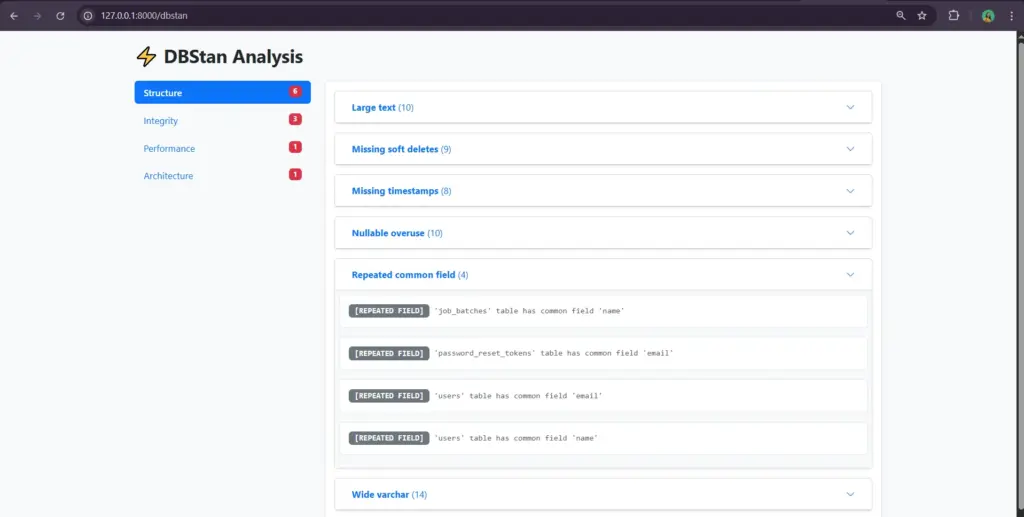
The dashboard provides a visual interface for exploring issues found during analysis.
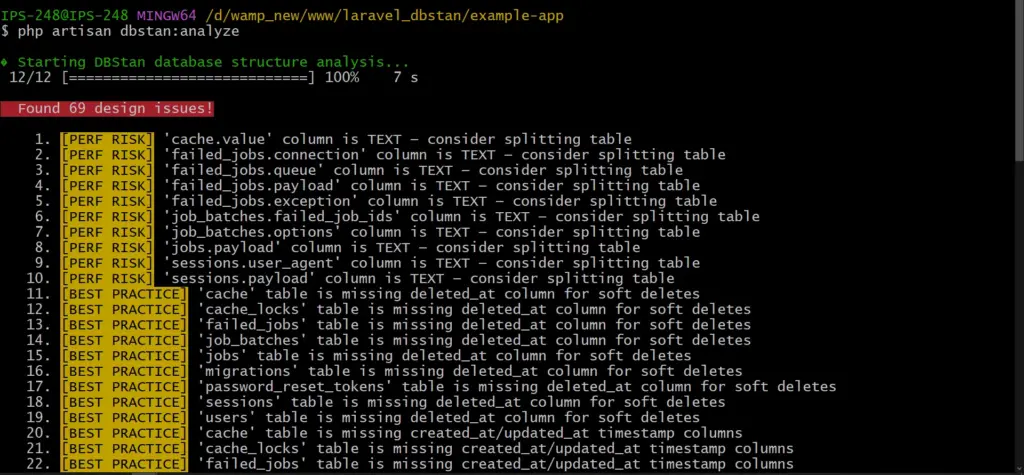
DBStan prints a list of findings grouped by severity. This happens when you run the CLI command.
A typical report might look like this:
⚠️ WARNING – Table `orders` has 32 columns (exceeds limit of 25)
❌ ERROR – Column `user_id` in `posts` has no index
✅ BEST PRACTICE – Table `users` is missing `deleted_at`
All are categorized with a severity level. This helps developers know what to fix first.
Severity types include:
| Label | Meaning | Action |
| ERROR | Critical schema problem | Fix immediately |
| WARNING | Design concern or anti-pattern | Review and address |
| BEST PRACTICE | Improvement recommendation | Consider adopting |
| PERFORMANCE | Potential performance bottleneck | Add index or optimize |
| HIGH RISK | Data integrity at serious risk | Fix immediately |
| SIZE ALERT | Table storage exceeds threshold | Archive/partition/optimize |
| NAMING | Column naming convention violation | Rename column |
| AUDIT | Missing audit trail columns | Add audit columns |
This structured output turns raw schema inspection into actionable insight.
While the CLI command is useful for quick checks, DBStan also includes a web dashboard.
The dashboard is available only in local or staging environments, keeping production environments secure.
The interface includes:
This makes DBStan useful not only for developers but also for teams reviewing database architecture together.
Securing the Dashboard
Because DBStan exposes schema information, the dashboard is intentionally restricted.
By default:
For staging environments, you can add additional protection such as:
These safeguards prevent schema information from being exposed publicly.
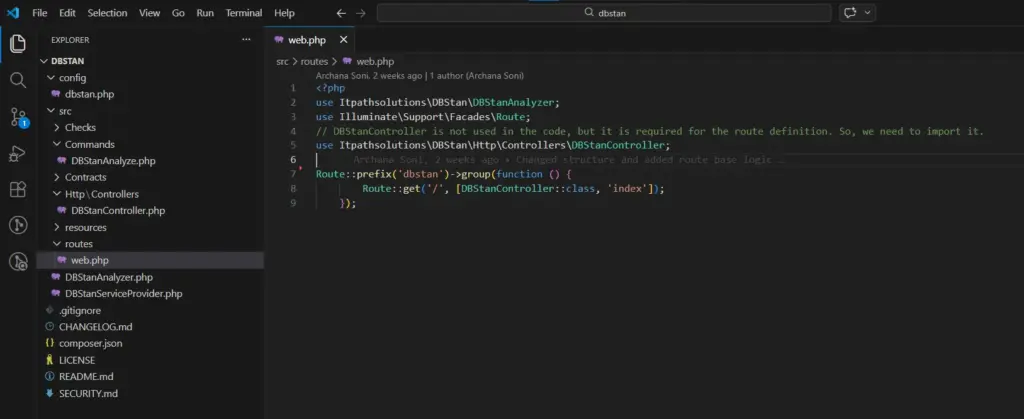
Configurable for your Project
Every Laravel project has different database needs.
DBStan includes a configuration file that allows developers to customize thresholds and checks.
You can publish the configuration file using:
php artisan vendor:publish –tag=dbstan-config
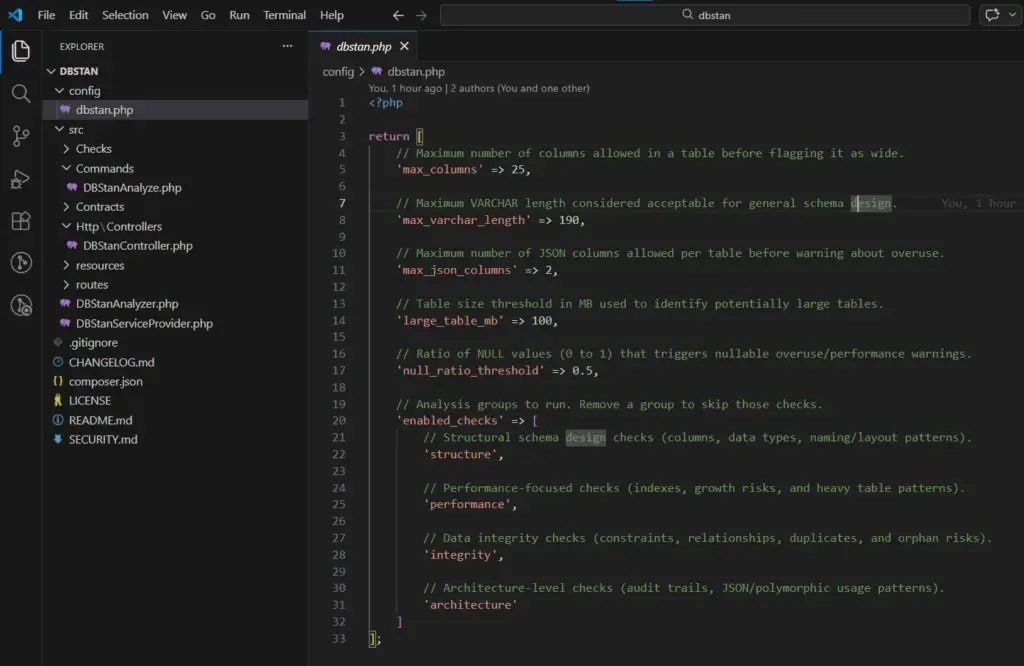
Configuration options include:
| Key | Type | Default | Description |
| max_columns | int | 25 | Tables with more columns trigger warning |
| max_varchar_length | int | 190 | VARCHAR columns wider trigger warning |
| max_json_columns | int | 2 | Tables with more JSON columns trigger warning |
| large_table_mb | int | 100 | Tables larger (MB) trigger size alert |
| null_ratio_threshold | float | 0.5 | Columns with NULL > ratio trigger warning |
| enabled_checks | array | all four | Remove a category to skip its checks |
This flexibility makes DBStan a practical Laravel database optimization tool that can adapt to different application architectures.
DBStan is useful for more than just Laravel developers.
Solo Developers
Run it before deployment to catch schema issues early.
Development Teams
Use it during code reviews to enforce database standards.
DevOps Engineers
Integrate it into CI pipelines as part of automated quality checks.
Database Administrators
Audit existing Laravel databases for structural problems.
Open-Source Maintainers
Ensure consistent database architecture across contributors.
To keep the tool safe and predictable, DBStan intentionally avoids certain actions.
It:
Instead, it focuses on reporting and analysis so developers remain in full control.
Your application logic can change. Your UI can evolve.
But your database schema becomes the foundation everything depends on.
Once bad design decisions enter production, fixing them becomes expensive.
DBStan helps teams run a quick Laravel database architecture analysis, identify schema problems early and maintain a healthier database structure over time.
If you’re serious about database quality, run your first analysis today.
You might be surprised by what your schema reveals.
GitHub: itpathsolutions/dbstan
Install: composer require itpathsolutions/dbstan
Your Laravel database deserves the same level of analysis as your code.
Run your first analysis in minutes!
Does DBStan modify my database?
No. DBStan is completely read-only. It only reads schema metadata and row counts from your database to analyze structure, relationships and indexes. It never inserts, updates or deletes any data.
Is DBStan safe to run in production?
Yes. The Artisan command can safely run in any environment, including production.
However, it’s recommended to avoid running it during peak traffic because some checks query information_schema and table statistics, which may add minor overhead.
Also, the web dashboard is automatically disabled in production to prevent exposing database structure publicly.
Which databases are supported?
At the moment, DBStan supports MySQL only.
The analyzer relies on MySQL-specific commands such as:
Support for other databases may come in future versions.
Can I create my own custom checks?
Yes. DBStan is designed to be extendable.
You can create custom checks by adding a class inside the src/Checks/ directory and:
DBStan automatically discovers new check classes, so you don’t need to manually register them.
Can specific checks or categories be disabled?
Yes. DBStan allows you to control which checks run.
Open the configuration file:
config/dbstan.php
Inside the enabled_checks array, you can include only the categories you want to run. You might choose structure or performance or integrity or architecture.
This makes it easy to tailor the analysis according to the needs your project.
Why am I seeing issues on Laravel’s default tables?
DBStan scans every table in the database, including Laravel’s default tables like jobs, failed_jobs or password_resets.
Some checks may flag these tables for things like: missing timestamps, missing soft deletes, column structure warnings.
These warnings are meant for information. Use your own judgment before acting on them.
The /dbstan dashboard is not loading. What should I check?
If the dashboard route is not loading, check the following:
Laravel News Links
https://cdn-fastly.thefirearmblog.com/media/2026/03/08/20461/post.jpg?size=720×845&nocrop=1
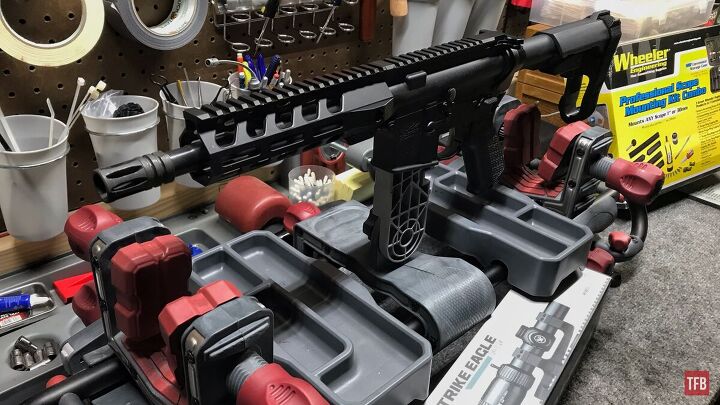
The internet can’t agree on AR cleaning schedules. You’ve got the "after every range trip no matter what" crowd and the "never cleaned mine, runs great" guys. Both are kinda wrong. Real answer depends on how you shoot and what you’re willing to tolerate. Your rifle won’t grenade if you skip a cleaning session. But neglect adds up.
AR-15 @TFB:
That handles most situations. Details below matter when things go wrong.
People overthink this part or completely ignore it. You don’t need a full teardown after 50 rounds. You also shouldn’t toss a wet rifle in the safe for six months. Middle ground exists.
Quick checks that actually matter:
Full disassembly after casual range time is overkill. The carbon buildup isn’t going to lock your gun up overnight; you’re not running a duty weapon in Fallujah.
Lube question: ARs run better wet. Period. A dirty but lubed gun will cycle all day. A spotless dry gun has an above-average chance of choking. If you do literally nothing else, make sure the bolt carrier group has oil where metal meets metal. Cam pin area, bolt lugs, carrier rails. That’s where it counts.
Want to know more about the difference between lubricants, protectives, and solvents? Wrote a whole article just for you!
This is your real maintenance window. Recreational shooters hit this every few trips. Competition guys might burn through it in a weekend.
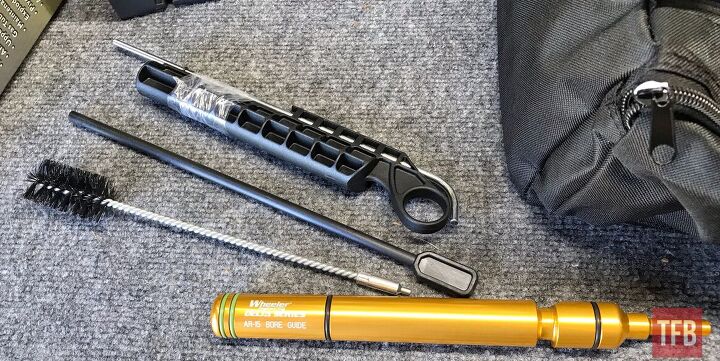
Pull the BCG and clean it properly. Carbon cakes up on the bolt, inside the carrier, around the gas rings. Nylon brush and solvent handles most of it, scrapers for stubborn buildup.
While you’re in there:
Copper fouling builds gradually and will eventually affect your groups. Every 500 rounds or so, run a proper bore cleaning. This means bore snake for quick work, rod and patches with copper solvent for thorough jobs. Clean until patches stop showing that blue-green copper staining. Some carbon in the bore doesn’t hurt anything. "Clean enough" is when patches come out mostly clear.
The chamber and barrel extension get ignored, but carbon here causes extraction problems. Chamber brush on a short rod, takes maybe 30 seconds, clean the lug recesses in the barrel extension too. Prevents headaches later.
Parts inspection and potential replacement territory. Round count actually matters here. If you don’t track your rounds, consider starting to keep a rough count now.
The most common wear items are on the bolt. The extractor spring loses tension over time, and you get failures to extract. Ejector spring weakens, ejection pattern gets erratic, or you get failures to eject entirely.
Wear signs:
Replacement springs cost a few bucks. Swap them proactively around 5,000 rounds instead of waiting for malfunctions. Some guys keep spares on hand or in the storage of a pistol grip.
Inspect the extractor hook for chips or rounding, check ejector for mushrooming. These outlast springs but do wear eventually.
If you didn’t swap them already, 3000-5000 rounds is typical service life. That bolt standing test from earlier is your check. Replace as a set.
Springs weaken from being compressed and expanded over and over again. You might notice the cycling sound changes, like less "sproing," more dull thud. Function usually continues fine until it’s pretty worn, but degraded springs mess with timing.
Standard carbine springs last around 5,000 rounds for most shooters; heavier buffers or adjustable gas blocks change that math.
Check for erosion if you shoot hot loads or do rapid-fire strings. Bore scope helps here. I’d look for sharp rifling edges at the throat becoming rounded or eroded. This kills accuracy before it affects function. Most recreational shooters won’t wear out a barrel throat in any reasonable timeframe. High-volume competitors and mag dump enthusiasts see it sooner.
Even with a low round count, thorough inspection once a year minimum. Rifles that sit unused develop different problems.
Storage issues:
Oil migrates and evaporates. A rifle stored for months might be bone dry even if you oiled it before putting it away. Check for rust in the bore, chamber, BCG, which are most vulnerable, especially in humid areas.
Hardware check:
Function test: Run a few rounds through it early in the season or after long storage. Don’t trust a gun that’s been sitting without verification.
Malfunctions are diagnostic. Random one-off jams happen to everyone. Patterns indicate actual problems.
NOTE: First and foremost, confirm the AR is having issues with multiple magazines. Sometimes it is that simple and at the very least it rules out a bad mag.
When cleaning doesn’t fix a malfunction pattern, narrow it down and start swapping parts. Springs first since they’re cheap. Move to harder stuff after. The AR platform is the Lego of guns. Parts can be cheap, spare parts can be on hand, don’t think too hard about it.
The AR platform is way more tolerant than a quick internet search suggests.
Over-cleaning myths: You don’t need to scrub the bore after every session, carbon on the bolt carrier won’t hurt if it’s lubed, the trigger doesn’t need cleaning unless it’s actually malfunctioning, buffer tube doesn’t need regular attention.
Parts that last longer than people think: Bolts regularly go 10,000+ rounds (often way more), barrels last 10,000-20,000+ depending on use, lower receivers basically last forever with normal use, triggers rarely wear out from shooting.
Don’t replace parts on arbitrary schedules. Inspect, test, and replace when you see actual wear or experience actual problems. The rifle tells you when something needs attention.
Your AR needs attention, but doesn’t need to be babied. Keep it lubed, clean the BCG periodically, inspect wear items at reasonable intervals, and address problems when they show up. That’s it.
The guys obsessing over every carbon speck are wasting time. The guys who never clean and wonder why their rifle chokes are learning expensive lessons the hard way. As I said, middle ground exists. Keep a rough track of your round count, and your rifle will run for tens of thousands of rounds.
What’s your maintenance routine look like? Any hard lessons learned from neglect or parts failures? Let us know what you guys and gals think in the comments below.
The Firearm Blog
https://acquaintsoft.com/img/asset/aW1hZ2VzL3NlY3VyaXR5LWJsdWVwcmludC1mb3ItZW50ZXJwcmlzZS1sYXJhdmVsLWFwcGxpY2F0aW9ucy53ZWJw/security-blueprint-for-enterprise-laravel-applications.webp?w=1200&h=630&fit=crop&s=52676c01b5524e5c722014416d3f3849
A complete Laravel application security blueprint covering authentication hardening, input validation, dependency auditing, CSP headers, secrets management, and CI/CD security scanning.
Laravel ships with strong security defaults. CSRF protection is built in. Password hashing uses bcrypt by default. Mass-assignment protection requires explicit fillable declarations. Most common web vulnerabilities are addressed out of the box if you use the framework as intended.
Enterprise applications need more than defaults. They need a layered security architecture that covers authentication hardening, input validation at every layer, dependency vulnerability management, secrets management separate from code, security headers, and automated security scanning in CI/CD. This article gives you that blueprint.

Key Takeaways
|
A Quick Answer |
A complete security blueprint for enterprise Laravel covers six layers:
|
Password-only authentication is insufficient for enterprise applications. Implement TOTP-based MFA using the pragmarx/google2fa-laravel package or the Spatie/laravel-google-authenticator equivalent. For higher assurance, WebAuthn hardware key support is available via the asbiin/laravel-webauthn package. Enforce MFA for administrative roles at minimum; consider enforcement for all users in high-risk applications.
Configure session settings in config/session.php for production: encrypt=true (encrypts session payload at rest in Redis), secure=true (HTTPS-only cookies), same_site=strict (prevents CSRF via cross-site requests), http_only=true (prevents JavaScript access to session cookies). Set an appropriate session lifetime — not indefinite. Implement session invalidation on password change.
Laravel’s built-in RateLimiter can implement account lockout. After five failed login attempts within ten minutes from a specific IP plus email combination, lock the account temporarily. Log the lockout event. Alert the account owner via email. This prevents credential stuffing attacks without creating excessive friction for legitimate users.
For API authentication with Sanctum: implement token rotation (new token issued on each authentication, old token revoked), set token expiry via the expiration configuration, use token abilities to scope permissions per token, and log all token creation and revocation events.
Create a Form Request class for every controller method that accepts input. Never use $request->all() or $request->input() without explicit validation rules. Form Requests enforce validation before the controller method is called and provide a clean, testable location for validation logic. Validate strictly — use ‘required’, ‘string’, ‘max:255′, ’email:dns’ rather than permissive rules.
Service class methods should use typed parameters (string, int, float, bool, or Value Objects) rather than accepting raw arrays or mixed types. PHP 8.1’s readonly properties and enums provide additional type safety at the service layer. Typed parameters prevent class of injection attacks that bypass HTTP-layer validation.
Eloquent’s query builder uses parameterised queries by default — SQL injection is prevented if you use the ORM correctly. The danger points are: raw query methods (DB::statement(), DB::select() with string interpolation), whereRaw() and orderByRaw() with user-controlled values, and direct use of $request->input() in query strings. Never interpolate user input into raw SQL expressions.
Third-party packages are a significant attack surface. The 2021 Log4Shell vulnerability and numerous npm/Composer package vulnerabilities demonstrate that supply chain attacks are real and impactful.
Run composer audit as part of every CI/CD pipeline. It queries the Packagist security advisories database and reports known vulnerabilities in installed packages. A build with known high-severity vulnerabilities should fail. Add composer audit –no-dev to your deployment pipeline — it checks production dependencies only.
Use Dependabot or Renovate to automate minor and patch version updates for Composer packages. Configure review requirements for major version updates. Keeping dependencies current reduces the vulnerability window between package vulnerability disclosure and application update.
Secrets — API keys, database credentials, encryption keys, third-party service tokens — must never live in code or version control. The .env file is a local development convention; it is not a secrets management system.
For AWS deployments: AWS Secrets Manager with IAM role-based access. Secrets are fetched at application bootstrap and injected as environment variables. Rotation policies rotate credentials automatically without code changes. For non-AWS deployments: HashiCorp Vault provides equivalent functionality. For Kubernetes deployments: Kubernetes Secrets with sealed-secrets for encrypted storage in version control.
Set rotation periods for all secrets: database passwords quarterly, API keys on any team member departure, encryption keys annually with key derivation function to transition encrypted data. Document the rotation procedure and test it — a rotation policy that has never been executed in testing will fail when executed under incident pressure.
CSP is the most effective defence against Cross-Site Scripting (XSS) attacks that bypass CSRF protection. A CSP header tells the browser which sources of scripts, styles, images, and other content are permitted to load on your pages. Inline scripts from attacker-injected content are blocked even if the injection bypasses server-side sanitisation.
Spatie’s laravel-csp package provides a clean interface for building and testing CSP headers in Laravel. Start with a report-only CSP (violations are reported but not blocked) to identify legitimate inline scripts before enforcing. Enforce with strict-dynamic and nonce-based script loading.
Add a security headers middleware to your HTTP kernel: Strict-Transport-Security: max-age=31536000; includeSubDomains; preload (HTTPS enforcement). X-Frame-Options: DENY (clickjacking prevention). X-Content-Type-Options: nosniff (MIME-type sniffing prevention). Referrer-Policy: strict-origin-when-cross-origin (referrer privacy). These four headers together close the most common browser-level attack vectors.
|
Laravel Security Audit We run a scored security audit on your existing or planned Laravel application. |
Enlightn is a Laravel-specific security and code quality analyser. Run php artisan enlightn to get a scored report covering: exposed debug information, CSRF configuration, CORS misconfiguration, SQL injection risk patterns, mass assignment vulnerabilities, and insecure session configuration. Integrate into CI/CD with a minimum score threshold.
PHPStan and Psalm perform static type analysis, catching type errors, undefined method calls, and logic errors before they reach production. At level 6 or above, PHPStan catches the majority of type-related bugs that would otherwise manifest as runtime errors. Add to CI/CD as a blocking check.
Security is a layered discipline. No single control is sufficient, and the most sophisticated attack surface protections are irrelevant if MFA is not enforced or if secrets live in the codebase. Work through the six layers in order – authentication hardening and input validation deliver the most impact per hour of effort. Our Laravel development services include security architecture review and Enlightn-scored security audits on all enterprise engagements.
Six layers: authentication hardening (MFA, session encryption, token rotation), input validation at HTTP/service/database layers, automated dependency vulnerability scanning with composer audit, secrets management separate from code (AWS Secrets Manager, HashiCorp Vault), security response headers (CSP, HSTS, X-Frame-Options), and static analysis with Enlightn and PHPStan in CI/CD.
Laravel ships with strong security defaults: CSRF protection on all state-changing routes, bcrypt password hashing, mass-assignment protection, parameterised queries via Eloquent, and XSS protection in Blade templates. Most vulnerabilities in Laravel applications come from bypassing these defaults – using raw SQL queries, skipping form request validation, or disabling CSRF middleware.
Use Eloquent and the query builder for all database interactions – they use parameterised queries by default. When raw queries are necessary, use parameterised bindings: DB::select(‘SELECT * FROM users WHERE id = ?’, [$userId]). Never interpolate $request->input() values directly into SQL strings. Use PHPStan with security-focused rules to detect unsafe raw query patterns in code review.
A Content Security Policy is a response header that tells the browser which sources of content are permitted to load on your page. It prevents XSS attacks by blocking injected scripts even if they bypass server-side sanitisation. Use Spatie’s laravel-csp package to implement CSP in Laravel. Start with report-only mode to identify legitimate inline scripts before switching to enforce mode.
With over 11 years of experience in web application development and project management, I excel in leading cross-functional teams to deliver innovative digital solutions. My expertise spans eCommerce platforms, ERP systems, and JS & PHP-based frameworks, including WordPress, React JS, and Laravel. As a Technical Project Manager, I specialize in strategic planning, system design, and end-to-end project execution, transforming complex ideas into scalable, high-impact applications.
Laravel News Links