https://media.notthebee.com/articles/69e1268e7e12769e1268e7e128.jpg
Do you think ABC is upset?
Not the Bee
Just another WordPress site
https://media.notthebee.com/articles/69e1268e7e12769e1268e7e128.jpg
Do you think ABC is upset?
Not the Bee
https://cdn-blog.adafruit.com/uploads/2026/04/32_IMG_3150_lowres.jpg

Shared by Layer me up NL on MakerWorld:
Bring a touch of magic into your room with these Potions!
Inspired by the iconic Minecraft potion bottle, these 3D-printable models are perfect for adding a playful fantasy vibe to your space.Several versions are available — you can choose a transparent model to add an LED light inside, a solid version that also works beautifully as a mini vase, or a mini Potion, which makes a fun and unique gift for kids (we recommend gluing the small cap for safety).
Download the files and learn more

Every Thursday is #3dthursday here at Adafruit! The DIY 3D printing community has passion and dedication for making solid objects from digital models. Recently, we have noticed electronics projects integrated with 3D printed enclosures, brackets, and sculptures, so each Thursday we celebrate and highlight these bold pioneers!
Have you considered building a 3D project around an Arduino or other microcontroller? How about printing a bracket to mount your Raspberry Pi to the back of your HD monitor? And don’t forget the countless LED projects that are possible when you are modeling your projects in 3D!
3D printing – Adafruit Industries – Makers, hackers, artists, designers and engineers!
https://theawesomer.com/photos/2026/04/rough_enough_crossbody_bag_t.jpg
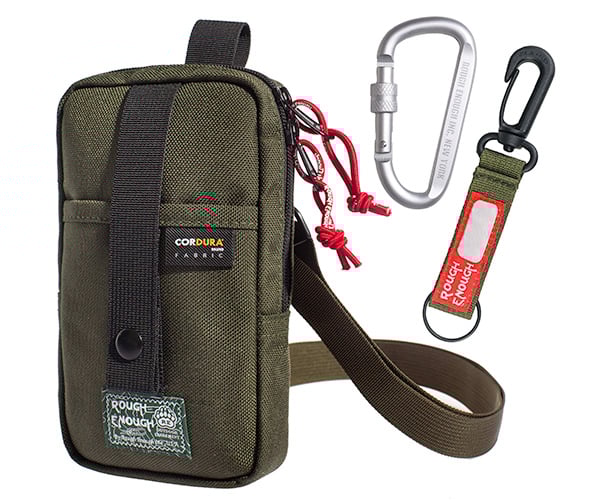
This compact crossbody bag from Rough Enough’s is built for carrying phones, keys, wallets, and other small everyday accessories. It’s fabricated from water-repellent 1000D CORDURA fabric. The 4″ x 1″ x 8″ pouch fits even the biggest smartphones, and keeps EDC essentials organized with a quick-access front pocket and YKK zippers.
The Awesomer
https://static.pingcap.com/files/2026/04/10114939/Blog-Feature-Banner.png
Editor’s note: This post originally appeared on The New Stack and is republished with permission. The original version is available here.
Key Takeaways
- S3’s durability and global availability remove the need to co-locate data with compute.
- Decoupled storage enables ephemeral clusters, event-driven workflows, and automatic tiering.
- TiDB X uses S3 as its shared backend for independent scaling and faster recovery.
- Object storage-first architecture matches the elastic, on-demand needs of AI agents.
For decades, database designers have built distributed databases around the assumption that storage must live close to compute.
The farther data travels over the network, the reasoning goes, the greater the potential for delay. Local RAID (redundant array of independent disks) arrays, network-attached storage (NAS), and cluster file systems keep data close, making it quick and easy to access.
But in a distributed system, keeping the entire data store close to compute makes scaling slow, cumbersome, and expensive. Each time you replicate a node or cluster, you must replicate its associated data as well.
It isn’t ideal, but until recently, there wasn’t any reasonable alternative. Databases had to scale. Teams had to meet service-level agreements (SLAs). Wide-area networks weren’t reliable enough to support high-performance databases at scale. Database designers accordingly spent a great deal of energy solving problems related to coordination, consistency, and replication logic.
But imagine things were different. What if they didn’t have to worry about the network, where their data lived, or how to get it from Point A to Point B? How would they design a database then?
That’s the intriguing question raised by the advent of cloud object storage services like AWS S3, Google Cloud Storage, and Microsoft Blob Storage.
The structure of cloud object storage services couldn’t be simpler. They’re essentially giant heaps of data, accessed via an API, through key/value pairings.
Their unlimited storage capacity and their “everywhere” availability make them revolutionary. They can hold billions of records — images, logs, training data, whatever you need — and crucially, they can make every one of those records available to compute anywhere in the world, at any level of workload.
S3 is extremely reliable. AWS designed S3 for 11 nines of durability (that’s 99.999999999%) and 99.99% availability, and it replicates data automatically across Amazon’s regional facilities. This means data on S3 is extremely safe and highly available without the need to manage physical disks or replication.
In addition, S3 scales seamlessly. There are no fixed volumes. No need for capacity planning. You can store practically unlimited data, and performance scales with parallel access rather than a single-server bottleneck. These guarantees free architects from worrying about low-level storage failures, capacity, and edge cases involving consistency.
In short, cloud object storage provides a highly durable, always-on, strongly-consistent single source of truth. It’s not as fast as local storage, but it doesn’t have to be. What services like S3 lack in sheer speed, they more than make up for in reliability and ease of maintenance. Instead of worrying about shards, segmentation, and software-defined networks, a database can simply retrieve data with confidence that it will be delivered in a reasonable amount of time.
What this means is that for the next generation of distributed databases, cloud object storage will, for all intents and purposes, be the network.
Building on cloud object storage enables several architectural patterns that were previously impractical.
Now let’s see how these capabilities translate into a real-world design. PingCAP uses cloud object storage as the foundation for TiDB X, the latest version of our popular open source distributed SQL database, TiDB.
Figure 1. TiDB X’s architecture with built-in object storage.
As shown in the diagram above, TiDB X fully separates compute and storage, using S3 for the shared backend. Compute nodes scale independently up and down. Fast local caches and Raft ensure consistency and low-latency access for hot data. Instead of keeping the entire data store close by, TiDB X keeps only the most active data near compute. TiDB X monitors query patterns, latency targets, and data characteristics, then reshapes itself in response to demand.
Its object storage-based architecture streamlines recovery and backup processes. By using S3 for primary data persistence, TiDB X reduces the overhead of traditional backup maintenance, enabling significantly faster completion times. This design also mitigates the impact of node failures: since local state functions primarily serve as a cache for durable, replicated storage, a failed instance can be replaced by retrieving its required state directly from object storage to resume operations.
From an operational perspective, cloud object storage makes TiDB X both highly adaptable and extremely cost-efficient. Its autoscaler responds not just to preset infrastructure thresholds, but to contextual signals like query patterns, latency targets, and data types. This enables it to reshape its resources in real time to address different tasks.
In sum, by building atop AWS’s high-performance object data store, TiDB X demonstrates how a cloud database can achieve elasticity, performance, and simplicity without sacrificing consistency or scale.
Keeping large relational data stores close to compute resources has always been a compromise. It was an expensive solution to a problem created by the limitations of traditional networking.
With architectures like TiDB, we see that the sheer power and scale of services like S3 have made the old workarounds unnecessary. They’ve rendered traditional architectures increasingly obsolete. More than that, they’ve enabled practices, such as ephemeral compute, suited to a world where users are more likely to be AI agents than humans.
As AI reshapes business organizations and best practices, the database itself is changing form. In large part, it’s services like S3 that are making that shift possible. By making data placeless, ubiquitous, and effortlessly accessible, cloud object storage is overturning the assumptions that once guided database design. The result will be databases that are more flexible and resilient — ones that are simpler to manage and scale almost effortlessly.
TiDB X is built from the ground up on cloud object storage. Explore the architecture behind it or try TiDB Cloud for free to see it in action.
Planet for the MySQL Community
https://theawesomer.com/photos/2026/04/super_mario_classical_arrangement_t.jpg
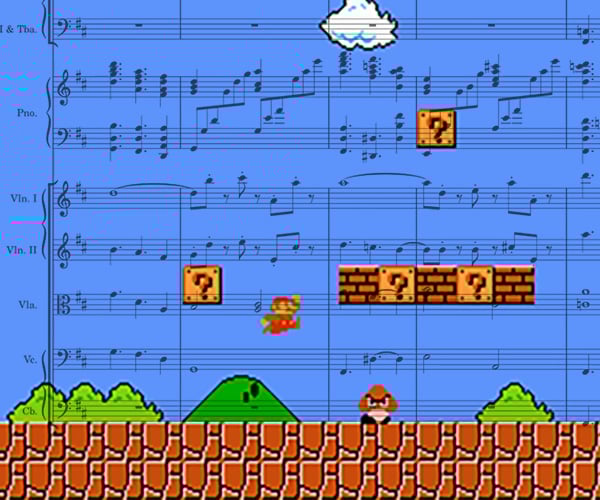
Super Mario Bros. came out in 1985. But what if it were 1885? Composer JunWu created this impressive classical arrangement of the game’s score. The piece reimagines the game’s 8-bit soundtrack as something much grander. He put it together using MuseScore 4 and the MuseSounds library. Imagine how great this would sound played by a live orchestra.
The Awesomer
https://media.notthebee.com/articles/69d7c2833b0b369d7c2833b0b4.jpg
Apparently Backstreet’s back and doing shows again in Vegas!
Not the Bee
In 2025, MySQL celebrated its 30th anniversary—and to mark the milestone, Oracle University (together with the MySQL Community team) offered free MySQL training and free certification exams from April 20 through July 31, 2025. The goal was simple: make it easy for developers, DBAs, architects, and newcomers to build practical skills and validate them with […]Planet MySQL
https://media.babylonbee.com/articles/69d53ecbe60ab69d53ecbe60ac.jpg
Steve and Timpani moved from California to Texas in the hit series Californians Move To Texas. There were a few cultural differences they weren’t prepared for in going from California wokeness to Texas freedom. Now their story continues…
In the all-new season, Steve and Timpani’s continued adjustment to all things Texas hits a speed bump when Timpani’s sister, Brittuni, arrives to talk some "California sense" into her gun-loving sister. Can Steve and Timpani’s love survive the wedge slowly being driven between them? And who knows what other surprises may be in store.
Catch the trailer here and get hype:
Episode 1: The Rodeo will premiere on YouTube on April 7 at 7PM PT:
Babylon Bee
https://villagesql.com/blog/content/images/size/w1200/2026/04/Gemini_Generated_Image_803gp6803gp6803g.png
And we have a winner! It was a busy weekend of match ups and we have our champion.
#1 Oracle vs. #2 MongoDB – Winner = Oracle
Oracle has too much enterprise credibility to overcome and they outlast the document database fans to win its matchup.
#1 MySQL vs. #3 DuckDB – Winner = MySQL
While in-process analytics are gaining in importance, the versatility and transactional nature of MySQL makes this a comfortable win for MySQL.
#1 PostgreSQL vs. #2 Snowflake – Winner = PostgreSQL
This was a match up of heavyweights with a battle of OTLP leader vs. OLAP leader. A classic matchup of different styles. Ultimately, the open source community of committers and extensions carried PostgreSQL to the victory.
#1 SQL Server vs. #2 Databricks – Winner = SQL Server
Another battle of styles, where the enterprise chops of SQL Server go up against the momentum of Databricks in data management. Ultimately, Microsoft ability to to recruit from the transfer portal was enough to squeak by Databricks in this last second decision.
#1 Oracle vs. #1 MySQL – Winner = MySQL
It’s the age-old story of the protege vs. the parent figure. Oracle is the owner of both databases but only one is open source. That open source ability allows the community to pull together to push it to victory. This was really a match up of proprietary vs. open source, and today, at least, open source has carried the day.
#1 PostgreSQL vs. #1 SQL Server – Winner = PostgreSQL
In what has become a theme of the tournament, it’s an open source juggernaut vs. the incumbent proprietary database. While SQL Server had all the support of the windows community, the overall open source community were able to hold on to win. The unsung hero was the extension authors that make PostgreSQL the innovation platform it is.
#1 PostgreSQL vs. #1 MySQL
I think we can all agree that tournaments and databases are better when there are two open source powerhouses to compete. This is the renewal of a 30+ year rivalry and it surely didn’t disappoint. The community and extensions of PostgreSQL showed up when it counted and had MySQL on the ropes in the second hard. Ultimately, the multi-threaded nature of MySQL and its default replication wich have been the bedrock of MySQL usage, were able to hold of Postgres and seal the victory and the championship.
What a thrilling end to the tournament. In the end, it was going to a two horse race by the open source OLTP leaders. It was just a question of which was going to outlast the other. The real winner was open source and the communities that support them, so keep supporting your favorite open source project.
Congrats to MySQL! The winner of the 2026 Tournament of Databases.
To get more database news and updates, subscribe to the Village Crier or checkout VillageSQL on Github.
Planet for the MySQL Community
https://www.fabbaloo.com/wp-content/uploads/2026/03/3d-filament-profiles-cover.jpg
3D Filament Profiles attempts to standardize and track 3D printer filament inventories, and that could simplify FFF 3D printing.
The post A Long-Needed Database For Filament Management appeared on Fabbaloo.
Fabbaloo