WINSTON-SALEM, NC—Gary Chapman, the author of the best-selling Christian romance novel The 5 Love Languages, has just announced that a 6th love language has emerged: Tacos.
“I always knew a love language was missing. Acts of Service, Quality Time, Physical Touch, Recurring Gifts, and Words Of Affirmation just felt incomplete and left me with an insatiable hunger that could never be filled,” said Gary Chapman. “That’s when it hit me: what people need to feel loved is Tacos!”
Chapman continued, ”It needed some additional meat to it (preferably seasoned ground beef or pork) with something special sprinkled on top and all wrapped up together in something tangible people could actually hold, and sink their teeth into. And that’s when it hit me…TACOS!”
According to sources, Gary Chapman’s new book The 6th Love Language details how couples can keep their love tank full by providing their loved one with delicious tacos. Many positive reviews have already flooded in with hundreds stating that their marriage has been saved thanks to tacos.
“Our marriage was on the rocks. We just couldn’t seem to express our love for one another in the way that fills each other’s ‘love tank,'” said Ben Heinemeier and his wife Jennifer. “Sometimes your words, time, gifts, touch, and actions just aren’t what people need. Instead, what they need is a tasty Mexican dish full of meat, cheese, and lettuce in a fried tortilla shell!”
At publishing time, Gary Chapman was rumored to be developing a brand new secret 7th love language: Pizza.
Mandy is absolutely triggered by Twitter’s possible takeover by Elon Musk. She attends a Twitter-sponsored therapy session to help her cope.
Donning the novelty singer’s trademark curly hair, mustache, and accordion, Daniel Radcliffe pulls out all of the stops for this unconventional biopic about the life of “Weird Al” Yankovic. We have high hopes it’s as weird as it sounds. Coming to The Roku Channel fall 2022.
If you ever ask yourself, "Man, what would make me feel really good right about now?"—you’d be surprised at how often the answer is, "Watching the U.S. Air Force drop a big ol’ bomb on a big ol’ ship."
In the seventh part of this tutorial series on developing PHP on Docker we will setup a CI
(Continuous Integration) pipeline to run code quality tools and tests on Github Actions and Gitlab
Pipelines.
If you want to follow along, please subscribe to the RSS feed
or via email
to get automatic notifications when the next part comes out 🙂
Table of contents
Introduction
CI is short for Continuous Integration and to me mostly means running the code quality
tools and tests of a codebase in an isolated environment (preferably automatically). This is
particularly important when working in a team, because the CI system acts as the final
gatekeeper before features or bugfixes are merged into the main branch.
I initially learned about CI systems when I stubbed my toes into the open source water. Back in the
day I used Travis CI for my own projects and replaced it
with Github Actions at some point. At ABOUT YOU we started
out with a self-hosted Jenkins server and then moved on to Gitlab CI as a fully
managed solution (though we use custom runners).
Recommended reading
This tutorial builds on top of the previous parts. I’ll do my best to cross-reference the
corresponding articles when necessary, but I would still recommend to do some upfront reading on:
And as a nice-to-know:
Approach
In this tutorial I’m going to explain how to make our existing docker setup work with Github Actions
and Gitlab CI/CD Pipelines. As I’m a big fan of a
“progressive enhancement” approach, we will ensure that all necessary steps can be performed
locally through make. This has the additional benefit of keeping a single source of truth (the Makefile) which will come in handy when we set up the CI system on two different providers
(Github and Gitlab).
The general process will look very similar to the one for local development:
build the docker setup
start the docker setup
run the qa tools
run the tests
You can see the final results in the CI setup section, including the concrete yml
files and links to the repositories, see
On a code level, we will treat CI as an environment, configured through the env variable ENV. So
far we only used ENV=local and we will extend that to also use ENV=ci. The necessary changes
are explained after the concrete CI setup instructions in the sections
This should give you a similar output as presented in the Execution example.
git checkout part-7-ci-pipeline-docker-php-gitlab-github

# Initialize make
make make-init

# Execute the local CI run
bash .local-ci.sh
CI setup
General CI notes
Initialize make for CI
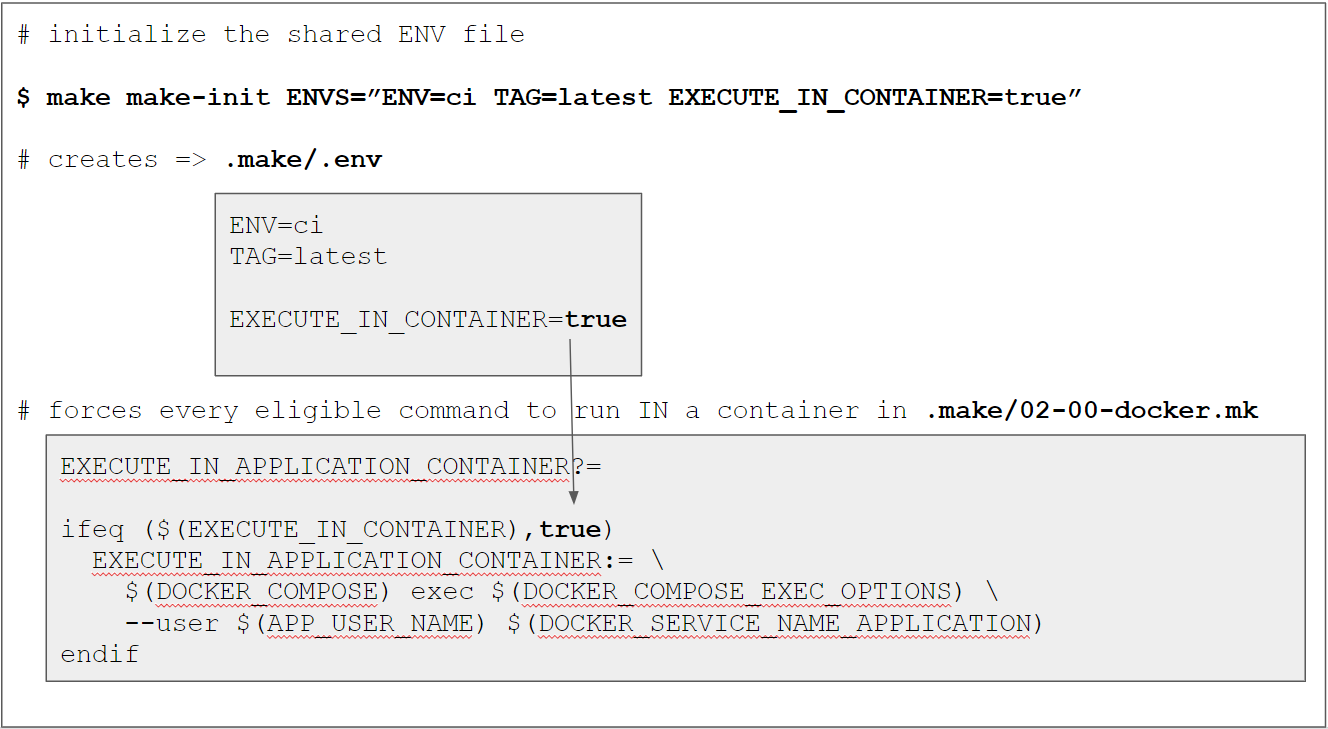
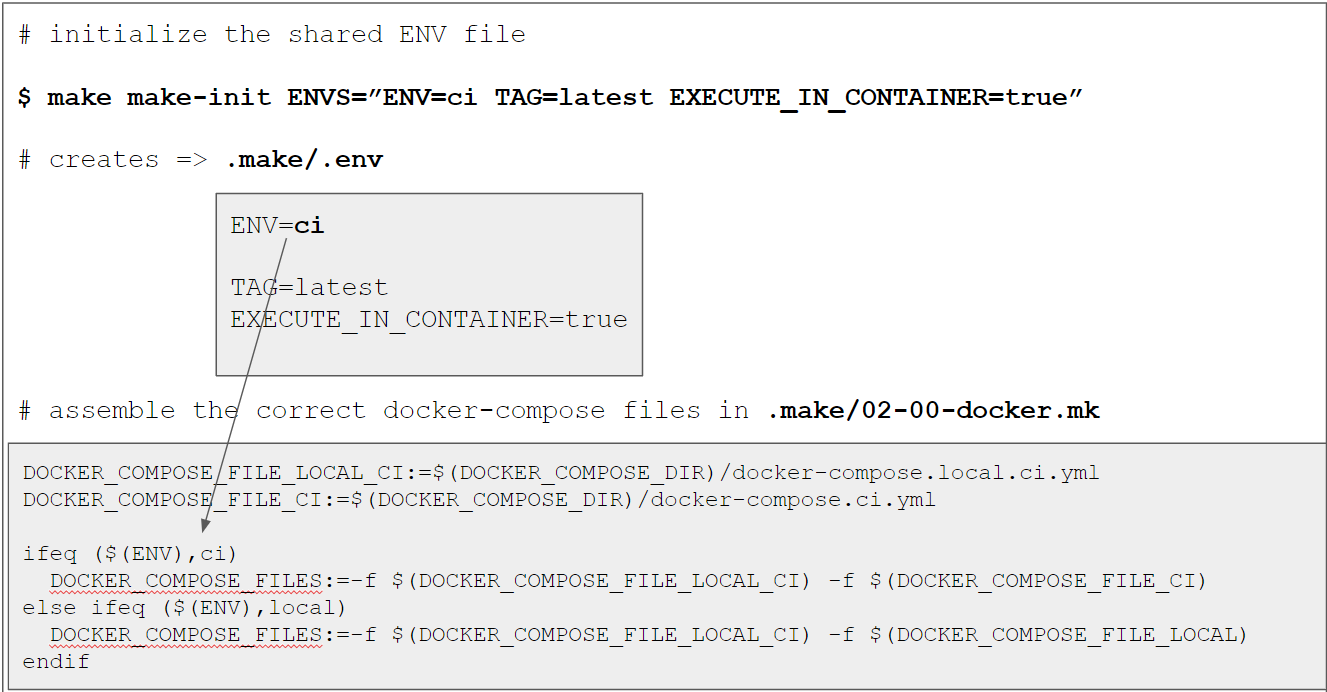
As a very first step we need to “configure” the codebase to operate for the ci environment.
This is done through the make-init target as explained later in more detail in the Makefile changes section via
make make-init ENVS="ENV=ci TAG=latest EXECUTE_IN_CONTAINER=true GPG_PASSWORD=12345678"
$ make make-init ENVS="ENV=ci TAG=latest EXECUTE_IN_CONTAINER=true GPG_PASSWORD=12345678"
Created a local .make/.env file
ENV=ci ensures that we
TAG=latest is just a simplification for now because we don’t do anything with the images yet.
In an upcoming tutorial we will push them to a container registry for later usage in production
deployments and then set the TAG to something more meaningful (like the build number).
EXECUTE_IN_CONTAINER=true forces every make command that uses a RUN_IN_*_CONTAINER setup
to run in a container. This is important, because the Gitlab runner will actually run in a
docker container itself. However, this would cause any affected target to omit the $(DOCKER_COMPOSER) exec prefix.
I’ll explain the “container is up and running but the underlying service is not” problem
for the mysql service and how we can solve it with a health check later in this article at Adding a health check for mysql.
On purpose, we don’t want docker compose to take care of the waiting because we can make
“better use of the waiting time” and will instead implement it ourselves with a simple bash
script located at .docker/scripts/wait-for-service.sh:
#!/bin/bash

name=$1
max=$2
interval=$3

[ -z "$1" ] && echo "Usage example: bash wait-for-service.sh mysql 5 1"
[ -z "$2" ] && max=30
[ -z "$3" ] && interval=1

echo "Waiting for service '$name' to become healthy, checking every $interval second(s) for max. $max times"

while true; do
  ((i++))
  echo "[$i/$max] ...";
  status=$(docker inspect --format "" "$(docker ps --filter name="$name" -q)")
  if echo "$status" | grep -q '"healthy"'; then
   echo "SUCCESS";
   break
  fi
  if [ $i == $max ]; then
    echo "FAIL";
    exit 1
  fi
  sleep $interval;
done
CAUTION: The script uses $(docker ps --filter name="$name" -q) to determine the id of the
container, i.e. it will “match” all running containers against the $name – this would fail if
there is more than one matching container! I.e. you must ensure that $name is specific
enough to identify one single container uniquely.
The script will check up to $max times
in a interval of $interval seconds. See these answers on the
“How do I write a retry logic in script to keep retrying to run it up to 5 times?” question for
the implementation of the retry logic. To check the health of the mysql service for 5
times with 1 seconds between each try, it can be called via
bash wait-for-service.sh mysql 5 1
Output
$ bash wait-for-service.sh mysql 5 1
Waiting for service 'mysql' to become healthy, checking every 1 second(s) for max. 5 times
[1/5] ...
[2/5] ...
[3/5] ...
[4/5] ...
[5/5] ...
FAIL

# OR

$ bash wait-for-service.sh mysql 5 1
Waiting for service 'mysql' to become healthy, checking every 1 second(s) for max. 5 times
[1/5] ...
[2/5] ...
SUCCESS
The problem of “container dependencies” isn’t new and there are already some existing solutions
out there, e.g.
But unfortunately all of them operate by checking the availability of a host:port combination
and in the case of mysql that didn’t help, because the container was up, the port was reachable
but the mysql service in the container was not.
Setup for a “local” CI run
As mentioned under Approach, we want to be able to perform all necessary steps
locally and I created a corresponding script at .local-ci.sh:
#!/bin/bash
# fail on any error
# @see https://stackoverflow.com/a/3474556/413531
set -e

make docker-down ENV=ci || true

start_total=$(date +%s)

# STORE GPG KEY
cp secret-protected.gpg.example secret.gpg

# DEBUG
docker version
docker compose version
cat /etc/*-release || true

# SETUP DOCKER
make make-init ENVS="ENV=ci TAG=latest EXECUTE_IN_CONTAINER=true GPG_PASSWORD=12345678"
start_docker_build=$(date +%s)
make docker-build
end_docker_build=$(date +%s)
mkdir -p .build && chmod 777 .build

# START DOCKER
start_docker_up=$(date +%s)
make docker-up
end_docker_up=$(date +%s)
make gpg-init
make secret-decrypt-with-password

# QA
start_qa=$(date +%s)
make qa || FAILED=true
end_qa=$(date +%s)

# WAIT FOR CONTAINERS
start_wait_for_containers=$(date +%s)
bash .docker/scripts/wait-for-service.sh mysql 30 1
end_wait_for_containers=$(date +%s)

# TEST
start_test=$(date +%s)
make test || FAILED=true
end_test=$(date +%s)

end_total=$(date +%s)

# RUNTIMES
echo "Build docker:        " `expr $end_docker_build - $start_docker_build`
echo "Start docker:        " `expr $end_docker_up - $start_docker_up  `
echo "QA:                  " `expr $end_qa - $start_qa`
echo "Wait for containers: " `expr $end_wait_for_containers - $start_wait_for_containers`
echo "Tests:               " `expr $end_test - $start_test`
echo "---------------------"
echo "Total:               " `expr $end_total - $start_total`

# CLEANUP
# reset the default make variables
make make-init
make docker-down ENV=ci || true

# EVALUATE RESULTS
if [ "$FAILED" == "true" ]; then echo "FAILED"; exit 1; fi

echo "SUCCESS"
Run details
as a preparation step, we first ensure that no outdated ci containers are running (this is
only necessary locally, because runners on a remote CI system will start “from scratch”)
make docker-down ENV=ci || true
we take some time measurements to understand how long certain parts take via
start_total=$(date +%s)
to store the current timestamp
we need the secret gpg key in order to decrypt the secrets and simply copy the password-protected example key
(in the actual CI systems the key will be configured as a secret value that is injected in
the run)
# STORE GPG KEY
cp secret-protected.gpg.example secret.gpg
I like printing some debugging info in order to understand which exact circumstances
we’re dealing with (tbh, this is mostly relevant when setting the CI system up or making
modifications to it)
# DEBUG
docker version
docker compose version
cat /etc/*-release || true
We don’t need to pass a GPG_PASSWORD to secret-decrypt-with-password because we have set
it up in the previous step as a default value via make-init
once the application container is running, the qa tools are run by invoking the qa make target
# QA
make qa || FAILED=true
The || FAILED=true part makes sure that the script will not be terminated if the checks fail.
Instead, the fact that a failure happened is “recorded” in the FAILED variable so that we
can evaluate it at the end. We don’t want the script to stop here because we want the
following steps to be executed as well (e.g. the tests).
Workflows are yaml files that live in the special .github/workflows directory in the
repository
a Workflow can contain multiple Jobs
each Job consists of a series of Steps
each Step needs a run: element that represents a command that is executed by a new shell
The Workflow file
Github Actions are triggered automatically based on the files in the .github/workflows directory.
I have added the file .github/workflows/ci.yml with the following content:
name: CI build and test
on:
# automatically run for pull request and for pushes to branch "part-7-ci-pipeline-docker-php-gitlab-github"
# @see https://stackoverflow.com/a/58142412/413531
push:
branches:
- part-7-ci-pipeline-docker-php-gitlab-github
pull_request: {}
# enable to trigger the action manually
# @see https://github.blog/changelog/2020-07-06-github-actions-manual-triggers-with-workflow_dispatch/
# CAUTION: there is a known bug that makes the "button to trigger the run" not show up
# @see https://github.community/t/workflow-dispatch-workflow-not-showing-in-actions-tab/130088/29
workflow_dispatch: {}
jobs:
build:
runs-on: ubuntu-latest
steps:
- uses: actions/[email protected]
- name: start timer
run: |
echo "START_TOTAL=$(date +%s)" > $GITHUB_ENV
- name: STORE GPG KEY
run: |
# Note: make sure to wrap the secret in double quotes (")
echo "$" > ./secret.gpg
- name: SETUP TOOLS
run : |
DOCKER_CONFIG=${DOCKER_CONFIG:-$HOME/.docker}
# install docker compose
# @see https://docs.docker.com/compose/cli-command/#install-on-linux
# @see https://github.com/docker/compose/issues/8630#issuecomment-1073166114
mkdir -p $DOCKER_CONFIG/cli-plugins
curl -sSL https://github.com/docker/compose/releases/download/v2.2.3/docker-compose-linux-$(uname -m) -o $DOCKER_CONFIG/cli-plugins/docker-compose
chmod +x $DOCKER_CONFIG/cli-plugins/docker-compose
- name: DEBUG
run: |
docker compose version
docker --version
cat /etc/*-release
- name: SETUP DOCKER
run: |
make make-init ENVS="ENV=ci TAG=latest EXECUTE_IN_CONTAINER=true GPG_PASSWORD=$"
make docker-build
mkdir .build && chmod 777 .build
- name: START DOCKER
run: |
make docker-up
make gpg-init
make secret-decrypt-with-password
- name: QA
run: |
# Run the tests and qa tools but only store the error instead of failing immediately
# @see https://stackoverflow.com/a/59200738/413531
make qa || echo "FAILED=qa" >> $GITHUB_ENV
- name: WAIT FOR CONTAINERS
run: |
# We need to wait until mysql is available.
bash .docker/scripts/wait-for-service.sh mysql 30 1
- name: TEST
run: |
make test || echo "FAILED=test $FAILED" >> $GITHUB_ENV
- name: RUNTIMES
run: |
echo `expr $(date +%s) - $START_TOTAL`
- name: EVALUATE
run: |
# Check if $FAILED is NOT empty
if [ ! -z "$FAILED" ]; then echo "Failed at $FAILED" && exit 1; fi
  - name: upload build artifacts
    uses: actions/[email protected]
    with:
      name: build-artifacts
      path: ./.build
This will be the only timer we use, because the job uses multiple steps that are timed
automatically – so we don’t need to take timestamps manually:
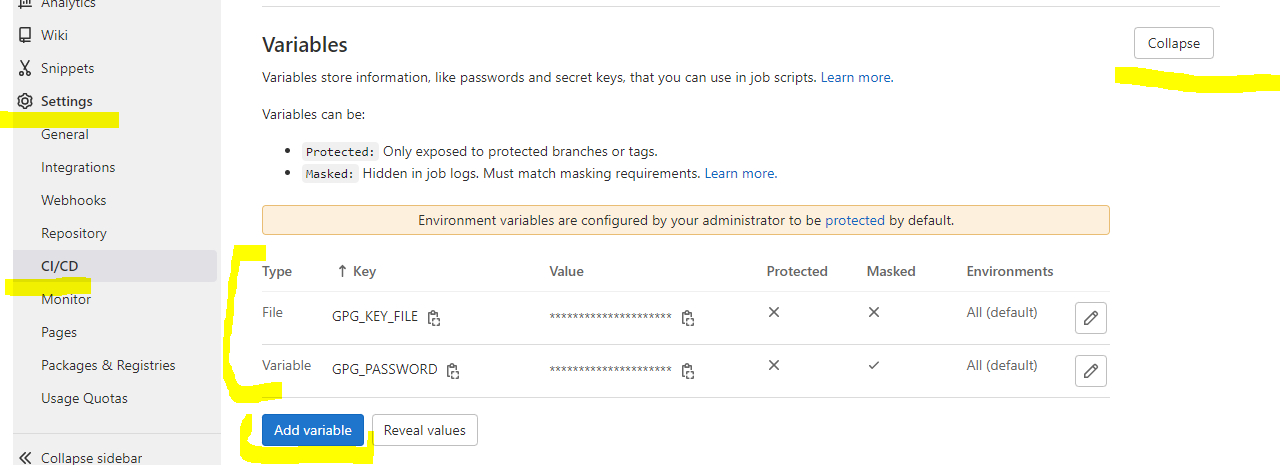
the gpg key is configured as an encrypted secret named GPG_KEY and is stored in ./secret.gpg. The value is the content of the secret-protected.gpg.example file
for the make initialization we need the second secret named GPG_PASSWORD – which is
configured as 12345678 in our case, see Add a password-protected secret gpg key
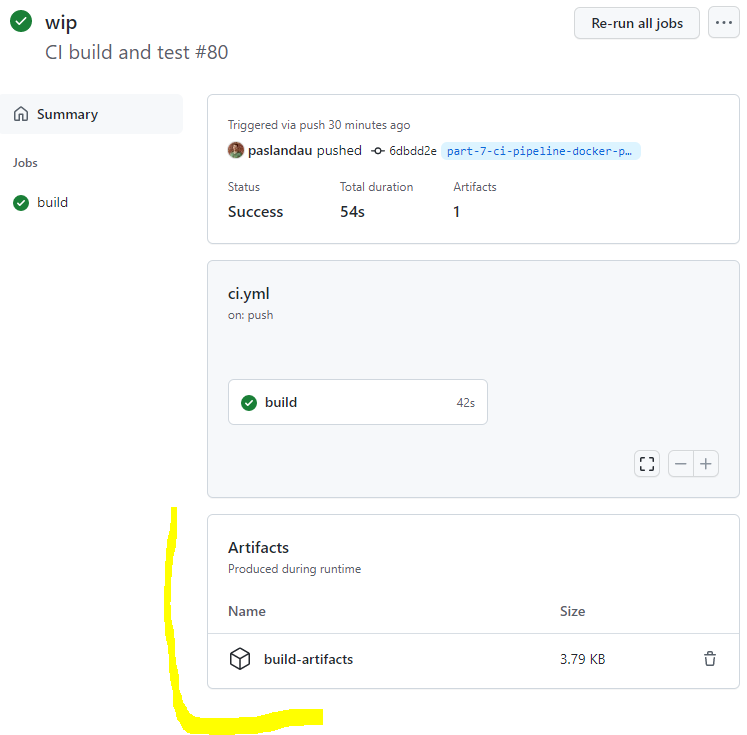
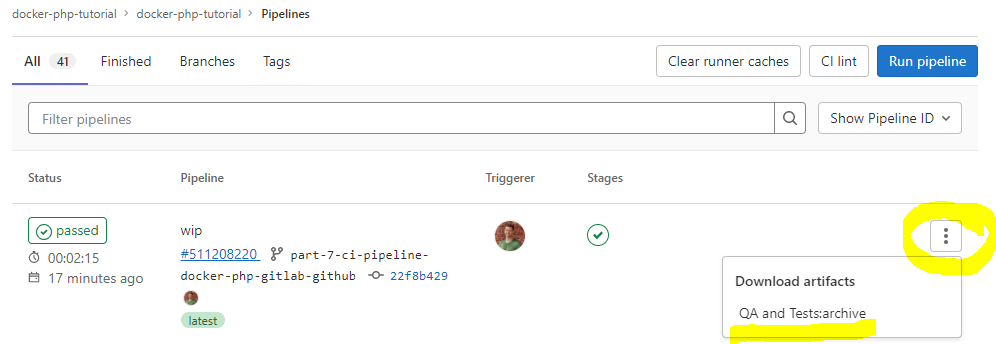
because the runner will be shutdown after the run, we need to move the build artifacts to a
permanent location, using the actions/[email protected] action
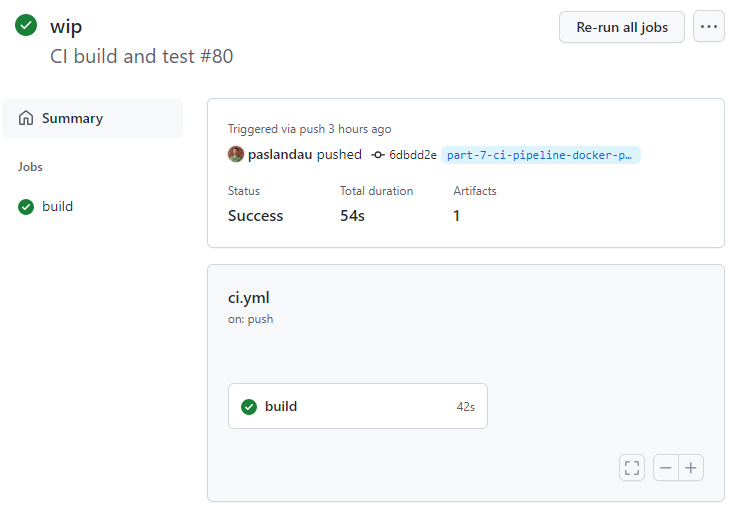
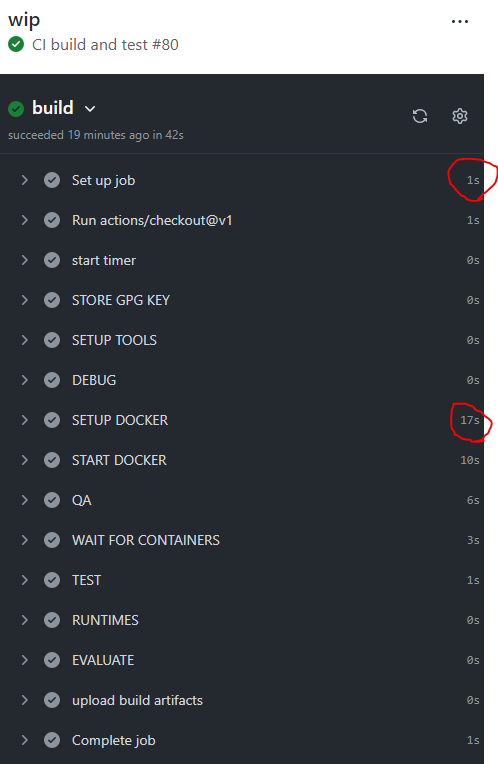
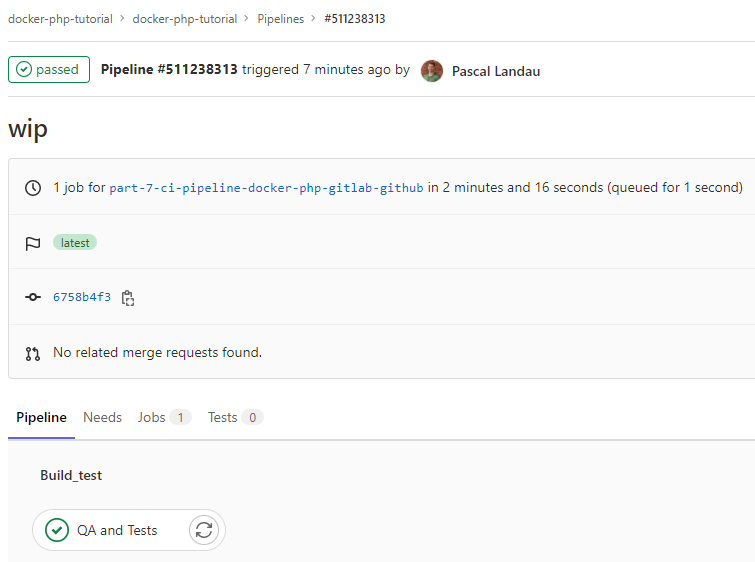
Performance isn’t an issue right now, because the CI runs take only about ~1 min (Github Actions)
and ~2 min (Gitlab Pipelines), but that’s mostly because we only ship a super minimal
application and those times will go up when things get more complex. For the local setup I
used all 8 cores of my laptop. The time breakdown is roughly as follows:
Step
Gitlab
Github
local without cache
local with cached images
local with cached images + layers
SETUP TOOLS
1
0
0
0
0
SETUP DOCKER
33
17
39
39
5
START DOCKER
17
11
34
2
1
QA
17
5
10
13
1
WAIT FOR CONTAINERS
5
5
3
2
13
TESTS
3
1
3
6
3
total (excl. runner startup)
78
43
97
70
36
total (incl. runner startup)
139
54
97
70
36
Times taken from
Optimizing the performance is out of scope for this tutorial, but I’ll at least document my
current findings.
The caching problem on CI
A good chunk of time is usually spent on building the docker images. We did our best to optimize
the process by leveraging the layer cache and using cache mounts
(see section Build stage ci in the php-base image).
But those steps are futile on CI systems, because the corresponding runners will start “from
scratch” for every CI run – i.e. there is no local cache that they could use. In
consequence, the full docker setup is also built “from scratch” on every run.
There are ways to mitigate that e.g.
But: None of that worked for me out-of-the-box 🙁 We will take a closer look in an upcoming
tutorial. Some reading material that I found valuable so far:
Docker changes
As a first step we need to decide which containers are required and how to provide the
codebase.
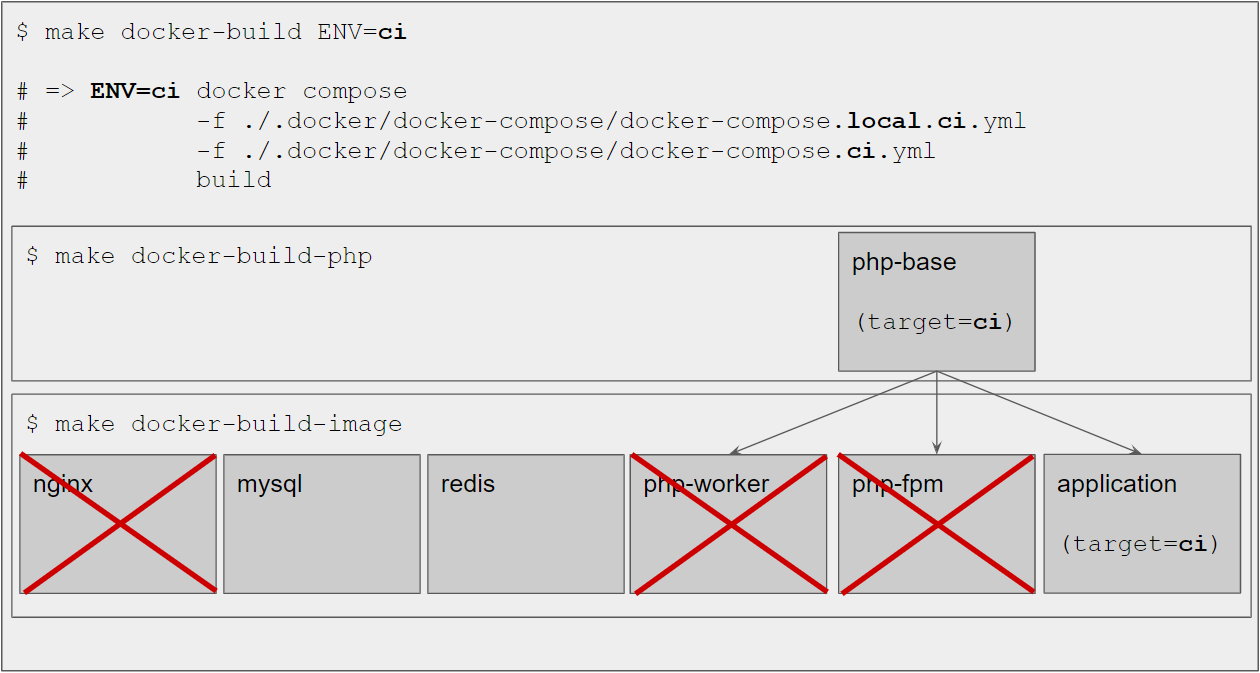
Since our goal is running the qa tools and tests, we only need the application php container. The
tests also need a database and a queue, i.e. the mysql and redis containers are required as
well – whereas nginx, php-fpm and php-worker are not required. We’ll handle that through
dedicated docker compose configuration files that only contain the necessary services. This is
explained in more detail in section Compose file updates.
In our local setup, we have shared the codebase between the host system and docker – mainly
because we wanted our changes to be reflected immediately in docker. This isn’t necessary for the
CI use case. In fact we want our CI images as close as possible to our production images – and
those should “contain everything to run independently”. I.e. the codebase should live in the
image – not on the host system. This will be explained in section Use the whole codebase as build context.
Compose file updates
We will not only have some differences between the CI docker setup and the local docker setup
(=different containers), but also in the configuration of the individual services. To accommodate
for that, we will use the following docker compose config files in the .docker/docker-compose/ directory:
docker-compose.local.ci.yml:
holds configuration that is valid for local and ci, trying to keep the config files DRY
docker-compose.ci.yml:
holds configuration that is only valid for ci
docker-compose.local.yml:
holds configuration that is only valid for local
When using docker compose we then need to make sure to include only the required files, e.g. for ci:
So all of those config values will only live in the docker-compose.local.yml file. In fact, there
are only two things that ci needs that local doesn’t:
a volume mount to share only the secret gpg key from the host with the application container
This will be used to collect any files we want to retain from a build (e.g. code coverage
information, log files, etc.)
Adding a health check for mysql
When running the tests for the first time on a CI system, I noticed some weird errors related to the
database:
1) Tests\Feature\App\Http\Controllers\HomeControllerTest::test___invoke with data set "default" (array(), '    <li><a href="?dispatch=fo...></li>')
PDOException: SQLSTATE[HY000] [2002] Connection refused
As it turned out, the mysql container itself was up and running – but the mysql process within the container was not yet ready to accept connections. Locally, this hasn’t been a problem,
because we usually would not run the tests “immediately” after starting the containers – but on CI
this is the case.
healthcheck declares a check that’s run to determine whether or not containers for this service are “healthy”.
Since this healthcheck is also “valid” for local, I defined it in the combined docker-compose.local.ci.yml file:
  mysql:
    healthcheck:
      # Only mark the service as healthy if mysql is ready to accept connections
      # Check every 2 seconds for 30 times, each check has a timeout of 1s
      test: mysqladmin ping -h 127.0.0.1 -u $$MYSQL_USER --password=$$MYSQL_PASSWORD
      timeout: 1s
      retries: 30
      interval: 2s
When starting the docker setup, docker ps will now add a health info to the STATUS:
$ make docker-up

$ docker ps
CONTAINER ID   IMAGE                            STATUS                           NAMES
b509eb2f99c0   dofroscra/application-ci:latest  Up 1 seconds                     dofroscra_ci-application-1
503e52fd9e68   mysql:8.0.28                     Up 1 seconds (health: starting)  dofroscra_ci-mysql-1

# a couple of seconds later

$ docker ps
CONTAINER ID   IMAGE                            STATUS                   NAMES
b509eb2f99c0   dofroscra/application-ci:latest  Up 13 seconds            dofroscra_ci-application-1
503e52fd9e68   mysql:8.0.28                     Up 13 seconds (healthy)  dofroscra_ci-mysql-1
Note the (health: starting) and (healthy) infos for the mysql service.
FYI: We could also use the depends_on property with a condition: service_healthy on the application container so that docker compose would
only start the container once the mysql service is healthy:
However, this would “block” the make docker-up until mysql is actually up and running. In
our case this is not desirable, because we can do “other stuff” in the meantime (namely: run the qa checks, because they don’t require a database) and thus save a couple of seconds on each CI
run.
in the Dockerfile of a service, define the ENV as a build stage. E.g. in .docker/images/php/base/Dockerfile
FROM base as ci
# ...
So to enable the new ci environment, we need to modify the Dockerfiles for the php-base and
the application image.
Build stage ci in the php-base image
Use the whole codebase as build context
As mentioned in section Docker changes we want to “bake” the codebase into
the ci image of the php-base container. Thus, we must change the context property in .docker/docker-compose/docker-compose-php-base.ymlto not only use the .docker/ directory
but instead the whole codebase. I.e. “dont use ../ but ../../“:
# File: .docker/docker-compose/docker-compose-php-base.yml

  php-base:
    build:
      # pass the full codebase to docker for building the image
      context: ../../
Build the dependencies
The composer dependencies must be set up in the image as well, so we introduce a new stage
stage in .docker/images/php/base/Dockerfile. The most trivial solution would look like this:
copy the whole codebase
run composer install
FROM base as ci

COPY . /codebase

RUN composer install --no-scripts --no-plugins --no-progress -o
However, this approach has some downsides:
if any file in the codebase changes, the COPY . /codebase layer will be invalidated. I.e.
docker could not use the layer cache
which also means that every layer afterwards cannot use the cache as well. In consequence the composer install would run every time – even when the composer.json file doesn’t change.
composer itself uses a cache for
storing dependencies locally so it doesn’t have to download dependencies that haven’t changed.
But since we run composer installin Docker, this cache would be “thrown away” every time
a build finishes. To mitigate that, we can use --mount=type=cache
to define a directory that docker will re-use between builds:
Contents of the cache directories persists between builder invocations without invalidating
the instruction cache.
Keeping those points in mind, we end up with the following instructions:
# File: .docker/images/php/base/Dockerfile
# ...

FROM base as ci

# By only copying the composer files required to run composer install
# the layer will be cached and only invalidated when the composer dependencies are changed
COPY ./composer.json /dependencies/
COPY ./composer.lock /dependencies/

# use a cache mount to cache the composer dependencies
# this is essentially a cache that lives in Docker BuildKit (i.e. has nothing to do with the host system)
RUN --mount=type=cache,target=/tmp/.composer \
    cd /dependencies && \
    # COMPOSER_HOME=/tmp/.composer sets the home directory of composer that
    # also controls where composer looks for the cache
    # so we don't have to download dependencies again (if they are cached)
    COMPOSER_HOME=/tmp/.composer composer install --no-scripts --no-plugins --no-progress -o

# copy the full codebase
COPY . /codebase

RUN mv /dependencies/vendor /codebase/vendor && \
    cd /codebase && \
    # remove files we don't require in the image to keep the image size small
    rm -rf .docker/ && \
    # we need a git repository for git-secret to work (can be an empty one)
    git init
FYI: The COPY . /codebase step doesn’t actually copy “everything in the repository”, because we
have also introduced a .dockerignore file to exclude some files from being included in the
build context – see section .dockerignore.
Some notes on the final RUN step:
rm -rf .docker/ doesn’t really save “that much” in the current setup – please take it more
as an example to remove any files that shouldn’t end up in the final image (e.g. “tests in a
production image”)
the git init part is required because we need to decrypt the secrets later – and git-secret requires a git repository (which can be empty). We can’t decrypt the secrets
during the build, because we do not want decrypted secret files to end up in the image.
When tested locally, the difference between the trivial solution and the one that makes use of
layer caching is ~35 seconds, see the results in the Performance section.
Create the final image
As a final step, we will rename the current stage to codebase and copy the “build
artifact” from that stage into our final ci build stage:
FROM base as codebase

# build the composer dependencies and clean up the copied files
# ...

FROM base as ci

COPY --from=codebase --chown=$APP_USER_NAME:$APP_GROUP_NAME /codebase $APP_CODE_PATH
Why are we not just using the previous stage directly as ci?
That does not only save us some layers, but also allows us to get rid of
files like the .docker/ directory. We needed that directory in the build context because
some files where required in other parts of the Dockerfile (e.g. the php ini files), so we
can’t exclude it via .dockerignore. But we can remove it in the codebase stage – so it will NOT
be copied over and thus not end up in the final image. If we wouldn’t have the codebase stage,
the folder would be part of the layer created when COPYing all the files from the build context
and removing it via rm -rf .docker/ would have no effect on the image size.
Currently, that doesn’t really matter, because the building step is super simple (just a composer install) – but in a growing and more complex codebase you can easily
save a couple MB.
To be concrete, the multistage build has 31 layers and the final layer containing the
codebase has a size of 65.1MB.
$ docker image history -H dofroscra/application-ci
IMAGE          CREATED          CREATED BY                                      SIZE      COMMENT
d778c2ee8d5e   17 minutes ago   COPY /codebase /var/www/app # buildkit          65.1MB    buildkit.dockerfile.v0
                                                                                ^^^^^^
<missing>      17 minutes ago   WORKDIR /var/www/app                            0B        buildkit.dockerfile.v0
<missing>      17 minutes ago   COPY /usr/bin/composer /usr/local/bin/compos…   2.36MB    buildkit.dockerfile.v0
<missing>      17 minutes ago   COPY ./.docker/images/php/base/.bashrc /root…   395B      buildkit.dockerfile.v0
<missing>      17 minutes ago   COPY ./.docker/images/php/base/.bashrc /home…   395B      buildkit.dockerfile.v0
<missing>      17 minutes ago   COPY ./.docker/images/php/base/conf.d/zz-app…   196B      buildkit.dockerfile.v0
<missing>      17 minutes ago   COPY ./.docker/images/php/base/conf.d/zz-app…   378B      buildkit.dockerfile.v0
<missing>      17 minutes ago   RUN |8 APP_USER_ID=10000 APP_GROUP_ID=10001 …   1.28kB    buildkit.dockerfile.v0
<missing>      17 minutes ago   RUN |8 APP_USER_ID=10000 APP_GROUP_ID=10001 …   41MB      buildkit.dockerfile.v0
<missing>      18 minutes ago   ADD https://php.hernandev.com/key/php-alpine…   451B      buildkit.dockerfile.v0
<missing>      18 minutes ago   RUN |8 APP_USER_ID=10000 APP_GROUP_ID=10001 …   62.1MB    buildkit.dockerfile.v0
<missing>      18 minutes ago   ADD https://gitsecret.jfrog.io/artifactory/a…   450B      buildkit.dockerfile.v0
<missing>      18 minutes ago   RUN |8 APP_USER_ID=10000 APP_GROUP_ID=10001 …   4.74kB    buildkit.dockerfile.v0
<missing>      18 minutes ago   ENV ENV=ci                                      0B        buildkit.dockerfile.v0
<missing>      18 minutes ago   ENV ALPINE_VERSION=3.15                         0B        buildkit.dockerfile.v0
<missing>      18 minutes ago   ENV TARGET_PHP_VERSION=8.1                      0B        buildkit.dockerfile.v0
<missing>      18 minutes ago   ENV APP_CODE_PATH=/var/www/app                  0B        buildkit.dockerfile.v0
<missing>      18 minutes ago   ENV APP_GROUP_NAME=application                  0B        buildkit.dockerfile.v0
<missing>      18 minutes ago   ENV APP_USER_NAME=application                   0B        buildkit.dockerfile.v0
<missing>      18 minutes ago   ENV APP_GROUP_ID=10001                          0B        buildkit.dockerfile.v0
<missing>      18 minutes ago   ENV APP_USER_ID=10000                           0B        buildkit.dockerfile.v0
<missing>      18 minutes ago   ARG ENV                                         0B        buildkit.dockerfile.v0
<missing>      18 minutes ago   ARG ALPINE_VERSION                              0B        buildkit.dockerfile.v0
<missing>      18 minutes ago   ARG TARGET_PHP_VERSION                          0B        buildkit.dockerfile.v0
<missing>      18 minutes ago   ARG APP_CODE_PATH                               0B        buildkit.dockerfile.v0
<missing>      18 minutes ago   ARG APP_GROUP_NAME                              0B        buildkit.dockerfile.v0
<missing>      18 minutes ago   ARG APP_USER_NAME                               0B        buildkit.dockerfile.v0
<missing>      18 minutes ago   ARG APP_GROUP_ID                                0B        buildkit.dockerfile.v0
<missing>      18 minutes ago   ARG APP_USER_ID                                 0B        buildkit.dockerfile.v0
<missing>      2 days ago       /bin/sh -c #(nop)  CMD ["/bin/sh"]              0B
<missing>      2 days ago       /bin/sh -c #(nop) ADD file:5d673d25da3a14ce1…   5.57MB
The non-multistage build has 32 layers and the final layer(s) containing the
codebase have a combined size of 65.15MB (60.3MB + 4.85MB).
$ docker image history -H dofroscra/application-ci
IMAGE          CREATED          CREATED BY                                      SIZE      COMMENT
94ba50438c9a   2 minutes ago    RUN /bin/sh -c COMPOSER_HOME=/tmp/.composer …   60.3MB    buildkit.dockerfile.v0
<missing>      2 minutes ago    COPY . /var/www/app # buildkit                  4.85MB    buildkit.dockerfile.v0
                                                                                ^^^^^^
<missing>      31 minutes ago   WORKDIR /var/www/app                            0B        buildkit.dockerfile.v0
<missing>      31 minutes ago   COPY /usr/bin/composer /usr/local/bin/compos…   2.36MB    buildkit.dockerfile.v0
<missing>      31 minutes ago   COPY ./.docker/images/php/base/.bashrc /root…   395B      buildkit.dockerfile.v0
<missing>      31 minutes ago   COPY ./.docker/images/php/base/.bashrc /home…   395B      buildkit.dockerfile.v0
<missing>      31 minutes ago   COPY ./.docker/images/php/base/conf.d/zz-app…   196B      buildkit.dockerfile.v0
<missing>      31 minutes ago   COPY ./.docker/images/php/base/conf.d/zz-app…   378B      buildkit.dockerfile.v0
<missing>      31 minutes ago   RUN |8 APP_USER_ID=10000 APP_GROUP_ID=10001 …   1.28kB    buildkit.dockerfile.v0
<missing>      31 minutes ago   RUN |8 APP_USER_ID=10000 APP_GROUP_ID=10001 …   41MB      buildkit.dockerfile.v0
<missing>      31 minutes ago   ADD https://php.hernandev.com/key/php-alpine…   451B      buildkit.dockerfile.v0
<missing>      31 minutes ago   RUN |8 APP_USER_ID=10000 APP_GROUP_ID=10001 …   62.1MB    buildkit.dockerfile.v0
<missing>      31 minutes ago   ADD https://gitsecret.jfrog.io/artifactory/a…   450B      buildkit.dockerfile.v0
<missing>      31 minutes ago   RUN |8 APP_USER_ID=10000 APP_GROUP_ID=10001 …   4.74kB    buildkit.dockerfile.v0
<missing>      31 minutes ago   ENV ENV=ci                                      0B        buildkit.dockerfile.v0
<missing>      31 minutes ago   ENV ALPINE_VERSION=3.15                         0B        buildkit.dockerfile.v0
<missing>      31 minutes ago   ENV TARGET_PHP_VERSION=8.1                      0B        buildkit.dockerfile.v0
<missing>      31 minutes ago   ENV APP_CODE_PATH=/var/www/app                  0B        buildkit.dockerfile.v0
<missing>      31 minutes ago   ENV APP_GROUP_NAME=application                  0B        buildkit.dockerfile.v0
<missing>      31 minutes ago   ENV APP_USER_NAME=application                   0B        buildkit.dockerfile.v0
<missing>      31 minutes ago   ENV APP_GROUP_ID=10001                          0B        buildkit.dockerfile.v0
<missing>      31 minutes ago   ENV APP_USER_ID=10000                           0B        buildkit.dockerfile.v0
<missing>      31 minutes ago   ARG ENV                                         0B        buildkit.dockerfile.v0
<missing>      31 minutes ago   ARG ALPINE_VERSION                              0B        buildkit.dockerfile.v0
<missing>      31 minutes ago   ARG TARGET_PHP_VERSION                          0B        buildkit.dockerfile.v0
<missing>      31 minutes ago   ARG APP_CODE_PATH                               0B        buildkit.dockerfile.v0
<missing>      31 minutes ago   ARG APP_GROUP_NAME                              0B        buildkit.dockerfile.v0
<missing>      31 minutes ago   ARG APP_USER_NAME                               0B        buildkit.dockerfile.v0
<missing>      31 minutes ago   ARG APP_GROUP_ID                                0B        buildkit.dockerfile.v0
<missing>      31 minutes ago   ARG APP_USER_ID                                 0B        buildkit.dockerfile.v0
<missing>      2 days ago       /bin/sh -c #(nop)  CMD ["/bin/sh"]              0B
<missing>      2 days ago       /bin/sh -c #(nop) ADD file:5d673d25da3a14ce1…   5.57MB
Again: It is expected that the differences aren’t big, because the only size savings come from
the .docker/ directory with a size of ~70kb.
There is actually “nothing” to be done here. We don’t need SSH any longer because it is only
required for the SSH Configuration of PhpStorm.
So the build stage is simply “empty”:
ARG BASE_IMAGE
FROM ${BASE_IMAGE} as base

FROM base as ci

FROM base as local
# ...
Though there is one thing to keep in mind: In the local image we used sshd as the entrypoint,
i.e. we had a long running process that would keep the container running. To keep the ci application container running, we must
.dockerignore
The .dockerignore file
is located in the root of the repository and ensures that certain files are kept out of the
Docker build context. This will
speed up the build (because less files need to be transmitted to the docker daemon)
keep images smaller (because irrelevant files are kept out of the image)
The syntax is quite similar to the .gitignore file – in fact I’ve found it to be quite often
the case that the contents of the .gitignore file are a subset of the .dockerignore file. This
makes kinda sense, because you typically wouldn’t want files that are excluded from the
repository to end up in a docker image (e.g. unencrypted secret files). This has also been
noticed by others, see e.g.
but to my knowledge there is currently (2022-04-24) no way to “keep the two files in sync”.
In our case, the content of the .dockerignore file looks like this:
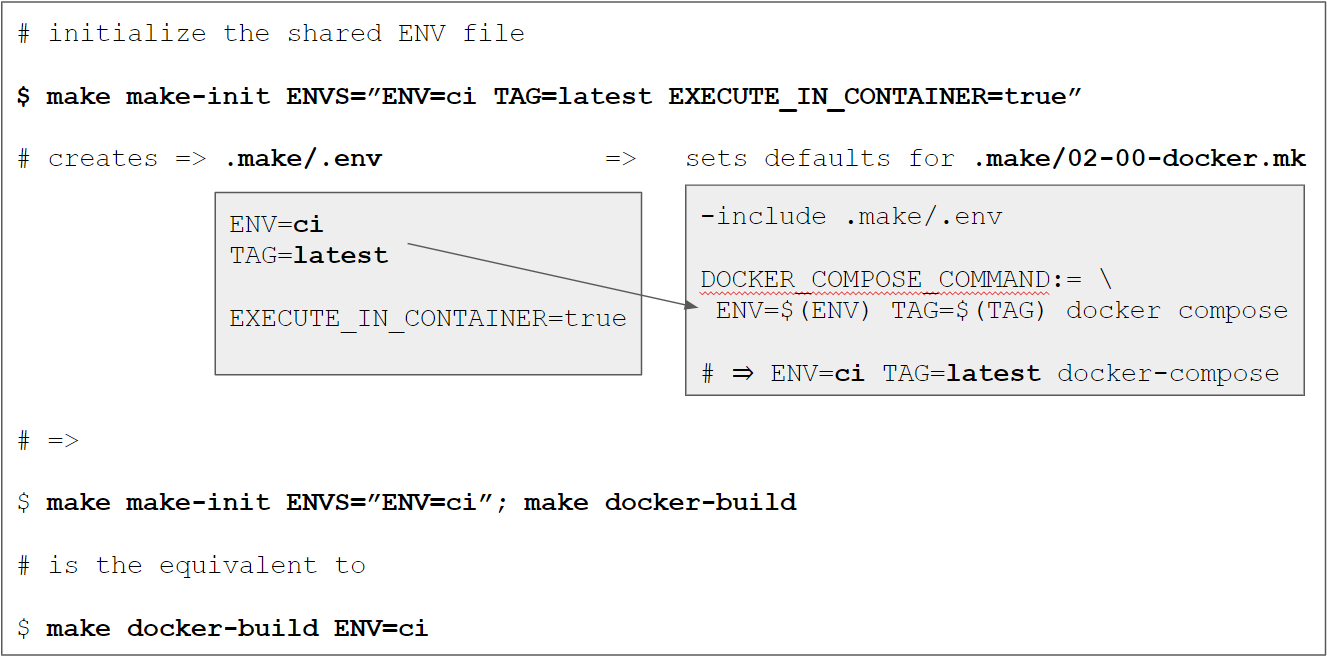
We have introduced the concept of shared variables via .make/.env
previously. It allows us to define variables in one place (=single source
of truth) that are then used as “defaults” so we don’t have to define them explicitly when
invoking certain make targets (like make docker-build). We’ll make use of this concept by
setting the environment to civiaENV=ci and thus making sure that all docker commands use ci “automatically” as well.
In addition, I made a small modification by introducing a second file at .make/variables.env
that is also included in the main Makefile and holds the “default” shared variables. Those
are neither “secret” nor are they likely to be be changed for environment adjustments. The file
is NOT ignored by .gitignore and is basically just the previous .make/.env.example file without
the environment specific variables:
The .make/.env file is still .gitignored and can be initialized with the make-init
target using the ENVS variable:
make make-init ENVS="ENV=ci SOME_OTHER_DEFAULT_VARIABLE=foo"
which would create a .make/.env file with the content
ENV=ci
SOME_OTHER_DEFAULT_VARIABLE=foo
If necessary, we could also override variables defined in the .make/variables.env file,
because the .make/.env is included last in the Makefile:
# File: Makefile
# ...

# include the default variables
include .make/variables.env
# include the local variables
-include .make/.env
The default value for ENVS is ENV=local TAG=latest to retain the same default behavior as
before when ENVS is omitted. The corresponding make-init target is defined in the main Makefile and now looks like this:
ENVS?=ENV=local TAG=latest
.PHONY: make-init
make-init: ## Initializes the local .makefile/.env file with ENV variables for make. Use via ENVS="KEY_1=value1 KEY_2=value2"
    @$(if $(ENVS),,$(error ENVS is undefined))
    @rm  -f .make/.env
    for variable in $(ENVS); do \
      echo $$variable | tee -a .make/.env > /dev/null 2>&1; \
    done
    @echo  "Created a local .make/.env file"
ENV based docker compose config
As mentioned in section Compose file updates we need to select the
“correct” docker compose configuration files based on the ENV value. This is done in .make/02-00-docker.mk:
# File .make/02-00-docker.mk

# ...

DOCKER_COMPOSE_DIR:=...
DOCKER_COMPOSE_COMMAND:=...

DOCKER_COMPOSE_FILE_LOCAL_CI:=$(DOCKER_COMPOSE_DIR)/docker-compose.local.ci.yml
DOCKER_COMPOSE_FILE_CI:=$(DOCKER_COMPOSE_DIR)/docker-compose.ci.yml
DOCKER_COMPOSE_FILE_LOCAL:=$(DOCKER_COMPOSE_DIR)/docker-compose.local.yml

# we need to "assemble" the correct combination of docker-compose.yml config files
ifeq ($(ENV),ci)
    DOCKER_COMPOSE_FILES:=-f $(DOCKER_COMPOSE_FILE_LOCAL_CI) -f $(DOCKER_COMPOSE_FILE_CI)
else ifeq ($(ENV),local)
    DOCKER_COMPOSE_FILES:=-f $(DOCKER_COMPOSE_FILE_LOCAL_CI) -f $(DOCKER_COMPOSE_FILE_LOCAL)
endif

DOCKER_COMPOSE:=$(DOCKER_COMPOSE_COMMAND) $(DOCKER_COMPOSE_FILES)
When we now take a look at a full recipe when using ENV=ci with a docker target (e.g. docker-up), we can see that the correct files are chosen, e.g.
We’ve introduced git-secret in the previous tutorial Use git-secret to encrypt secrets in the repository
and used it to store the file passwords.txt encrypted in the codebase. To make sure that the
decryption works as expected on the CI systems, I’ve added a test at tests/Feature/EncryptionTest.php to check if the file exists and if the content is correct.
class EncryptionTest extends TestCase
{
    public function test_ensure_that_the_secret_passwords_file_was_decrypted()
    {
        $pathToSecretFile = __DIR__."/../../passwords.txt";

        $this->assertFileExists($pathToSecretFile);

        $expected = "my_secret_password\n";
        $actual   = file_get_contents($pathToSecretFile);

        $this->assertEquals($expected, $actual);
    }
}
Of course this doesn’t make sense in a “real world scenario”, because the secret value would now
be exposed in a test – but it suffices for now as proof of a working secret decryption.
Add a password-protected secret gpg key
I’ve mentioned in Scenario: Decrypt file
that it is also possible to use a password-protected secret gpg key for
an additional layer of security. I have created such a key and stored it in the repository at secret-protected.gpg.example (in a “real world scenario” I wouldn’t do that – but since this
is a public tutorial I want you to be able to follow along completely). The password for that
key is 12345678.
make gpg-init
make secret-add-user EMAIL="[email protected]"
make secret-encrypt
When I now import the secret-protected.gpg.example key, I can decrypt the secrets, though I
cannot use the usual secret-decrypt target but must instead use secret-decrypt-with-password
make secret-decrypt-with-password GPG_PASSWORD=12345678
or store the GPG_PASSWORD in the .make/.env file when it is initialized for CI
make make-init ENVS="ENV=ci TAG=latest EXECUTE_IN_CONTAINER=true GPG_PASSWORD=12345678"
make secret-decrypt-with-password
Create a JUnit report from PhpUnit
I’ve added the --log-junit option
to the phpunit configuration of the test make target in order to create an XML report in the .build/ directory in the .make/01-02-application-qa.mk file:
I.e. each run of the tests will now create a Junit XML report at .build/report.xml. The file is used as an example of a build artifact, i.e.
“something that we would like to keep” from a CI run.
Wrapping up
Congratulations, you made it! If some things are not completely clear by now, don’t hesitate to
leave a comment. You should now have a working CI pipeline for Github (via Github Actions)
and/or Gitlab (via Gitlab pipelines) that runs automatically on each push.
In the next part of this tutorial, we will use terraform to create an infrastructure for
production deployments on GCP and deploy the docker containers there.
Please subscribe to the RSS feed or via email to get automatic
notifications when this next part comes out 🙂
Wanna stay in touch?
Since you ended up on this blog, chances are pretty high that you’re into Software Development
(probably PHP, Laravel, Docker or Google Big Query) and I’m a big fan of feedback and networking.
So – if you’d like to stay in touch, feel free to shoot me an email with a couple of words about yourself and/or
connect with me on LinkedIn or Twitter
or simply subscribe to my RSS feed
or go the crazy route and subscribe via mail
and don’t forget to leave a comment 🙂
https://i.ytimg.com/vi/qSJlovwPEJE/maxresdefault.jpgA facade in Laravel is a wrapper around a non-static function that turns it into a static function. Before we continue, you need to have a basic understanding of Laravel Ioc service containers.Laravel News Links
https://i.ytimg.com/vi/ZRdgVuIppYQ/maxresdefault.jpgIn this lesson, we go over what an active record pattern is & how Laravel implements it in its ORM package called Eloquent. This lesson also covers the basics of eloquent to get you familiar with it & show you the differences between the data mapper & active record patterns.Laravel News Links
In the sixth part of this tutorial series on developing PHP on Docker we will setup git-secret
to store secrets directly in the repository. Everything will be handled through Docker and
added as make targets for a convenient workflow.
FYI:
This tutorial is a precursor to the next a part Create a CI pipeline for dockerized PHP Apps
because dealing with secrets is an important aspect when setting up a CI system (and later when
deploying to production) – but I feel it’s complex enough to warrant its own article.
If you want to follow along, please subscribe to the RSS feed
or via email
to get automatic notifications when the next part comes out 🙂
Table of contents
Introduction
Dealing with secrets (passwords, tokens, key files, etc.) is close to “naming things”
when it comes to hard problems in software engineering. Some things to consider:
security is paramount – but high security often goes hand in hand with high inconvenience
and if things get too complicated, people look for shortcuts…
in a team, sharing certain secret values is often mandatory
so now we need to think about secure ways to distribute and update secrets across multiple
people
concrete secret values often depend on the environment
inherently tricky to “test” or even “review”, because those values are “by definition”
different on “your machine” than on “production”
In fact, entire products have been build around dealing with secrets, e.g. HashiCorp Vault, AWS Secrets Manager or the GCP Secret Manager. Introducing those in a project comes
with a certain overhead as it’s yet another service that needs to be integrated and
maintained. Maybe it is the exactly right decision for your use-case – maybe it’s overkill.
By the end of this article you’ll at least be aware of an alternative with a lower barrier to entry.
See also the Pros and cons section in the end for an overview.
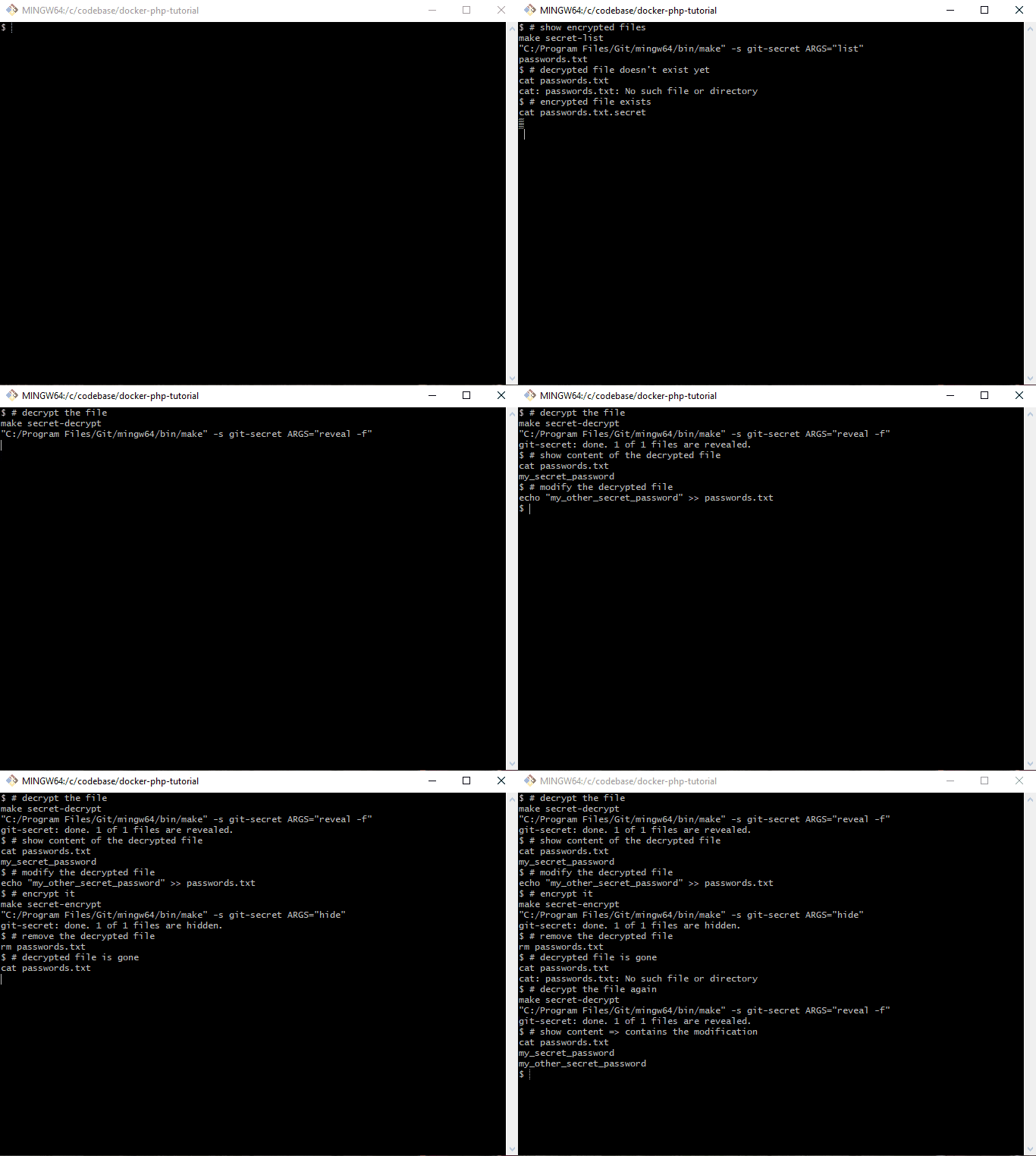
to reveal secrets in the codebase, make modifications to them if necessary and then run
make secret-encrypt
to encrypt them again so that they can be committed (and pushed to the remote repository). To
see it in action, check out branch part-6-git-secret-encrypt-repository-docker
and run the following commands:
# checkout the branch
git checkout part-6-git-secret-encrypt-repository-docker

# build and start the docker setup
make make-init
make docker-build
make docker-up

# "create" the secret key - the file "secret.gpg.example" would usually NOT live in the repo!
cp secret.gpg.example secret.gpg

# initialize gpg
make gpg-init

# ensure that the decrypted secret file does not exist
ls passwords.txt

# decrypt the secret file
make secret-decrypt

# show the content of the secret file
cat passwords.txt
Tooling
We will set up gpg and git-secret in the php base image, so that the tools become available in
all other containers. Please refer to Docker from scratch for PHP 8.1 Applications in 2022
for an in-depth explanation of the docker images.
Please note, that there is a caveat when using git-secret in a folder that is shared between
the host system and a docker container. I’ll explain that in more detail (including a workaround)
in section The git-secret directory and the gpg-agent socket.
gpg
gpg is short for The GNU Privacy Guard and is an open source implementation
of the OpenPGP standard. In short, it allows us to create a personal key file pair
(similar to SSH keys) with a private secret key and a public
key that can be shared with other parties whose messages you want to decrypt.
gpg installation
To install it, we can simply run apk add gnupg and thus update .docker/images/php/base/Dockerfile accordingly
# File: .docker/images/php/base/Dockerfile

RUN apk add --update --no-cache \
        bash \
        gnupg \
        make \
#...
Caution: If the secret key requires a password, you would now be prompted for it. We can
circumvent the prompt by using --batch --yes --pinentry-mode loopback:
The public key can be imported in the same way as private keys via
path="public.gpg"
gpg --import "$path"
Example:
$ gpg --import /var/www/app/public.gpg
gpg: key E1E734E00B611C26: "Pascal Landau <[email protected]>" not changed
gpg: Total number processed: 1
gpg:              unchanged: 1
git-secret
The official website of git-secret is already doing a great job of
introducing the tool. In short, it allows us to declare certain files as “secrets” and encrypt
them via gpg – using the keys of all trusted parties. The encrypted file can then by stored
safely directly in the git repository and decrypted if required.
We only need to do this once, because we’ll commit the folder to git later. It contains the
following files:
$ git status | grep ".gitsecret"
        new file:   .gitsecret/keys/pubring.kbx
        new file:   .gitsecret/keys/pubring.kbx~
        new file:   .gitsecret/keys/trustdb.gpg
        new file:   .gitsecret/paths/mapping.cfg
gpg uses a gpg-agent to perform its tasks and the two tools communicate through sockets
that are created in the --home-directory of the gpg-agent
the agent is started implicitly through a gpg command used by git-secret, using the .gitsecret/keys directories as a --home-directory
because the location of the --home-directory is shared with the host system, the socket
creation fails (potentially only an issue for Docker Desktop, see the related discussion in
Github issue Support for sharing unix sockets)
The corresponding error messages are
gpg: can't connect to the agent: IPC connect call failed

gpg-agent: error binding socket to '/var/www/app/.gitsecret/keys/S.gpg-agent': I/O error
FYI: This command was renamed to removeperson in git-secret >= 0.5.0
$ git secret killperson [email protected]
git-secret: removed keys.
git-secret: now [[email protected]] do not have an access to the repository.
git-secret: make sure to hide the existing secrets again.
User [email protected] will no longer be able to decrypt the secrets.
Caution: The secrets need to be re-encrypted after removing a user!
Reminder: Rotate the encrypted secrets
Please be aware that not only your secrets are stored in git, but who had access as well. I.e.
even if you remove a user and re-encrypt the secrets, that user would still be able to decrypt
the secrets of a previous commit (when the user was still added). In consequence, you need
to rotate the encrypted secrets themselves as well after removing a user.
But isn’t that a great flaw in the system, making it a bad idea to use git-secret in general?
In my opinion: No.
If the removed user had access to the secrets at any point in time (no
matter where they have been stored), he could very well have just created a local copy or simply
“written them down”. In terms of security there is really no “added downside” due to git-secret.
It just makes it very clear that you must rotate the secrets ¯\_(ツ)_/¯
The encrypted files are de-cryptable for all users that have been added via git secret tell.
That also means that you need to run this command again whenever a new user is added.
Decrypting files
You can decrypt files via
git secret reveal
Output:
$ git secret reveal
File '/var/www/app/.env' exists. Overwrite? (y/N) y
git-secret: done. 1 of 1 files are revealed.
the files are decrypted and will overwrite the current, unencrypted files (if they already exist)
use the -f option to force the overwrite and run non-interactively
if you only want to check the content of an encrypted file, you can use git secret cat $filename (e.g. git secret cat .env)
In case the secret gpg key is password protected, you must pass the password via the -p option. E.g. for password 123456
git secret reveal -p 123456
Show changes between encrypted and decrypted files
One problem that comes with encrypted files: You can’t review them during a code review in a
remote tool. So in order to understand what changes have been made, it is helpful to show the changes between the encrypted and the decrypted files. This can be done via
Note the +foo at the bottom of the output. It was added in the first line via echo "foo"> >> .env.
Makefile adjustments
Since I won’t be able to remember all the commands for git-secret and gpg, I’ve added them to
the Makefile at .make/01-00-application-setup.mk:
# File: .make/01-00-application-setup.mk

#...

# gpg

DEFAULT_SECRET_GPG_KEY?=secret.gpg
DEFAULT_PUBLIC_GPG_KEYS?=.dev/gpg-keys/*

.PHONY: gpg
gpg: ## Run gpg commands. Specify the command e.g. via ARGS="--list-keys"
    $(EXECUTE_IN_APPLICATION_CONTAINER) gpg $(ARGS)

.PHONY: gpg-export-public-key
gpg-export-public-key: ## Export a gpg public key e.g. via EMAIL="[email protected]" PATH=".dev/gpg-keys/john-public.gpg"
    @$(if $(PATH),,$(error PATH is undefined))
    @$(if $(EMAIL),,$(error EMAIL is undefined))
    "$(MAKE)" -s gpg ARGS="gpg --armor --export $(EMAIL) > $(PATH)"

.PHONY: gpg-export-private-key
gpg-export-private-key: ## Export a gpg private key e.g. via EMAIL="[email protected]" PATH="secret.gpg"
    @$(if $(PATH),,$(error PATH is undefined))
    @$(if $(EMAIL),,$(error EMAIL is undefined))
    "$(MAKE)" -s gpg ARGS="--output $(PATH) --armor --export-secret-key $(EMAIL)"

.PHONY: gpg-import
gpg-import: ## Import a gpg key file e.g. via GPG_KEY_FILES="/path/to/file /path/to/file2"
    @$(if $(GPG_KEY_FILES),,$(error GPG_KEY_FILES is undefined))
    "$(MAKE)" -s gpg ARGS="--import --batch --yes --pinentry-mode loopback $(GPG_KEY_FILES)"

.PHONY: gpg-import-default-secret-key
gpg-import-default-secret-key: ## Import the default secret key
    "$(MAKE)" -s gpg-import GPG_KEY_FILES="$(DEFAULT_SECRET_GPG_KEY)"

.PHONY: gpg-import-default-public-keys
gpg-import-default-public-keys: ## Import the default public keys
    "$(MAKE)" -s gpg-import GPG_KEY_FILES="$(DEFAULT_PUBLIC_GPG_KEYS)"

.PHONY: gpg-init
gpg-init: gpg-import-default-secret-key gpg-import-default-public-keys ## Initialize gpg in the container, i.e. import all public and private keys

# git-secret

.PHONY: git-secret
git-secret: ## Run git-secret commands. Specify the command e.g. via ARGS="hide"
    $(EXECUTE_IN_APPLICATION_CONTAINER) git-secret $(ARGS)

.PHONY: secret-init
secret-init: ## Initialize git-secret in the repository via `git-secret init`
    "$(MAKE)" -s git-secret ARGS="init"

.PHONY: secret-init-gpg-socket-config
secret-init-gpg-socket-config: ## Initialize the config files to change the gpg socket locations
    echo "%Assuan%" > .gitsecret/keys/S.gpg-agent
    echo "socket=/tmp/S.gpg-agent" >> .gitsecret/keys/S.gpg-agent
    echo "%Assuan%" > .gitsecret/keys/S.gpg-agent.ssh
    echo "socket=/tmp/S.gpg-agent.ssh" >> .gitsecret/keys/S.gpg-agent.ssh
    echo "extra-socket /tmp/S.gpg-agent.extra" > .gitsecret/keys/gpg-agent.conf
    echo "browser-socket /tmp/S.gpg-agent.browser" >> .gitsecret/keys/gpg-agent.conf

.PHONY: secret-encrypt
secret-encrypt: ## Decrypt secret files via `git-secret hide`
    "$(MAKE)" -s git-secret ARGS="hide"

.PHONY: secret-decrypt
secret-decrypt: ## Decrypt secret files via `git-secret reveal -f`
    "$(MAKE)" -s git-secret ARGS="reveal -f"

.PHONY: secret-decrypt-with-password
secret-decrypt-with-password: ## Decrypt secret files using a password for gpg via `git-secret reveal -f -p $(GPG_PASSWORD)`
    @$(if $(GPG_PASSWORD),,$(error GPG_PASSWORD is undefined))
    "$(MAKE)" -s git-secret ARGS="reveal -f -p $(GPG_PASSWORD)"

.PHONY: secret-add
secret-add: ## Add a file to git secret via `git-secret add $FILE`
    @$(if $(FILE),,$(error FILE is undefined))
    "$(MAKE)" -s git-secret ARGS="add $(FILE)"

.PHONY: secret-cat
secret-cat: ## Show the contents of file to git secret via `git-secret cat $FILE`
    @$(if $(FILE),,$(error FILE is undefined))
    "$(MAKE)" -s git-secret ARGS="cat $(FILE)"

.PHONY: secret-list
secret-list: ## List all files added to git secret `git-secret list`
    "$(MAKE)" -s git-secret ARGS="list"

.PHONY: secret-remove
secret-remove: ## Remove a file from git secret via `git-secret remove $FILE`
    @$(if $(FILE),,$(error FILE is undefined))
    "$(MAKE)" -s git-secret ARGS="remove $(FILE)"

.PHONY: secret-add-user
secret-add-user: ## Remove a user from git secret via `git-secret tell $EMAIL`
    @$(if $(EMAIL),,$(error EMAIL is undefined))
    "$(MAKE)" -s git-secret ARGS="tell $(EMAIL)"

.PHONY: secret-show-users
secret-show-users: ## Show all users that have access to git secret via `git-secret whoknows`
    "$(MAKE)" -s git-secret ARGS="whoknows"

.PHONY: secret-remove-user
secret-remove-user: ## Remove a user from git secret via `git-secret killperson $EMAIL`
    @$(if $(EMAIL),,$(error EMAIL is undefined))
    "$(MAKE)" -s git-secret ARGS="killperson $(EMAIL)"

.PHONY: secret-diff
secret-diff: ## Show the diff between the content of encrypted and decrypted files via `git-secret changes`
    "$(MAKE)" -s git-secret ARGS="changes"
Workflow
Working with git-secret is pretty straight forward:
initialize git-secret
add all users
add all secret files and make sure they are ignored via .gitignore
encrypt the files
commit the encrypted files like “any other file”
if any changes were made by other team members to the files:
=> decrypt to get the most up-to-date ones
if any modifications are required from your side:
=> make the changes to the decrypted files and then re-encrypt them again
But: The devil is in the details. The Process challenges section explains
some of the pitfalls that we have encountered and the Scenarios section gives some
concrete examples for common scenarios.
Process challenges
From a process perspective we’ve encountered some challenges that I’d like to mention – including
how we deal with them.
Updating secrets
When updating secrets you must ensure to always decrypt the files first in order to avoid
using “stale” files that you might still have locally. I usually check out the latest main
branch and run git secret reveal to have the most up-to-date versions of the secret files. You
could also use a post-merge git hook to do
this automatically, but I personally don’t want to risk overwriting my local secret files by
accident.
Code reviews and merge conflicts
Since the encrypted files cannot be diffed meaningfully, the code reviews become more difficult
when secrets are involved. We use Gitlab for reviews and I usually first check the diff of
the .gitsecret/paths/mapping.cfg file to see “which files have changed” directly in the UI.
In addition, I will
checkout the main branch
decrypt the secrets via git secret reveal -f
checkout the feature-branch
run git secret changes to see the differences between the decrypted files from main and the
encrypted files from feature-branch
Things get even more complicated when multiple team members need to modify secret files at the same
time on different branches, as the encrypted files cannot be compared – i.e. git cannot be smart
about delta updates.
The only way around this is coordinating the pull requests, i.e. merge the first, update the
secrets of the second and then merge the second.
Fortunately, this has only happened very rarely so far.
Local git-secret and gpg setup
Currently, all developers in our team have git-secret installed locally (instead of using it
through docker) and use their own gpg keys.
This means more onboarding overhead, because
a new dev must
install git-secret locally (*)
install and setup gpg locally (*)
create a gpg key pair
the public key must be added by every other team member (*)
the user of the key must be added via git secret tell
the secrets must be re-encrypted
And for offboarding
the public key must be removed by every other team member (*)
the user of the key must be removed via git secret killperson
the secrets must be re-encrypted
Plus, we need to ensure that the git-secret and gpg versions are kept up-to-date for everyone to
not run into any compatibility issues.
As an alternative, I’m currently leaning more towards handling everything through docker (as
presented in this tutorial). All steps marked with (*) are then obsolete, i.e. there is no need
to setup git-secret and gpg locally.
But the approach also comes with some downsides, because
the secret key and all public keys have to be imported every time the container is started
each dev needs to put his private gpg key “in the codebase” (ignored by .gitignore) so it
can be shared with docker and imported by gpg (in docker). The alternative would be using
a single secret key that is shared within the team – which feels very wrong 😛
To make this a little more convenient, we put the public gpg keys of every dev in the
repository under .dev/gpg-keys/ and the private key has to be named secret.gpg and put
in the root of the codebase.
In this setup, secret.gpg must also be added to the.gitignore file.
# File: .gitignore
#...
vendor/
secret.gpg
The import can now be be simplified with make targets:
# gpg

DEFAULT_SECRET_GPG_KEY?=secret.gpg
DEFAULT_PUBLIC_GPG_KEYS?=.dev/gpg-keys/*

.PHONY: gpg
gpg: ## Run gpg commands. Specify the command e.g. via ARGS="--list-keys"
    $(EXECUTE_IN_APPLICATION_CONTAINER) gpg $(ARGS)

.PHONY: gpg-import
gpg-import: ## Import a gpg key file e.g. via GPG_KEY_FILES="/path/to/file /path/to/file2"
    @$(if $(GPG_KEY_FILES),,$(error GPG_KEY_FILES is undefined))
    "$(MAKE)" -s gpg ARGS="--import --batch --yes --pinentry-mode loopback $(GPG_KEY_FILES)"

.PHONY: gpg-import-default-secret-key
gpg-import-default-secret-key: ## Import the default secret key
    "$(MAKE)" -s gpg-import GPG_KEY_FILES="$(DEFAULT_SECRET_GPG_KEY)"

.PHONY: gpg-import-default-public-keys
gpg-import-default-public-keys: ## Import the default public keys
    "$(MAKE)" -s gpg-import GPG_KEY_FILES="$(DEFAULT_PUBLIC_GPG_KEYS)"

.PHONY: gpg-init
gpg-init: gpg-import-default-secret-key gpg-import-default-public-keys ## Initialize gpg in the container, i.e. import all public and private keys
“Everything” can now be handled via
make gpg-init
that needs to be run one single time after a container has been started.
Unfortunately, I didn’t find a way to create and export gpg keys through make and docker. You
need to either run the commands interactively OR pass a string with newlines to it. Both things are
horribly complicated with make and docker. Thus, you need to log into the application
container and run the commands in there directly. Not great – but this needs to be done only
once when a new developer is onboarded anyways.
That’s it. We now have a new secret and private key for [email protected] and have exported it to secret.gpg resp. .dev/gpg-keys/alice-public.gpg (and thus shared it with the host system).
The remaining commands can now be run outside of the application container directly on the
host system.
Initial setup of git-secret
Let’s say we want to introduce git-secret “from scratch” to a new codebase. Then you would run
the following commands:
After restarting the containers, we need to initialize gpg, i.e. import all public keys from .dev/gpg-keys/* and the private key from secret.gpg. Otherwise we will not be able to en-
and decrypt the files.
make gpg-init
$ make gpg-init
"C:/Program Files/Git/mingw64/bin/make" -s gpg-import GPG_KEY_FILES="secret.gpg"
gpg: directory '/home/application/.gnupg' created
gpg: keybox '/home/application/.gnupg/pubring.kbx' created
gpg: /home/application/.gnupg/trustdb.gpg: trustdb created
gpg: key BBBE654440E720C1: public key "Alice Doe <[email protected]>" imported
gpg: key BBBE654440E720C1: secret key imported
gpg: Total number processed: 1
gpg:               imported: 1
gpg:       secret keys read: 1
gpg:   secret keys imported: 1
"C:/Program Files/Git/mingw64/bin/make" -s gpg-import GPG_KEY_FILES=".dev/gpg-keys/*"
gpg: key BBBE654440E720C1: "Alice Doe <[email protected]>" not changed
gpg: Total number processed: 1
gpg:              unchanged: 1
$ make secret-encrypt
"C:/Program Files/Git/mingw64/bin/make" -s git-secret ARGS="hide"
git-secret: done. 1 of 1 files are hidden.

$ ls secret_password.txt.secret
secret_password.txt.secret
Decrypt files
Let’s first remove the “plain” secret_password.txt file
rm secret_password.txt
$ rm secret_password.txt

$ ls secret_password.txt
ls: cannot access 'secret_password.txt': No such file or directory
and then decrypt the encrypted one.
make secret-decrypt
$ make secret-decrypt
"C:/Program Files/Git/mingw64/bin/make" -s git-secret ARGS="reveal -f"
git-secret: done. 1 of 1 files are revealed.

$ cat secret_password.txt
my_new_secret_password
Caution: If the secret gpg key is password protected (e.g. 123456), run
make secret-decrypt-with-password GPG_PASSWORD=123456
You could also add the GPG_PASSWORD variable to the .make/.env
file as a local default value so that you wouldn’t have to specify the value every time and
could then simply run
make secret-decrypt-with-password
without passing GPG_PASSWORD
Removing files
Remove the secret_password.txt file we added previously:
make secret-remove FILE="secret_password.txt"
$ make secret-remove FILE="secret_password.txt"
"C:/Program Files/Git/mingw64/bin/make" -s git-secret ARGS="remove secret_password.txt"
git-secret: removed from index.
git-secret: ensure that files: [secret_password.txt] are now not ignored.
Caution: this will neither remove the secret_password.txt file nor
the secret_password.txt.secret file automatically”
$ ls -l | grep secret_password.txt
-rw-r--r-- 1 Pascal 197121     19 Mar 31 14:03 secret_password.txt
-rw-r--r-- 1 Pascal 197121    358 Mar 31 14:02 secret_password.txt.secret
But even though the encrypted secret_password.txt.secret file still exists, it will not be
decrypted:
$ make secret-decrypt
"C:/Program Files/Git/mingw64/bin/make" -s git-secret ARGS="reveal -f"
git-secret: done. 0 of 0 files are revealed.
$ make secret-remove-user EMAIL="[email protected]"
"C:/Program Files/Git/mingw64/bin/make" -s git-secret ARGS="killperson [email protected]"
git-secret: removed keys.
git-secret: now [[email protected]] do not have an access to the repository.
git-secret: make sure to hide the existing secrets again.
If there are any users left, we must make sure to re-encrypt the secrets via
make secret-encrypt
Otherwise (if no more users are left) git-secret would simply error out
$ make secret-decrypt
"C:/Program Files/Git/mingw64/bin/make" -s git-secret ARGS="reveal -f"
git-secret: abort: no public keys for users found. run 'git secret tell [email protected]'.
make[1]: *** [.make/01-00-application-setup.mk:57: git-secret] Error 1
make: *** [.make/01-00-application-setup.mk:69: secret-decrypt] Error 2
easy to integrate in existing codebases, because the secrets are located directly in
the codebase
everything can be handled through docker (no additional local software necessary)
once set up, it is very easy/convenient to use and can be integrated in a team workflow
changes to secrets can be reviewed before they are merged
this leads to less fuck-ups on deployments
“everything” is in the repository, which brings a lot of familiar benefits like
version control
a single git pull is the only thing you need to get everything (=> good dev experience)
Cons
some overhead during onboarding and offboarding
the secret key must be put in the root of the repository at ./secret.gpg
no fine grained permissions for different secrets, e.g. the mysql password on production and
staging can not be treated differently
if somebody can decrypt secrets, ALL of them are exposed
if the a secret key ever gets leaked, all secrets are compromised
=> can be mitigated (to a degree) by using a passphrase on the secret key
=> this is kinda true for any other system that stores secrets as well BUT third parties
could probably implement additional measures like multi factor authentication
secrets are versioned alongside the users that have access, i.e. even if a user is removed at
some point, he can still decrypt a previous version of the encrypted secrets
Wrapping up
Congratulations, you made it! If some things are not completely clear by now, don’t hesitate to
leave a comment. You are now able to encrypt and decrypt secret files so that they can be stored
directly in the git repository.
Please subscribe to the RSS feed or via email to get automatic
notifications when this next part comes out 🙂
Wanna stay in touch?
Since you ended up on this blog, chances are pretty high that you’re into Software Development
(probably PHP, Laravel, Docker or Google Big Query) and I’m a big fan of feedback and networking.
So – if you’d like to stay in touch, feel free to shoot me an email with a couple of words about yourself and/or
connect with me on LinkedIn or Twitter
or simply subscribe to my RSS feed
or go the crazy route and subscribe via mail
and don’t forget to leave a comment 🙂
Most SaaS applications have plans that users can subscribe to, such as “Standard Plan” and “Premium Plan” and those plans can be on a yearly or monthly base. The idea is that when a user subscribes to a plan we give them the permission to access our restricted content or service so they can use it.
How We Will Approach That
Let’s say we have two plans in our application “Standard Plan” and “Premium Plan” then we will make two roles, one for standard customers and another for premium customers.
When our user buys a subscription, we give him that role so he can access the features associated with it.
Lets Code
First Part: Roles based access
composer require laravel/breeze --dev

php artisan breeze:install

npm install && npm run dev

php artisan migrate
composer require spatie/laravel-permission
Let’s add these to our $routeMiddleware array inside app/Http/Kernel.php
// you can move this to a database table
private $plans = array(
    'standard_monthly' => 'price_1KpyUHEpWs7pwp46NqoIW3dr',
    'standard_annually' => 'price_1KpyUHEpWs7pwp46bvRJH9lM',
    'premium_monthly' => 'price_1KpyYdEpWs7pwp46q31BU6vT',
    'premium_annually' => 'price_1KpyYdEpWs7pwp46iGRz3829',
);

public function subscribe(Request $request) {
  // this is a demo make sure to add some validation logic

  $user = auth()->user();


  $planeName =
      in_array($request->planId, ['standard_monthly', 'standard_annually']) ?
      'standard' :
      'premium';

  // check if the user already have subscribed to the plan
  if ($user->subscribed($planeName)) {
    return response()->json(
        ['message' => 'You have already subscribed to this plan!'], 403);
  }


  // get plan priceId
  $planPriceId = $this->plans[$request->planId];


  // It does what it says :p
  $user->createOrGetStripeCustomer();

  try {
    // subscribe user to plan
    $subscription = $user->newSubscription($planeName, $planPriceId)
                        ->create($request->paymentMethodId);


    if ($subscription->name == 'standard') {
      $user->assignRole('standard-user');

    } else {
      $user->assignRole('premium-user');
    }

    return response()->json(
        ['message' => 'Subscription was successfully completed!'], 200);


  } catch (IncompletePayment $exception) {
    return response()->json(['message' => 'Opps! Something went wrong.'], 400);
  }
}
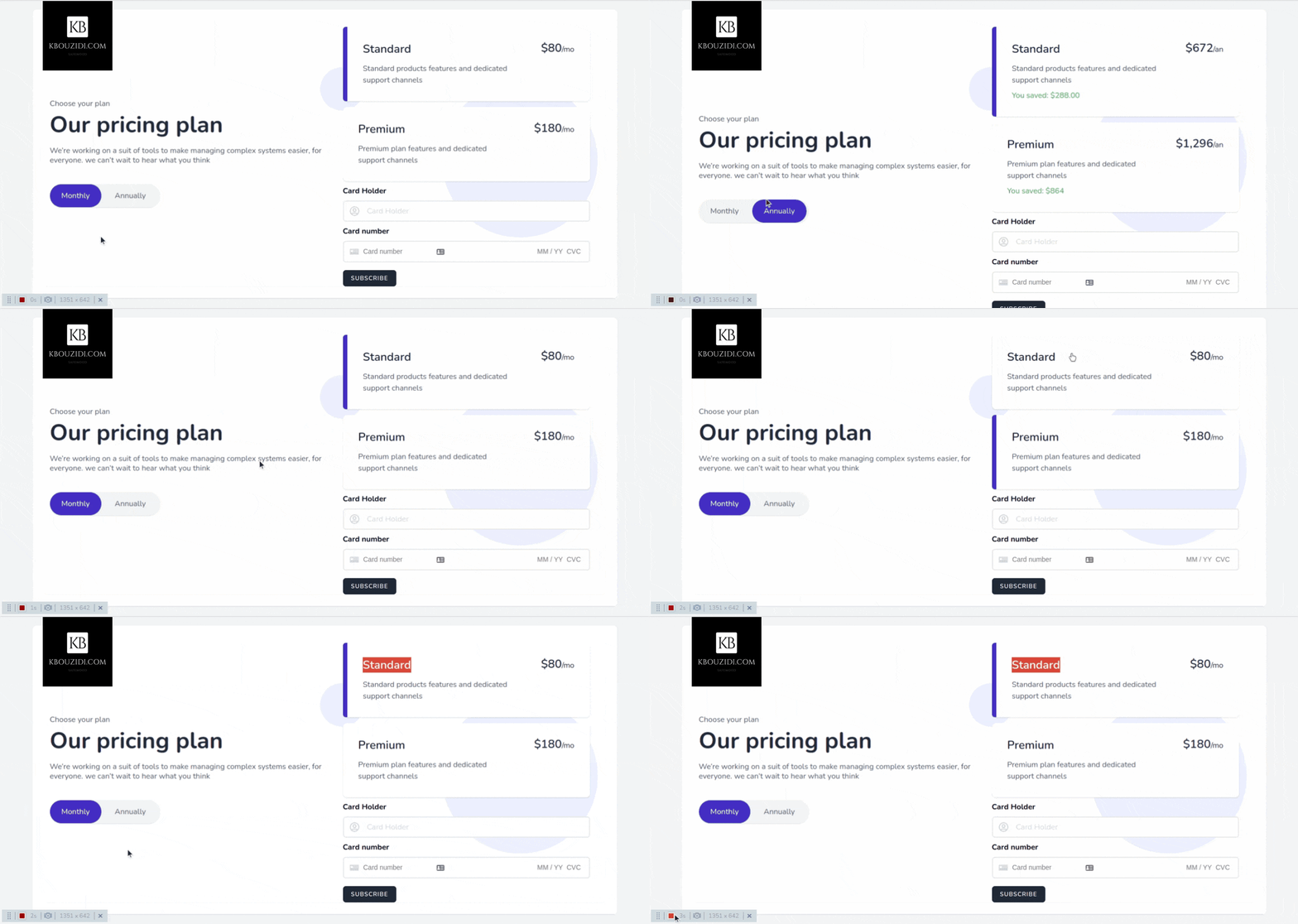
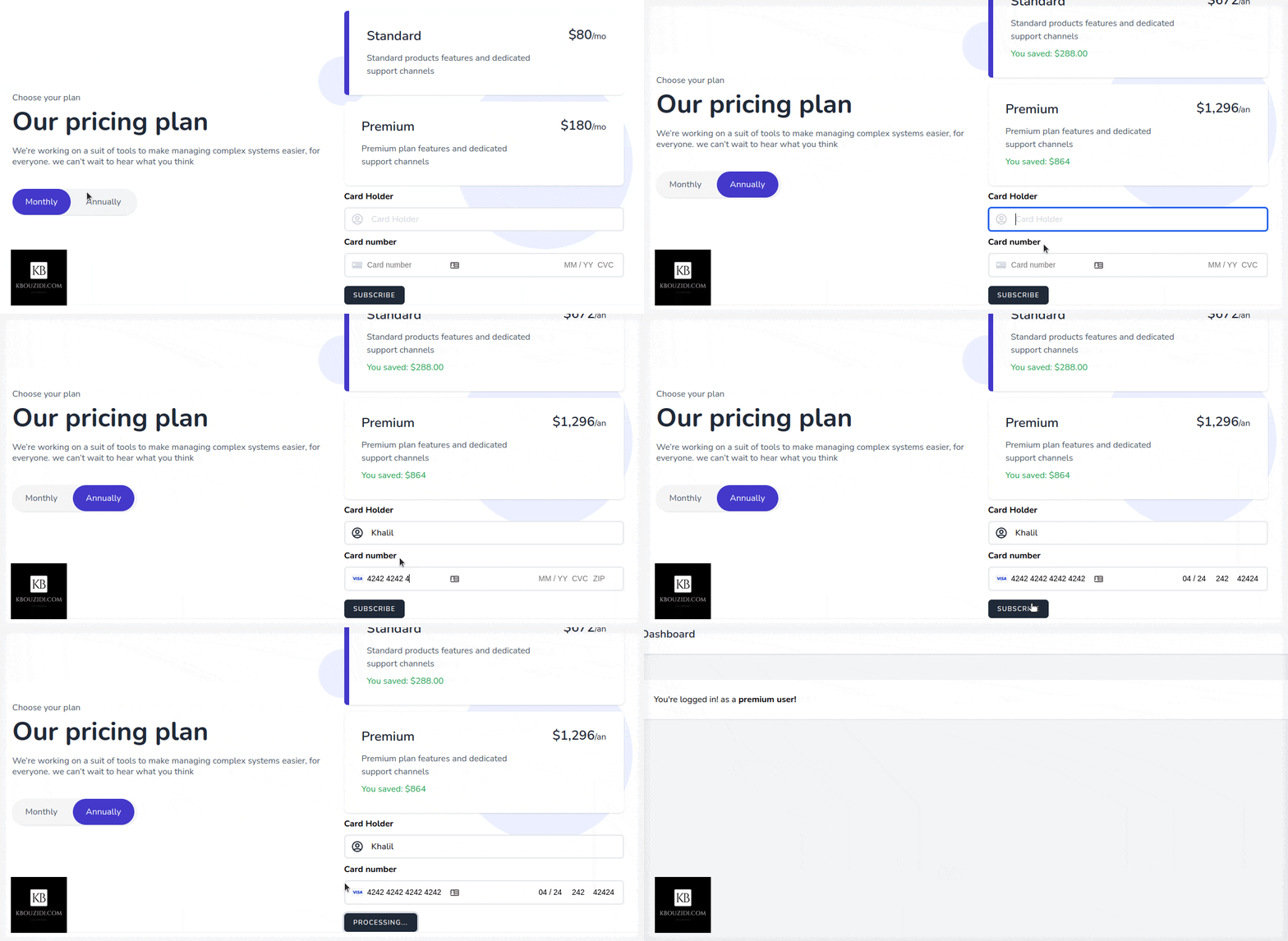
I did use this Tailwindcss snippet Template with a bit of AlpineJs magic 🪄 we got this.
When the button is clicked we will call the subscribe method which will use the stripe SDK to call the confirmCardSetup method with the clientSecret as an argument so we can check the card information without they hit our server 🔒.
Stripe will then return a setupIntent if the card is valid, then we will be able to access the user payment_method id that we will send to our back-end to charge the customer.
After the post request to the subscribe route, we will trigger location.reload() to redirect the user to the appropriate section with the help of the isSubscribed middleware.
Last Part: Add Features
We have two features, standard users can manage tasks and premium users can manage tasks and events.
Now you can check if the user has that permission or not you can also use policies to have more control: like limiting standard users to create a certain number of tasks like 3 or 5 or whatever you got the idea 😉.