Let’s Encrypt takes free “wildcard” certificates live

Enlarge /

Now everyone can have this in front of all the sites in their domain with one step, for free.

In July of 2017, the nonprofit certificate authority Let’s Encrypt promised to deliver something that would put secure websites and Web applications within reach of any Internet user: free “wildcard” certificates to enable secure HTTP connections for entire domains. Today, Let’s Encrypt took that promised service live, in addition to a new version of the Automated Certificate Management Environment (ACME) protocol, an interface that can be used by a variety of client software packages to automate verification of certificate requests.

ACME version 2 “has gone through the IETF standards process,” said Josh Aas, executive director of the Internet Security Research Group (ISRG), the group behind Let’s Encrypt, in a blog post on the release. ACME v2 is currently a draft Internet Engineering Task Force standard, so it may not yet be in its final form. But the current version is the result of significant feedback from the industry. And its use is required to obtain wildcard certificates.

In addition to the ACME v2 requirement, requests for wildcard certificates require the modification of a Domain Name Service “TXT” record to verify control over the domain—a similar method to that used by Google and other service providers to prove domain ownership. But much of this can be automated by hosting providers that provide DNS services. A single Let’s Encrypt account can request up to 300 wildcard certificates over a period of three hours, allowing a hosting provider to handle requests for customers who may not have shell access to their sites.

Many hosting providers already support the registration of Let’s Encrypt certificates to varying degrees. WordPress.com, Tumblr, and a few other blog platforms already directly support Let’s Encrypt certificate integration for users with custom domains. But Let’s Encrypt’s free certificate offering hasn’t been snapped up by some larger hosting providers—such as GoDaddy—who also sell SSL certificates to their customers.

via Ars Technica
Let’s Encrypt takes free “wildcard” certificates live

50 Engineers Spent Six Months Designing a Fidget Spinner That Set a New World Record

GIF

Just when you thought that the fidget spinner fad had gone the way of the dodo bird, hoverboards, and 3D TVs, a Japanese company, MinebeaMitsumi Inc., known for manufacturing electronic components, and Mitsubishi, used 50 engineers to design and build a near-flawless fidget spinner over a six-month period that eventually set a new Guinness World Record.

Spun by hand and balanced on a single finger, it was one of MinebeaMitsumi Inc.’s employees, Takayuki Ishikawa, who set the new fidget spinner world record with an astonishing spin time of 24 minutes and 46.34 seconds. That might not seem impressive when other world records include people juggling for 12 hours straight, but try holding your finger out, perfectly still, for almost half an hour, and you’ll soon understand why it might be a while before this record falls.

[YouTube via The Kid Should See This]

via Gizmodo
50 Engineers Spent Six Months Designing a Fidget Spinner That Set a New World Record

Mark Hamill on Skywalker disagreements, fear of starring in a new Star Wars film

AUSTIN, Texas—Following the world premiere of The Director and The Jedi, a comprehensive two-hour documentary about the making of the latest Star Wars film, South By Southwest Film Festival attendees got a Last Jedi double-whammy. After the curtain raised at the Paramount Theater, director Rian Johnson and actor Mark Hamill took the stage for an impromptu Q&A.

Hamill, unsurprisingly, opted for jokes and openness in his answers, and, in particular, he offered his most robust comments yet about that spicy bit of news ahead of Episode VIII‘s launch: that he didn’t much care for how the character of Luke Skywalker had been written.

“A house I didn’t recognize”

The topic bubbled up with a question about Star Wars’ mythical and heroic scope as a long-running series, and Hamill explained how he prepared for the role: “When you get down to it, it’s not Mark Hamill in a blockbuster film. It’s Luke. I had to do a wild reimagining of the character. Like, hey, what happened between the last one and this one, where the most hopeful man in the galaxy becomes a cranky old suicidal man telling people to get off his lawn?

“Here I am going home again,” he later added, “but it was a house I didn’t recognize at all.”

Another fan pressed Hamill about this and about the brief mentions of disagreements between Hamill and Johnson during the film’s production, at which he opened up widely.

“It’s not distaste at all,” Hamill said, partially quoting the question. “It just wasn’t a Luke I understood.” He described “backstories” that he had to invent for himself, including how Luke, in mentoring Kylo Ren, “picked the new Hitler to be the next hope” and “how I justified cutting off my telepathic communication with my sister.” He even had a conversation with Johnson about the fact that Episode VII ended with Luke wearing Jedi robes. “What do we say about that? To make sure there was a flow.”

“I’m in black. I have a glove. I see a trend here.”

“In the context of how this has all been framed, you have to snap your head back and remember that with every single movie, with characters, it’s always a dialogue between the director and actors,” Johnson added. “That’s a healthy thing. You always butt heads with actors.”

The same fan asked a follow-up question: how, Mr. Hamill, would you have written the plot if you could have? (Johnson immediately interjected and drew a huge laugh from the audience: “I wanna hear this. What would you do, motherfucker?”)

Hamill admitted that he had “lots of really terrible ideas” for Episode VIII, at which point he shifted the question with an interesting tidbit: he had similar beef with George Lucas and Return of the Jedi‘s plot before that began filming. “I read [the script for] Jedi and thought, ‘Wait a sec! I thought I was heading toward the struggle of heading to the Dark Side. I’m in black. I have a glove. I see a trend here.'”

After offering a cooking analogy about actors and directors, Hamill expressed a rare bit of regret, which he explained by way of his own Star Wars fandom.

via Ars Technica
Mark Hamill on Skywalker disagreements, fear of starring in a new Star Wars film

dbdeployer release candidate

The latest release of dbdeployer is possibly the last one with a leading 0. If no serious bugs are found in the next two weeks, the next release will bear a glorious 1.0.

Latest news

The decision to get out of the stream of pre-releases that were published until now comes because I have implemented all the features that I wanted to add: mainly, all the ones that I wished to add to MySQL-Sandbox but it would have been too hard:

The latest addition is the ability of running multi-source topologies. Now we can run four topologies:

  • master-slave is the default topology. It will install one master and two slaves. More slaves can be added with the option --nodes.
  • group will deploy three peer nodes in group replication. If you want to use a single primary deployment, add the option --single-primary. Available for MySQL 5.7 and later.
  • fan-in is the opposite of master-slave. Here we have one slave and several masters. This topology requires MySQL 5.7 or higher.
    all-masters is a special case of fan-in, where all nodes are masters and are also slaves of all nodes.

It is possible to tune the flow of data in multi-source topologies. The default for fan-in is three nodes, where 1 and 2 are masters, and 2 are slaves. You can change the predefined settings by providing the list of components:

$ dbdeployer deploy replication \
--topology=fan-in \
--nodes=5 \
--master-list="1 2 3" \
--slave-list="4 5" \
8.0.4 \
--concurrent

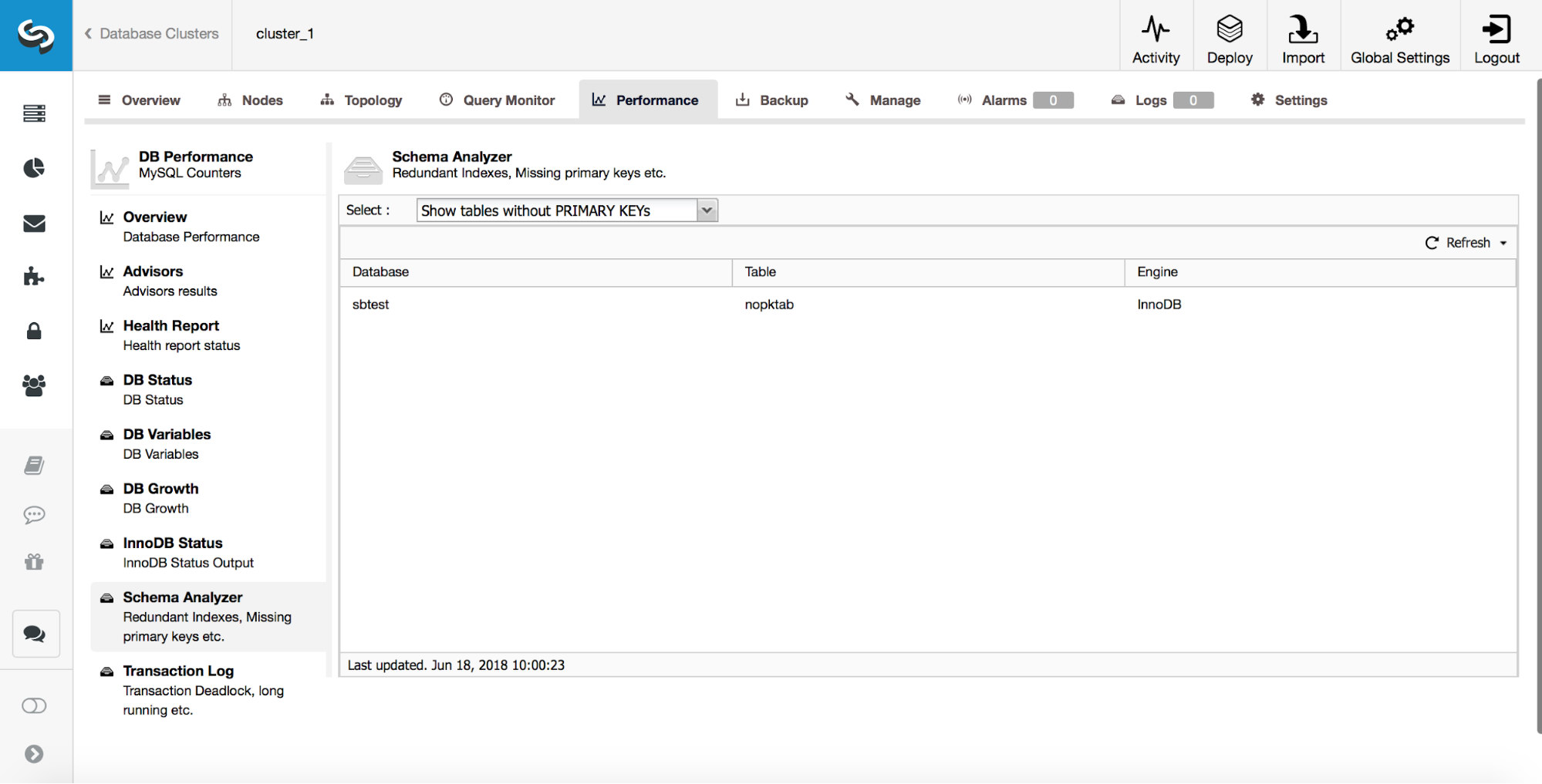
In the above example, we get 5 nodes instead of 3. The first three are master (--master-list="1 2 3") and the last two are slaves (--slave-list="4 5") which will receive data from all the masters. There is a test automatically generated to test replication flow. In our case it shows the following:

$ ~/sandboxes/fan_in_msb_8_0_4/test_replication
# master 1
# master 2
# master 3
# slave 4
ok - '3' == '3' - Slaves received tables from all masters
# slave 5
ok - '3' == '3' - Slaves received tables from all masters
# pass: 2
# fail: 0

The first three lines show that each master has done something. In our case, each master has created a different table. Slaves in nodes 5 and 6 then count how many tables they found, and if they got the tables from all masters, the test succeeds.
Note that for all-masters topology there is no need to specify master-list or slave-list. In fact, those lists will be auto-generated, and they will both include all deployed nodes.

What now?

Once I make sure that the current features are reasonably safe (I will only write more tests for the next 10~15 days) I will publish the first (non-pre) release of dbdeployer. From that moment, I’d like to follow the recommendations of the Semantic Versioning:

  • The initial version will be 1.0.0 (major, minor, revision);
  • The spects for 1.0 will be the API that needs to be maintained.
  • Bug fixes will increment the revision counter.
  • New features that don’t break compatibility with the API will increment the minor counter;
  • New features or changes that break compatibility will trigger a major counter increment.

Using this method will give users a better idea of what to expect. If we get a revision number increase, it is only bug fixes. An increase in the minor counter means that there are new features, but all previous features work as before. An increase in the major counter means that something will break, either because of changed interface or because of changed behavior.
In practice, the tests released with 1.0.0 should run with any 1.x subsequent version. When those tests need changes to run correctly, we will need to bump up the major version.

Let’s see if this method is sustainable. So far, I haven’t had need to do behavioural changes, which are usually provoked by new versions of MySQL that introduce incompatible behavior (definitely MySQL does not follow the Semantic Versioning principles.) When the next version becomes available, I will see if this RC of dbdeployer can stand its ground.

via The Data Charmer
dbdeployer release candidate

The case for boosting enterprise software startups with services


One of the truisms of software business strategy is that services is bad business; heck, we’ve also said it. The reason, put bluntly, is that it’s a business with low margins and is not as scalable. So in the early days of bringing to market a complex enterprise software product, the repeated feedback I got from nearly all my advisors was to make sure customers were paying for software licenses, not services. (Although I remember when receiving this advice in the early days of Nicira that I wished I even had the problem of money coming in the “wrong” way in the first place — wow, look at all this cash; if ONLY my margins were better and I could scale faster!)

Now, it’s certainly good advice as a company matures: limiting non-recurring revenue from services means better margins/ unit economics, a more scalable business, and so on. And even in an earlier stage company (that’s pre-product-market fit or in a pre-chasm market), the advice is still a sound warning — because unless someone is actually buyingthe product, you don’t actually know if you have the right minimum viable product (MVP) to sell in the first place. In this context, services can be startup speak for “I’m doing custom engineering per customer because I don’t yet have a product more than one customer wants”.

Yet the reasons for this advice are far more nuanced than appears on the surface, and I’d argue that for a company that’s in a pre-chasm market — particularly one with a complex product that touches sensitive infrastructure — leaning in to services can also be a good thing for the business. Because services are a well-established path to helping a deployment be successful and helping your startup become a strategic advisor to the target customer. Being in that support flow and having that position are both crucial aspects of getting an early go-to-market engine going.

Here’s more on why enterprise startups should not dismiss services so quickly, particularly in pre-chasm markets…

  • Services are an account control leverage point. Often when doing enterprise sales, the initial sale is for just a few seats (individual licensees within an organization), and the hope is to “land and expand” that over time. Having a strong solutions architect work with the customer to help integrate and run the product positions you as a strategic advisor, especially if you’re the one helping define the value of the product to the company in the first place. More importantly, it provides you direct visibility into their context and culture that helps control and frame the conversation when it’s time to expand or upsell. Most enterprise startups are competing against large incumbents who almost certainly have a sizeable service arm, and that are likely directing the customer away from your product (Cisco’s services business alone is $12B annually!). So it’s fair to assume that organization will have someone close to the buyer with the ability to de-position your startup once you start to pose a threat. In such situations, having your own employees deeply engaged in the account is a good leverage point for re-asserting control.


  • Services help ensure a new product works. For a fledgling startup still figuring out product-market fit — let alone how their product works “in the wild” — a problematic early deployment would be a terrible setback in terms of customer credibility (not to mention internal morale for your startup). But besides obvious bugs or downtimes, issues are most often caused by user error or misconfigurations. Having someone inside via services, with their finger on the pulse of the deployment, can immediately help troubleshoot and detect the problem — a good solutions architect can often identify and rectify a bug before there is any impact. That person or account support team can also be a local knowledgeable resource for the company’s engineering organization to work with to figure out the issue and fix the situation before it escalates any further, giving advocates from the inside more reason to believe in the product and continue championing it.


  • Service dollars are a great way to get channel partners involved. In enterprise sales, a lot of distribution and purchasing is done via a third-party ecosystem of channel partners. However, it’s hard for a pre-chasm startup to bootstrap this partner ecosystem; without an existing market draw, it’s hard to incent those channel partners to put in the work (pitching, educating, hiring the right sales force). Yet without the channel it’s hard to get leverage in sales and services as you scale. So a successful approach I’ve seen is for a startup to build a material services business, and over time, as more customers bite on the core software product business, to then offload the services business to the channel. Service revenue is often far more attractive to channel partners than software license revenue anyway. And if there are real dollars at play, those channel partners will be far more incented to dedicate the necessary resources, prioritize your product in their offerings, and look past conflicts with more entrenched competitors. In this way services are a vector to engaging the channel without keeping it as a burden; the services business should not be an albatross around your neck later — the key is to use it to draw and entice your partner ecosystem, but then offload it at the right time.
  • Service dollars reveal the true price the market is willing to pay for license. I’ve seen this play out multiple times in early sales: Annual contract value (ACV) per account — which measures the value of the contract over a 12-month period — is very high, indicating customers are willing to pay you more on average for your product over time. But each account — especially if you’re giving away tons of services or they’re buying into short contracts (or contracts with the option to discontinue without penalty) — is effectively getting unlimited, free attention, from integration to operations. What’s often really going on is that the startup is offering free services in exchange for a smaller discount on license. There is no free lunch: In reality, those free services are hitting the startup’s balance sheet, thus impacting overall margins. And when the startup eventually does ask for the “fully loaded” price of the license, they lose leverage and may see a decrease in ACV. Since young startups can use all the pricing leverage they can get, offering services can actually be a good practice to help set license pricing high in the early days. However, it’s also important to be realistic about what’s going on with respect to future roadmap and pricing planning.

Now comes the hard part… How do you know when you have the just-right amount or timing of services, or that it’s an albatross around your company’s neck dragging down your unit economics and preventing you from scaling the business as you grow? When are you doing too much — or that it is too late to do services?

Here’s the thing: Customers often WANT to pay for services. Enterprise buyers know what it means to adopt technology from a startup and are realistic about product maturity; they understand that there will be integration time as well as educational and operational hurdles. If you’ve made the case that your product is core to their strategy, and they are engaging with you, then it’s likely they’re deeply motivated to make absorbing your product into their enterprise successful. One of the very few actions the customer can take to de-risk the effort is to throw money at services. I’ve been in multiple situations where companies effectively demanded services precisely because they were keen on investing in the new product’s success.

So services are a good way for startups to engage with targets. The reality is that with most complex software products, you’re going to have to do the work anyway, and you might as well also collect services revenue to raise your top line and provide the business (and channel partners) more incentive to lean into the product. But this is where the truisms about services on the surface are also, well, true — relying on services can be risky and even be a fatal distraction. How can you tell the difference between a good services scenario and a bad one?

There are some pitfalls to be aware of, that can help avoid going down a fatal path:

  • Services dollars are not necessarily a signal for product-market fit. As I’ve mentioned before, companies are highly motivated to pay a lot (at least to a startup) for services simply to learn about a technology area or as an expected later stage in the sales process. But service dollars do not necessarily translate to product dollars down the line. Even if services can be a useful leverage point to expand or upsell the customer account over time, there is no direct correlation between services and product dollars. So beware.


  • Watch out for the line between solutions integration and engineering. I would be very careful before extending services to include engineering work, because the most limited (and arguably most valuable) resource a software company has in its early days is the R&D organization/ engineering department. Anything that distracts it from a dead run towards an MVP is jeopardizing the entire business. So build a services organization, not a contract engineering organization. And by that I mean: don’t let services dollars dictate what your product engineers do; that should still be dictated by the entrepeneur’s vision and all the signals you’re getting around product-market fit. But it’s all too common that a startup wooed by the particular needs of a single or few large clients encumbers themselves with one-off development work — losing sight of the big picture and bigger market they’re going for — and is therefore unable to respond when the market shifts or the competitive environment heats up.


  • Building a profitable services organization is not the point. For the companies that do lean into services, I find they often try and optimize too early and often at the cost of customer engagement. The point of this post is not that services are a good business. The point is that collecting service dollars can help with customer engagement. Often I see entrepreneurs obsess about margins in the services business, justifying that to limit customer engagement, even though the company broadly is burning cash. Once you have a mature business with predictable growth and positive unit economics, you can start to worry about services margin if you plan to keep the business. Know why and when and how you’re doing it, and don’t build a services organization by accident.

Of course, many startups today do have a small services business. The standard advice is to keep services to less than 20% of total revenue. While that works for some products selling to some verticals, I’ve seen many successful enterprise products have services that accounted for over 40% of revenue early on.

As always, my point here is not to give formulaic, one-size-fits-all advice. If you can get by without the operational pressure of building out a services organization, that’s great. Less complex products — or those that don’t drastically change costumer behavior — can for sure get by with relatively little services. But that blanket advice doesn’t fit every startup. So if you’re in a place where more services would help, I’d think seriously about being more aggressive with them… as long as you’re being disciplined about how you do it, and when to stop. I certainly won’t judge you; heck, I may even view it as an asset when implemented at the right time and with the right strategic planning mindset behind it.

Featured Image: Blend Images/Shutterstock

via TechCrunch
The case for boosting enterprise software startups with services

How Atlassian moved Jira and Confluence users to Amazon Web Services, and what it learned along the way

A sample Jira screen. (Atlassian Image)

If your business is built around servicing software developers who know exactly what state-of-the-art tools should be capable of doing, at a certain point it’s time to bite the bullet and modernize your infrastructure.

Atlassian just completed a two-year-long migration to Amazon Web Services after hitting scaling issues with its old hosted approach, created and developed before the public cloud was a viable option for larger companies. Users of Atlassian’s Jira bug-management tool and Confluence, its collaboration software product, used to have their applications run on their own dedicated virtual machine on a server in Atlassian’s data centers, but around 2014 that system started to break down, said Mike Tria, head of infrastructure for the Sydney, Australia-based company, in a recent interview.

About 70 percent of Atlassian’s customers were running its software on Atlassian-hosted infrastructure (the rest ran it on their own servers), and as those numbers grew, Atlassian’s infrastructure began to strain under the weight of thousands of servers and tens of thousands of virtual machines, Tria said. Atlassian’s original hosted product was set up as a single-tenant service, which meant that each customer got a dedicated server for their instance of the software.

Mike Tria, head of infrastructure, Atlassian (Atlassian Photo)

That was standard practice back in 2010 when Atlassian first set up this system, but growing pains and the benefits of multitenant architectures have steadily changed the thinking around how to provision applications across big distributed systems. Public clouds are multitenant, which means that different customers can share the same servers in the name of efficiency.

So around the time Atlassian decided it needed to embrace the benefits of the public cloud in 2013 and 2014 (“we had to replace disks all the time,” Tria said) it also decided to rewrite Jira and Confluence in cloud-native fashion to take advantage of multitenancy and microservices, rather than simply “lifting and shifting” that code into AWS.

This required the company to develop several tools along the way in order to make sure customer data would not mix on a multitenant cloud, which is the base fear of any CIO thinking about a move to cloud computing. Atlassian hopes to release some of those tools as open-source projects in the coming months.

“(The migration) is definitely the largest engineering project that we’ve ever done,” Tria said.

Atlassian evaluated other cloud providers, including Microsoft Azure and Google Cloud Platform, but when it was first planning the project in 2013 felt AWS offered the most proven platform. The company was also drawn by the breadth of services offered by AWS; of the nearly 100 separate services offered by AWS, Atlassian is using all of them but three, Tria said.

The company completed the migration of its cloud customers from its own infrastructure to AWS in December, and in most cases the end user of that software had no idea, he said. That’s not to say, however, that everything went smoothly.

Under the old system, customers who wanted to search for something specific across all of their bug filing and tracking systems had to re-index all that data with every query, which took a lot of time. So Atlassian decided that it would move from a search-engine style interface for those queries to the Postgres database, which would be much faster.

However, there was a catch: Postgres queries returned different answers than the old system, which threw the team into a frenzy trying to figure out how to replicate the old results under the new system. “We probably had 30 or 40 developers banging away on keyboards just trying to get it done,” Tria said.

As it turned out, however, the Postgres queries actually produced better results than the old system. Still, it took quite a bit of time to realize that, and in not wanting “to replace their reindexing pain with other pain, it took longer than we had thought,” he said.

Atlassian was also forced to discard years’ worth of tricks and tactics for squeezing performance out of a single-tenant architecture with the move to a multitenant architecture, he said. Luckily, some of other products in the Atlassian family, such as Trello and Bitbucket, were built for the cloud era and were able to share some of their knowledge with the Jira and Confluence teams, Tria said.

And just last week, the company got a rude lesson in the benefits of redundancy — an issue it thought it had tackled with this move — last week thanks to what Tria called a “black-swan event” that he said took out all the availability zones in the U.S. East region run by AWS. Atlassian thought it had planned for such an event by using multiple availability zones for its networking connections to AWS, but it was one of the more prominent companies affected by last week’s weather-related outage, which also took out a fair amount of Capital One’s services as well as Amazon’s own Alexa service.

However, that incident is still an advertisement for the public cloud, Tria said, because it would have taken Atlassian far longer to recover from such an incident running a single-tenant infrastructure managed by its own people.

via GeekWire
How Atlassian moved Jira and Confluence users to Amazon Web Services, and what it learned along the way

Former Slave, 2-Time Olympian Becomes an Airman

By Air Force Airman Dillon Parker
Joint Base San Antonio-Lackland

Gour Maker
Gour Maker, a trainee at basic military training, receives an “Airman’s Coin” at the Coin Ceremony Feb. 1, 2018 outside the Pfingston Reception Center at Joint Base San Antonio-Lackland, Texas. Maker was recognized by his wingmen as a selfless leader and motivator during his time at BMT.
(Click photo for screen-resolution image);high-resolution image available.

JOINT BASE SAN ANTONIO-LACKLAND, Texas –-(Ammoland.com)- After enduring countless hardships and overcoming unimaginable obstacles, Air Force Airman 1st Class Guor Maker found his way out of war-torn South Sudan and into the U.S. nearly 20 years ago.

As one of roughly 20,000 children uprooted by the gruesome second Sudanese civil war, Maker’s childhood was far from normal. After losing 28 family members, including eight of his nine siblings, 8-year-old Maker set out on foot from South Sudan to live with his uncle.

“The country I came from was torn apart by war,” said Maker, who is attending training here to become a dental assistant “It was all I knew growing up, nothing else. I’ve seen people die in front of me, but I knew no matter what, I had to make it.”

During his harrowing journey, he was captured and enslaved twice: once by Sudanese soldiers, and once by herdsmen.

“When I was captured, I was forced to be a slave laborer,” Maker said. “I would wash dishes or do anything else needed to get by. I slept in a small cell and rarely got to eat … but not always.”

Twice escaped from enslavement, he finally joined his uncle in Khartoum after three perilous years. However, Maker’s journey to safety was far from over.

During a nighttime attack on his uncle’s home, he was beaten unconscious by a soldier who smashed his jaw with a rifle.

“My mouth was shut for two months and I could only consume liquids because my jaw was broken,” said. “We fled to Egypt after that, and the United Nations treated my injuries.”

After two years of filling out paperwork at U.S. Citizenship and Immigration Services in Egypt, Maker and his uncle’s family were finally granted permission to enter the United States.

“I was very excited to come to the U.S.,” he said. “Looking back at everything my family and I endured, it is a miracle that we made it out of there.”

Dreaming

When Maker first arrived in the U.S. in 2001, he settled in Concord, New Hampshire. Not only did he want to survive, but he wanted to thrive.

“I wanted to change my life, help my parents back in South Sudan, and give my future children a better childhood than the one I had,” he said. “And the only way to do that was through education and determination.”

Maker started with the basics — learning English by watching children’s cartoons and spending plenty of time with other high school kids, listening to their conversations and absorbing all that he could.

“Within a short amount of time, I was able to communicate with effectively with other students and teachers, order food, and really get by on my own,” he said.

While learning English was a crucial step his personal journey, Maker’s high school career really took off when one of his teachers introduced him to running.

“Running was always just natural and easy for me,” he said. “It was a great high school experience and it helped me meet a lot of friends, build confidence and it was genuinely fun.”

After winning the National High School indoor two-mile title, Maker received a scholarship to compete at Iowa State University, where he allowed himself to dream of things that had never been done before.

“When I got to college in 2005, I remember hanging a piece of paper on my wall that said I was going to run in the Olympics in 2012 for South Sudan,” he said. “I thought ‘Why not me? Why can’t I do it?’”

Maker graduated with a bachelor’s degree in chemistry and reached All-American status as a . Ready to start his new life, Maker planned to head to Flagstaff, Arizona, to train for the 2012 Olympics.

The same day he left for Arizona in 2011 was the day South Sudan officially gained its independence.

“I drove the whole way celebrating and it was a very special day that I will always remember,” Maker said.

Stateless

Following his year of training, he qualified to run the marathon in the 2012 London Olympics.

Gour Maker Training
Gour Maker, a trainee at basic military training, completes the one and a half mile run portion of the Air Force physical fitness test Jan. 30, 2018 at the 324th Training Squadron’s physical training pad at Join Base San Antonio-Lackland, Texas. Maker finished his run with a time of 7 minutes 31 seconds, earning the top fitness score for males in his graduating class.

Even though South Sudan was officially an independent nation, it was not yet a member of the International Olympic Committee, and Maker was not yet a U.S. citizen.

“State senators from New Hampshire and Arizona presented my case to the Senate in Washington, D.C., so the International Olympic Committee allowed me to run in the Olympics without a country,” he said.

Even though his dream of running for South Sudan went unrealized in 2012, Maker accomplished a great deal as an unaffiliated Olympian.

“All of the people in South Sudan knew where I was from,” he said. “I wanted to be the inspiration for the children to say, ‘Hey, if Maker can do it, you know what, I can do it too.’”

After the 2012 Olympics, Maker was undeterred and set a new goal for himself and his country.

“I said to myself, ‘In 2016, I’m going to bring South Sudan to the Olympics for the first time,’” he said. “I wanted to try to do more for my country and the 2012 Olympics only strengthened my conviction to accomplish my goal.”

Maker’s dream became a reality in Rio de when he was one of three athletes to represent South Sudan in the 2016 Olympics. He also served as South Sudan’s flag bearer for the opening ceremony.

“Walking into that stadium, carrying the South Sudan flag was just indescribable,” he said. “The people of South Sudan were in my mind the whole time I was running into the stadium with that flag and it meant so much to me.”

While it was a truly incredible and improbable moment for Maker, his thoughts were filled with the people of his home country while he was running with that flag.

“Over 50 years of civil war and my country finally got independence,” he said. “So many lives were lost for our freedom, it was just ringing in my head that we have done it, we have done it. On that day, everyone in South Sudan was at peace watching the Olympics for the first time.”

The 2016 Olympics were an enormous accomplishment for the former slave and South Sudan native that went far beyond his 82nd overall finish in the marathon.

“I couldn’t have accomplished any of it without all the support I received from my family and the opportunity the United States gave me. It’s the highlight of my athletic career so far and a moment I’ll treasure forever,” he said.

Serving

The next chapter in Maker’s life began when he decided to join the Air Force to serve the country that gave him so many opportunities.

“All of the things I’ve accomplished have derived from the opportunities the U.S. has afforded me,” he said. “When I first came to America, I didn’t have hardly anything, but with the support and opportunity this country has given me, I’ve been able to completely change my life.”

The staff at basic military training had no idea who Maker was, but he quickly stood out to leaders at the 324th Training Squadron.

“I went out to the track and saw the instructors were putting their attention on one trainee in particular,” said Air Force Maj. John Lippolis, director of operations for the 324th TRS. “I could see him running noticeably faster than everyone else and the instructors explained to me that we had a two-time Olympian at [basic military training].”

In addition to Maker’s Olympian status, his unique personal story also stood out to Lippolis.

“I was just absolutely floored when I talked to him about what he went through to get to where he is today,” he said. “Not only did he get , he wanted to better himself and he has accomplished so much. He has an amazing story and the drive he has displayed to succeed like that in the face of such adversity is truly inspiring.”

Maker inspired not only but other members of his flight.

“All of his wingmen said the same things when I talked to them,” Lippolis said. “They told me what an inspiration he was the flight; that the flight rallied around him and he doesn’t do anything he’s supposed to do for himself until he helps out everybody else.

While Maker has accomplished a great deal in his lifetime, he’s not done dreaming. After he completes his training here, he hopes to join the Air Force World Class Athlete Program, a program designed to allow elite athletes to train and compete in national events to make the Olympics. He also wants to make the 2020 Olympics, where he’ll have the opportunity to represent his new home and the country that gave him so much.

“Joining the greatest Air Force in the world has been an absolute miracle,” Maker said. “I can’t wait to see what this next chapter holds for me.”

This post Former Slave, 2-Time Olympian Becomes an Airman appeared first on AmmoLand.com .

via AmmoLand.com
Former Slave, 2-Time Olympian Becomes an Airman

Comic for March 11, 2018

Transcript

Dilbert: What would you say are your biggest weaknesses? Man: I like to rifle through my coworkers’ desks when they aren’t looking. But I don’t steal anything unless I know I can frame someone else for the crime. I leave for work an hour late every day and blame traffic. I avoid accomplishing goals so I won’t feel like sellout. Sometimes I’ll start a trash fire just to get out of a meeting. And I’ve gotten every one of my bosses fired for things they didn’t say or do. Boss: Would he be a good fit? Dilbert: I like what he has to offer.

via Dilbert Daily Strip
Comic for March 11, 2018

The Best Multiport USB Wall Charger

For an impressive amount of power in a tiny package, we like Aukey’s 12W / 2.4A Home Travel USB Wall Charger Adapter with AIPower Tech. You get as much juice as you’d get with Apple’s iPad charger and an extra charging port, in a much smaller package—a scant 1.4 by 1.2 by 1.2 inches with its prongs folded in—for half the price. The Aukey is the smallest full-speed iPad/tablet charger we’ve found, and it’s a great travel companion for charging a tablet and phone overnight, for fast-charging two smartphones, or for just charging your phone and a Bluetooth headset or speakers. (It provides a total of 2.4 amps of current, which means it can fast-charge an iPad by itself; if you connect two tablets, or a tablet and a smartphone, those 2.4 amps will be split between them.)

ChargeTech’s Fast Charge Dual USB Wall Charger is essentially the same product as the Aukey 12W / 2.4A, above, but more expensive.

Zolt is a tiny (3.2 inches long, 1.3 inches in diameter, 3.7 ounces) travel charger with fold-out prongs and three USB-charging ports, one of which can provide up to 65 watts to your laptop when paired with the included proprietary cable and the appropriate charging head for your laptop. (The company includes eight connectors to work with most major laptop brands, including Dell, HP, and Lenovo; you can purchase a $20 MagSafe cable for use with older Apple laptops.) We tested the Zolt with three Mac laptops, and the only issue we saw was slow charging with the 15-inch 2015 MacBook Pro, which requires 85 watts to charge at full speed. As for USB charging, when testing with an iPad Air and an iPad Air 2, instead of charging at full speed (2.4 amps), each iPad drew about 2.1 amps. If space when traveling is truly at a premium, the Zolt is a neat accessory worthy of a look. But its $100 price ($120 if you need to buy the Mac cable) is too high for most people, especially considering that it doesn’t live up to all its promises. In addition, as of the July 2017 update to this guide, the Zolt website has gone dark, though the charger is still available on Amazon.

Tylt’s Energi 5-Port USB Charging Station is so much more expensive than our top charging picks that we have a really hard time recommending it despite its novelty. Four USB ports provide up to 2.4 amps each, as advertised. But what makes this one kind of cool is the inclusion of a 1-amp, 3,200-mAh battery pack that slides into the base station for charging—you just pop it out when you need portable power. (The 0.8 inch by 0.8 inch by 3.7 inch battery can also be charged via a Micro-USB cable on the go.) However, considering that similar-capacity batteries from reputable brands go for as little as $10, we don’t think the huge price premium for the setup is worth it.

We saw all sorts of weird readings with Photive’s 50-Watt 6-Port USB Desktop Rapid Charger on our power meters during testing.

Poweradd’s 50W 6-Port Family-Sized USB Desktop Charger didn’t live up to the company’s claims. It promises two 2.4-amp ports, two 2.1-amp ports, and two 1-amp ports, but in repeated tests, one of the 2.1-amp ports put out only about 0.5 amps.

A few chargers made it past the first round of testing but were dismissed based on their performance with multiple tablets. Choetech’s 50-Watt 6-Port Desktop Rapid USB Charger continuously reset the amperage meters we used when five or six iPads were connected, and we saw wild fluctuations in the charge rate to an iPad Air even with only four tablets plugged in.

iLuv’s RockWall 6 Compact 6 USB Port AC Charger worked fine when five iPads were connected. With the sixth plugged in, the current sometimes, but not always, fluctuated dramatically from 1 amp to 2.3 amps. We also saw the dreaded “This accessory may not be supported” message on the screen of some connected iPads. Though neither of these are absolute dealbreakers, our top picks didn’t exhibit such issues.

The Bolse 60W / 12-Amp 7-Port Fast Charging USB Wall / Desktop Charging Station With SmartIC Technology has more ports than any other unit we tested. Though we didn’t have seven iPads on hand to test, it turns out that we didn’t need to fill all seven ports to eliminate this one from contention. With only six iPads plugged in, our amperage meters continuously reset, likely because the charger itself was shutting down due to built-in protection circuitry. This one also one felt cheap in a number of ways—for example, it was sometimes difficult to insert USB plugs into the charger’s ports because of alignment/fit issues.

We also ruled out Griffin’s PowerDock 5, mainly because its ports are capable of putting out only 2.0 amps each rather than 2.4 amps. This is true even if only one iPad is plugged in—the ports are simply 2.0 amps each. The PowerDock 5’s thin plastic dividers also pop out of the base a bit too easily.

Kanex’s Sydnee has only four ports, and each of those puts out only 2.1 amps—pretty good, but not enough for power-hungry tablets to charge at full speed. And the design of its tablet-organization slots means those slots work only with naked tablets or ones in thin cases. The Signal model, our former recommendation, provides an additional port (and maximum output from each) for only a few dollars more.

In an earlier version of this guide, we picked Signal’s Power Station 5 High Performance Universal Charge Dock as our favorite organizational charging dock. It can hold and charge five 9.7-inch iPads at full speed simultaneously, and we liked its sturdy metal base and thick, rubber-covered dividers. However, though our review unit has functioned properly for nearly a year, Wirecutter readers and Amazon customers have had too many negative experiences for us to continue to recommend the dock. The most common issues include DOA units and individual ports (or the entire dock) dying within a few months of purchase.

We’ve been testing Griffin Technology’s Griffin Technology’s Cove, and although it’s an appealing idea, its high price ($130 as of this writing) makes it difficult to recommend for most people. The Cove is a plastic shell measuring 16.8 inches wide by 12.8 inches deep by 6.7 inches tall. Most of the body is white, but the top and the exterior of the fold-down front door are covered in a woodlike veneer (your choice of birch, walnut, or ebony). Inside are three shelves with openings to route charging cables that you connect to a five-port USB charger built into the top, slide-out shelf. (Only a power cable for the charger is included—you don’t get any device-charging cables.) Each port can provide 2.4 amps of current, and the front door can either close completely or sit slightly ajar to act as an angled tablet stand, using the door’s handle as a cradle. The shelves are covered in thick felt, and a drawer-like cubby in front of the charger ports offers a good place to stash your smartphone. The Cove keeps your devices organized and hidden while charging, though keeping the cables organized inside the Cove takes a bit of finagling. And despite the Cove’s sturdy looks, the top is largely unsupported—you can store a MacBook on top, but anything heavier (or similar in weight but not spread out over the top of the Cove) will cause the top to sag, which prevents its door from opening. If you’re seeking a way to keep all your devices hidden when charging, and you like the Cove’s design, take a look, but for the price, we’d like something sturdier and perhaps made with real wood.

Satechi’s 7-Port USB Charging Station Dock uses the same body as our organizational-charger pick, Skiva’s StandCharger, but only three of the Satechi model’s seven ports provide 2.4 amps of charging current; the other four offer only 1 amp each.

via Wirecutter: Reviews for the Real World
The Best Multiport USB Wall Charger

AR-15 Parts List: Building a Rifle? Start Here!

So you’re building an AR-15, or an AR-10, or an AR-47, or an AR-whatever.  

Awesome!

Building a rifle is one of the best things you can do to improve your knowledge as a shooter, and it means you end up with a rifle that’s uniquely yours.

custom ar-15
Building an AR let’s you create a rifle that’s uniquely yours.

What’s the most important thing to have when you’re building your rifle?

Bingo, your parts list!

Today, we’re going to talk about all the little parts and pieces you need to build an AR-15, where you can buy them, how to choose them, and the tools you’ll need to assemble everything.  

This should cover basically everything you need to build an AR of any caliber, except for the actual build process, which you can find here.

The actual parts you will need are:

Lower Parts List

  • Stripped Lower
  • Lower Parts Kit
  • Trigger (If not using parts kit trigger)
  • Buffer Kit  (Buffer, buffer tube, buffer spring)
  • Stock
  • Pistol Grip

Upper Parts List

  • Stripped or Assembled Upper
  • Forward Assist (If using a Stripped Upper)
  • Dust Cover (If using Stripped Upper)
  • Barrel
  • Handguard
  • Gas Tube
  • Gas Block
  • Bolt Carrier Group
  • Charging Handle
  • Muzzle Device

Tools Needed

  • Vice
  • Upper Vice Block
  • Lower Vice Block
  • Pin Punches
  • Armorer’s Wrench
  • Mallet
  • Utility Knife
  • Hex Key Set
  • C-Clamp or Roll Pin Pusher

Alright, if you just wanted to make sure you weren’t missing a part, you’re all done!  Good luck with your build, and make sure to let us know how it went in the comments below!

If you want a little more info about each of these parts, keep reading.

AR-15 Lower Parts List

  • Stripped Lower: You can get a stripped lower from a lot of different places, and there’s not going to be a huge amount of difference between the best one and an average one.  In general, buy from a brand you like, or buy one you like the rollmark on. This is going to be the heart of your build, so make sure you go with something you’ll like looking at a year from now.  If you aren’t sure, check out our list of best AR-15 lowers.
Editor’s Pick (Forged)
Aero Precision Lower

Aero Precision Lower

Prices accurate at time of writing

  • Lower Parts Kit: This contains all the springs and pins and detents and other hardware that will go into holding your lower together.  You can also get them with or without a trigger, depending on if you want a basic Mil-Spec-style trigger, or want something a little bit nicer.
  • Trigger: The quality of your barrel is going to have a huge effect on your accuracy, so it makes sense to spend a little money here, even if it means saving a little money elsewhere.  Check out our list of Best AR-15 Triggers if that’s something you’re interested in.
Geissele AR-15 Enhanced Triggers

Geissele AR-15 Enhanced Triggers

Prices accurate at time of writing

  • Buffer Kit: Your buffer system is what manages the recoil of your rifle and allows the rifle to cycle.  There’s a lot to be said about choosing a buffer weight, so be sure to check out this article on how to choose the proper buffer for your system.
  • Stock: MagPul or gtfo.  Just kidding. There’s about a million AR stock manufacturers out there, so just pick one you like the look of, or choose one that fits your purpose for the rifle, so a nice light stock like the standard MagPul MOE stock for a run-and-gun rifle, or  something like a PRS stock for a precision rifle.
  • Pistol Grip: Same deal as the stock, unless you’re doing a featureless build and need something to comply with your state’s gun laws (I’m looking at you California).
AR-15 with Magpul M-LOK handguard
AR-15 with Magpul M-LOK handguard and Magpul pistol grip and stock.

That does it for your lower parts.  Be sure to follow our AR-15 lower build guide if you want to make sure you’ve got all your parts in the right place, or just want to take a look at how we build our rifles.

AR-15 Upper Parts List

  • Stripped or Assembled Upper:  A “stripped” upper is just the upper.  An “assembled” upper comes with your forward assist and dust/ejection port cover.  A “complete” upper will include the barrel, handguard…well, everything.  Hence “complete”.  The final option is good if you don’t want to buy the tools to build an upper, or if you don’t want to mess with an upper at all and just want to slap something on a complete lower that works.  Also, people are going to tell you that building an upper is hard. Those people are wrong.  It’s easy, it’s safe (AR’s are self-headspacing for the most part, so you’re not going to accidentally build a hand grenade, and if you’re worried, you can get a No-Go or headspace gauge.  So, I recommend getting a stripped or assembled upper, the latter of which just comes with your ejection port and forward assist installed, and is what I’d suggest if you don’t want a fancy dust cover.   If you absolutely have to have your Punisher logo or whatever, get a stripped one.  All our suggestions here.
Aero M4E1 Enhanced Upper

Aero M4E1 Enhanced Upper

Prices accurate at time of writing

  • Forward Assist: I have…never, in my life, needed a forward assist on a rifle.  I know people with multiple tours of duty in very dry, sandy places who have never touched a forward assist outside of training.  I can count one one hand the number of times I’ve heard of people ever needing a forward assist.  Ostensibly, it’s on there if you need a little extra help getting a round seated in a dirty gun.  Realistically, especially if you’re cleaning your AR the way you should be, you’ll never need one, and I’d be fine running an upper that doesn’t have a slot for one.  You may feel differently, and that’s fine. I totally understand the “better to have it and not need it” mindset as well.  That’s the great thing about building your AR, you can get exactly what you want, not what some asshole on the internet (me) tells you to get.
  • Dust cover:  Your dust cover (also called an ejection port cover) goes over your ejection port to keep out dust.  Pretty self-explanatory. The only thing I’ll say is that you can get ones with cool designs, so if looking fashionable at the range is important to you, or you want to do a custom build around a theme, like this Storm Trooper build from IACoatings.com.
stormtrooper Iacoating
Not every rifle has to be a scurry black gun. It’s okay to have fun with it.
  • Barrel: Other than the trigger, your barrel is going to be the biggest factor impacting your accuracy and the overall performance of the rifle.  There are a lot of factors to think about when choosing a barrel like rifling twist, length, steel or fancy-shmancy carbon fiber, lining options, and more.  Be sure to check out our list of the best AR-15 barrels if you want to learn more about solid options, or how to choose a barrel for your build.
  • Handguard: Your handguard should reflect what you’re using the rifle for, and there are literally hundreds of options out there.  Pick one that suits your needs, and you’ll be all good. This is an area of intense personal preference, so pick something you’ll like.  Personally, I likes my rifles nice and light, so I usually go for minimalist options without all the rails and such. If you want to hang four flashlights and a coffee grinder on your gun, you’ll want the rails though, so again, pick something that fits your purpose.  Here’s our picks of the best AR-15 Handguards.
Aero Precision M4E1 with ATLAS Handguards
  • Gas Tube: It’s a tube that transports gas.  Really, there’s not much to say here other than to match the gas tube to your barrel’s system length (carbine, rifle, mid-length) and pick from a brand you trust.  Worst case, they’re like $20 unless you’re building a piston-based upper, so don’t stress too much over it.
  • Gas Block: This is another area where you have to pick your poison yourself.  You might be fine with a plain old gas block, you might be running a suppressor sometimes and need an adjustable gas block.  Get something that matches your purpose. I’d recommend an adjustable gas block for all rifles if you have the money though, as it’ll let you fine-tune your gas system to minimize recoil.  More functionality is almost always a good thing because it let’s you get a rifle that’s more suited to your specific needs and style.
Seekins

Seekins’ Adjustable Gas Block

Prices accurate at time of writing

  • Bolt Carrier Group: The BCG is the part that handles the actual firing and extraction of your rounds.  In general, what you want to think is “light and smooth”. The lighter your BCG is, the less recoil you’ll have, the less muzzle movement, the more accurate you can be, especially during rapid fire.  The smoother the BCG is, the more reliable and the more consistent your AR will be, and the well, smoother it will be to shoot. There are a number of coating options that’ll make your gun a little smoother, and there are a number of lightweight BCGS out there.  The BCG is one of the easiest parts to swap out, and indeed you’ll be pulling it out every time you clean your gun anyway, so it’s okay to cheap out at first if you want to get a basic gun built that you can upgrade later.  Check out our BCG guide for more info.
Brownells Lightweight Bolt Carrier Group Finished in Titanium Nitride
  • Charging Handle:  This is what you will use to chamber a round in your AR.  If you’re going with a basic build, go with a basic charging handle.  If not, go with something nicer. I will say, if you’re a leftie, or building a rifle for someone who is, or you just want a slightly more useable rifle, get yourself an ambidextrous handle.  If you just want a quick, high-quality recommendation, BCM’s Gunfighter handle is on all my rifles, and I love it.
BCM Charging Handle
BCM Charging Handle
  • Muzzle Device:  Compensators, Flash Hiders, Suppressors, Brakes, there’s all kinds of things you can slap on the end of your rifle, and they all have their benefits.  Check out our muzzle device guide  to figure out what you need for your build.
VG6 Gamma 556
VG6 Gamma 556


That does it for our upper parts, so check out our AR-15 upper build guide if you want to make sure you got all your parts in the right way.

AR-15 Build Tools Parts List

  • Vice:  Necessary for keeping everything stable while you’re hammering and punching and such.  I use a basic bench vise, but you can use whatever works for the space you’re in. You can also get by without one if you’re very, very, very careful, and creative.  I’ve seen people building rifles in caves using nothing but a box cutter, a screwdriver, and an old brick, but I wouldn’t recommend it.
  • Upper Vice Block: This let’s you safely and effectively hold your upper in place, which is especially important while you’re installing your barrel.  I use this DPMS block
  • Lower Vice Block: Less important than the upper block, still highly recommended if you want to make your life easier while building your rifle.  
  • Pin Punches:  Brass is recommended so you don’t mar your finish.  I like these.
Trigger Hammer Pin with Punch
  • C-Clamp:  Buy a cheap 3 Pack off Amazon and use them as needed to install your roll pins.
  • Roll-Pin Pusher/Drift Tool:  Not strictly necessary, still highly recommended if you’re going to be building multiple rifles. Makes roll-pin installation much easier
  • Armorer’s Wrench: Needed for tightening your barrel nut, delta ring, castle nut, etc.  They’re relatively cheap, and is also one of the only purpose-built tools you’ll need.  We recommend this guy.
AR-15 Armorer's Wrench
AR-15 Armorer’s Wrench
  • Utility Knife: A box cutter is the best way to install some of your detents, trust me.
  • Hex Key Set:  Needed for installing some handguards, as well as things like your gas block, and often your trigger guard.

That about does it for the tools you’ll need.  I’m sure there’s a million and one other things out there that you can use, and I’d love to here about tools that could make the job easier, or about the…creative ways you all have built your rifles, so let me know in the comments below.

How To Build One

We’ve got you covered here too!

And for more recommendations down to individual parts…check out our AR-15 Definitive Resource.

Parting Shots

That about does it for our parts list.  There’s probably something I’m forgetting so let me know in the comments below if I left something out, and let me know about any builds this helps you with.  I can also help you out if you have any questions about the parts we’ve talked about today.

What did you think of our parts list?  Did this help you with your build? Let me know in the comments!

The post AR-15 Parts List: Building a Rifle? Start Here! appeared first on Pew Pew Tactical.

via Pew Pew Tactical
AR-15 Parts List: Building a Rifle? Start Here!