https://backoffice.itpathsolutions.com/wp-content/uploads/2026/03/is-your-laravel-schema-ready-for-prime-time-find-out-in-minutes-with-dbstan.webp
You push your Laravel project to production. Everything works fine for weeks. Then suddenly, performance slows down, queries start lagging and debugging turns into a detective job.
After hours of digging, you discover the real issues:
- A foreign key column without an index
- A table with 35 columns
- Prices stored as integers
- A VARCHAR (255) column that never needed to be that wide
- Tables missing timestamps
None of these are dramatic bugs. But together, they quietly damage database performance, maintainability and scalability.
That’s exactly the kind of problem DBStan was built to solve.
Instead of discovering database issues months later, DBStan analyzes your schema in minutes and flags structural, performance and architectural problems before they become production incidents.
What Is DBStan?
DBStan is a Laravel database schema analyzer that performs a comprehensive read-only inspection of your MySQL database structure. It detects design issues, missing indexes, performance risks and schema inconsistencies automatically.
The package is developed by IT Path Solutions and designed for Laravel developers, database administrators and DevOps teams who want better visibility into their database structure.
Think of it like PHPStan for your database schema.
Instead of analyzing PHP code, it analyzes how your database tables, indexes and relationships are structured.
The tool runs a full Laravel database architecture analysis. It produces a categorized report to help developers improve schema quality.
Technical Requirements
| Component | Requirement |
| PHP | ^8.1 | ^8.2 | ^8.3 | ^8.4 |
| Laravel | ^9.0 | ^10.0 | ^11.0 | ^12.0 |
| Database | MySQL |
| Package Manager | Composer |
| Frontend Dashboard | Bootstrap 5.3.2 (CDN), Bootstrap Icons |
| License | MIT |
These requirements allow DBStan to work across modern Laravel projects without additional dependencies.
The Real Problem
Common Database Mistakes Developers Make
Even experienced developers unintentionally introduce database design issues during development.
Laravel migrations make database creation easy, but that convenience sometimes hides structural problems.
Here are a few common mistakes DBStan catches automatically.
Missing Indexes on Foreign Keys
A column like user_id without an index might work fine initially. But once your application grows, query performance starts to degrade.
Prices Stored as INT Instead of DECIMAL
Storing monetary values as integers often causes rounding problems and inconsistent calculations.
Tables Without Timestamps
Laravel relies heavily on created_at and updated_at. Missing timestamps reduces traceability and data tracking.
Overusing VARCHAR (255)
Many developers default to VARCHAR (255) for almost everything. In reality, most fields don’t need that much space.
Weak Foreign Key Rules
Foreign keys without cascading rules can leave orphaned data after deletions.
Missing Soft Deletes
Critical tables without deleted_at make recovery impossible. Accidentally removed data cannot be restored.
These kinds of schema design issues accumulate quietly over time.
A Laravel database analysis tool like DBStan scans your entire schema and surfaces these risks instantly.
How DBStan works Internally
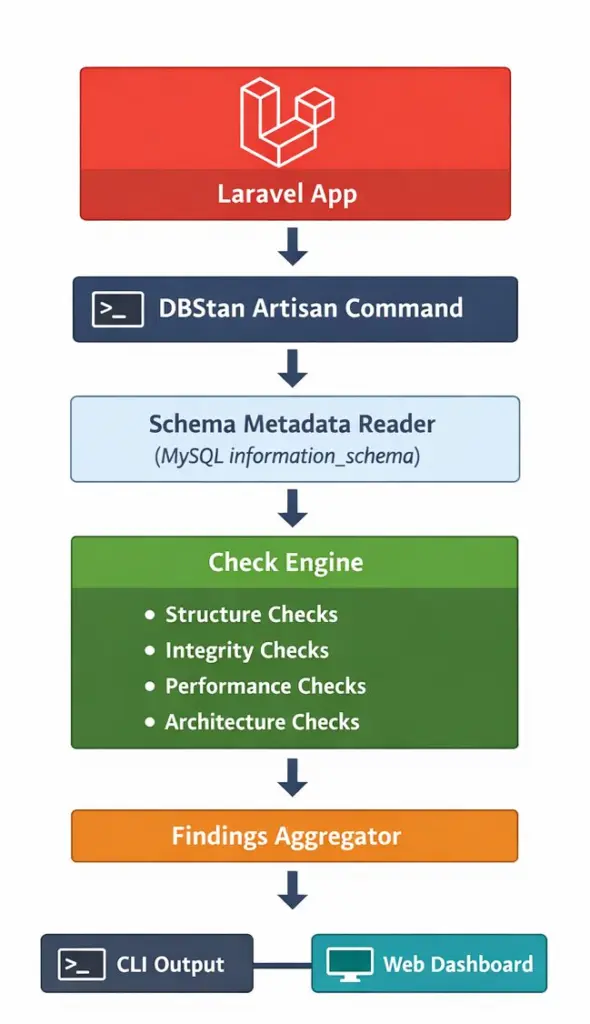
DBStan performs a read-only inspection of the database by querying MySQL metadata tables and Laravel’s database connection layer.
Internally, the analyzer collects schema information using:
- information_schema.tables
- information_schema.columns
- information_schema.statistics
- SHOW INDEX
- SHOW CREATE TABLE
This metadata is then passed through a set of modular rule checks that analyze:
- column types
- index coverage
- table width
- nullable ratios
- foreign key relationships
- storage size
Each rule produces a Finding object containing:
- severity
- description
- affected table
- suggested improvement
These findings are aggregated and displayed in two places:
This rule-based architecture makes DBStan easy to extend with custom checks.
How DBStan Helps
Four Categories of Database Checks
DBStan performs 26 automated checks grouped into four categories.
Instead of presenting raw database metadata, it translates technical issues into clear findings developers can act on.
1.Structure Checks
Is your table design clean?
Structure checks focus on table design, column types and schema conventions.
Examples include:
| Check Name | What It Detects | Severity |
| Too Many Columns | Tables exceeding max_columns (default 25) | WARNING |
| Wide Varchar Columns | VARCHAR columns wider than 190 | WARNING |
| Missing Timestamps | Tables missing created_at / updated_at | BEST PRACTICE |
| Missing Soft Deletes | Tables missing deleted_at column | BEST PRACTICE |
| Nullable Column Overuse | Columns marked nullable without justification | NULLABLE |
| Large TEXT Columns | Columns using TEXT type | PERF RISK |
| Data Type Appropriateness | “price” columns stored as INT not DECIMAL | DATA TYPE |
| Enum Overuse | Tables with >2 ENUM columns or ENUMs with >5 values | ENUM OVERUSE |
| Boolean Overuse | Tables with >4 boolean columns | ARCH WARNING |
| Pivot Table Structure | Pivot tables with unnecessary id or timestamps | PIVOT |
| Repeated Common Fields | Common field names across tables | REPEATED FIELD |
| Mixed Domain Columns | VARCHAR columns named “data”, “info”, “details” | DOMAIN MIX |
These checks help enforce Laravel schema best practices, ensuring tables remain readable and maintainable.
2. Integrity Checks
Is your data safe?
Integrity checks verify relationships, constraints and data consistency.
Examples include:
| Check | What It Detects | Severity |
| Foreign Key Naming | Columns like userid instead of user_id | NAMING |
| Duplicate Rows Risk | Tables without primary or unique keys | DATA INTEGRITY |
| Orphan Risk | _id columns without foreign key constraints | ORPHAN / HIGH RISK |
| Cascading Rules | Foreign keys using restrictive delete rules | INTEGRITY |
| Unique Constraint Violations | Duplicate values in email or slug columns | UNIQUE VIOLATION |
These issues often go unnoticed until real data inconsistencies appear.
A Laravel database schema analyzer like DBStan identifies them early.
3. Performance Checks
Will your database scale?
Performance issues rarely show up during development. They appear when real traffic hits your application.
DBStan includes several checks focused on database performance.
Examples include:
| Check | What It Detects | Severity |
| Missing Foreign Key Indexes | _id columns without indexes | ERROR |
| Large Table Size | Tables exceeding storage thresholds | SIZE ALERT |
| High NULL Ratio | Columns filled mostly with NULL values | DATA QUALITY |
| Status Column Indexing | Unindexed state or status columns | PERF |
| Log Table Indexing | Log tables missing indexes on created_at or user_id | PERFORMANCE |
| Unbounded Growth Risk | High-growth tables lacking indexing | GROWTH RISK |
These checks form the core of DBStan’s Laravel database performance analysis, helping developers identify scalability risks early.
4. Architecture Checks
Are you designing for the long term?
Beyond structural and performance checks, DBStan also evaluates architectural patterns.
Examples include:
| Check | What It Detects | Severity |
| JSON Column Overuse | Tables with too many JSON columns | WARNING |
| Audit Trail Check | Missing created_by, deleted_by or updated_by fields | AUDIT |
| Polymorphic Relation Overuse | Excessive polymorphic relationships | ARCH RISK |
These checks help teams evaluate long-term maintainability and overall schema architecture.
Installation and Quick Start
Getting started with DBStan takes less than two minutes.
Step 1 – Install the Package
composer require itpathsolutions/dbstan
Step 2 – Run the Analysis
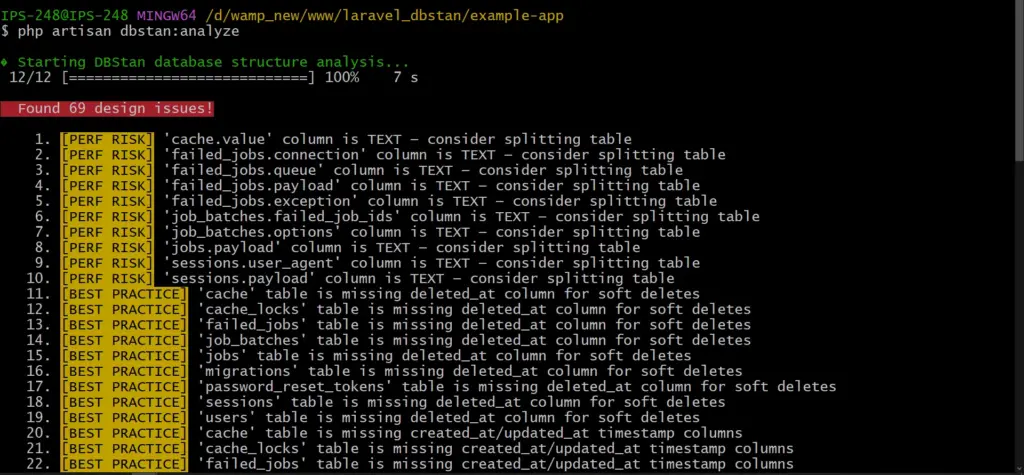
php artisan dbstan:analyze
DBStan scans your entire database schema and runs all enabled checks automatically.
Step 3 – Open the Web Dashboard
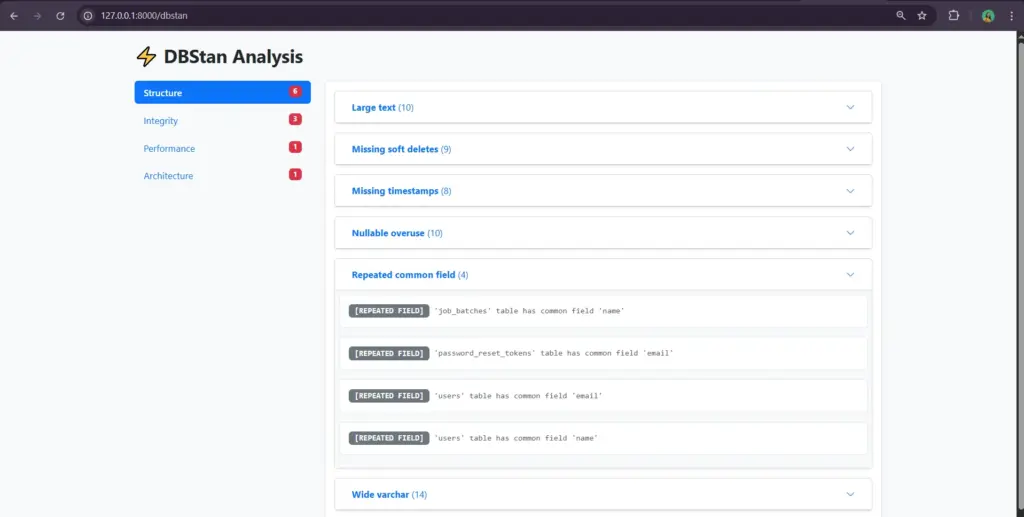
The dashboard provides a visual interface for exploring issues found during analysis.
What the Output looks like
DBStan prints a list of findings grouped by severity. This happens when you run the CLI command.
A typical report might look like this:
⚠️ WARNING – Table `orders` has 32 columns (exceeds limit of 25)
❌ ERROR – Column `user_id` in `posts` has no index
✅ BEST PRACTICE – Table `users` is missing `deleted_at`
All are categorized with a severity level. This helps developers know what to fix first.
Severity types include:
| Label | Meaning | Action |
| ERROR | Critical schema problem | Fix immediately |
| WARNING | Design concern or anti-pattern | Review and address |
| BEST PRACTICE | Improvement recommendation | Consider adopting |
| PERFORMANCE | Potential performance bottleneck | Add index or optimize |
| HIGH RISK | Data integrity at serious risk | Fix immediately |
| SIZE ALERT | Table storage exceeds threshold | Archive/partition/optimize |
| NAMING | Column naming convention violation | Rename column |
| AUDIT | Missing audit trail columns | Add audit columns |
This structured output turns raw schema inspection into actionable insight.
Web Dashboard for Visual Analysis
While the CLI command is useful for quick checks, DBStan also includes a web dashboard.
The dashboard is available only in local or staging environments, keeping production environments secure.
The interface includes:
- A left sidebar with category tabs
- Issue counts for each category
- Collapsible cards showing detailed findings
- A summary of schema problems
This makes DBStan useful not only for developers but also for teams reviewing database architecture together.
Securing the Dashboard
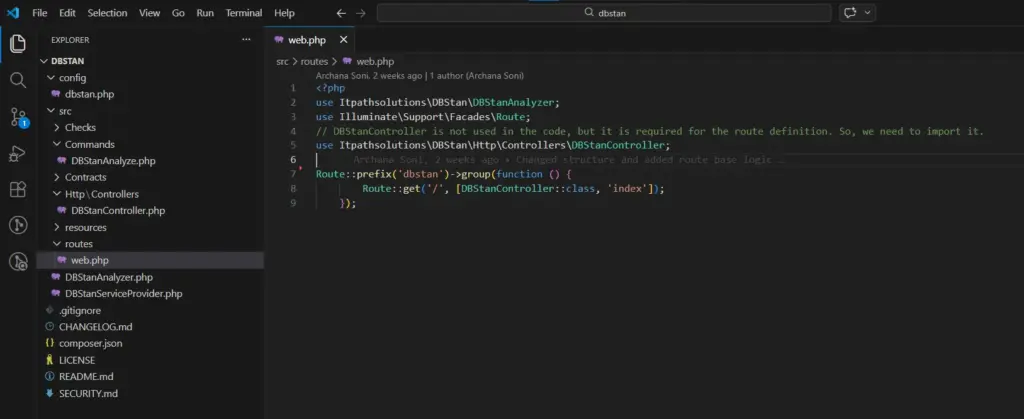
Because DBStan exposes schema information, the dashboard is intentionally restricted.
By default:
- The /dbstan route is disabled in production
- It works only in local or staging environments
For staging environments, you can add additional protection such as:
- authentication middleware
- IP whitelisting
- admin-only access
These safeguards prevent schema information from being exposed publicly.
Configurable for your Project
Every Laravel project has different database needs.
DBStan includes a configuration file that allows developers to customize thresholds and checks.
You can publish the configuration file using:
php artisan vendor:publish –tag=dbstan-config
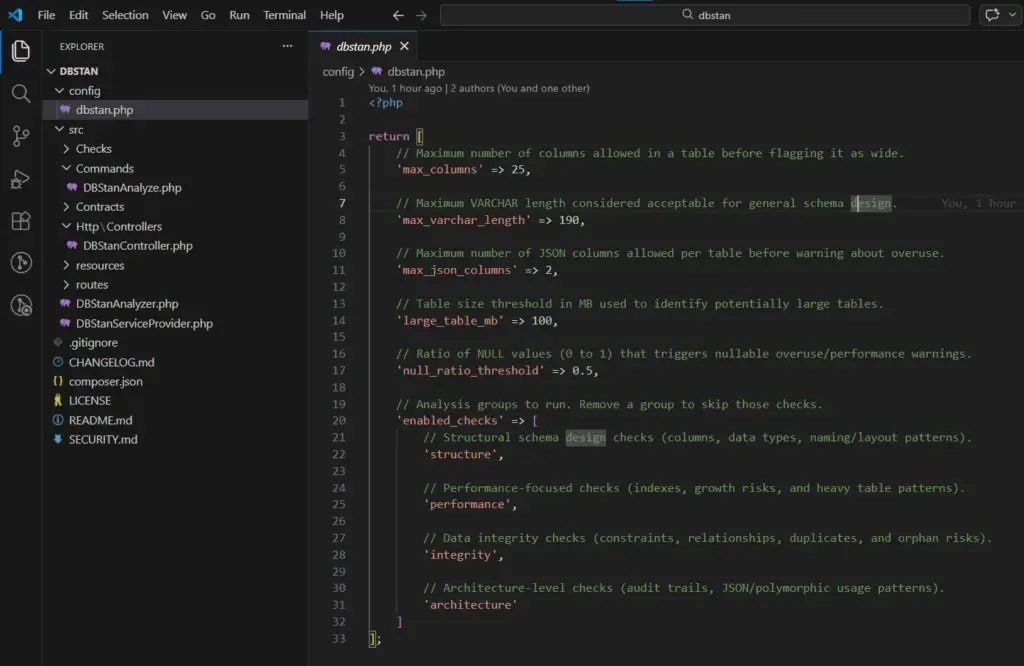
Configuration options include:
| Key | Type | Default | Description |
| max_columns | int | 25 | Tables with more columns trigger warning |
| max_varchar_length | int | 190 | VARCHAR columns wider trigger warning |
| max_json_columns | int | 2 | Tables with more JSON columns trigger warning |
| large_table_mb | int | 100 | Tables larger (MB) trigger size alert |
| null_ratio_threshold | float | 0.5 | Columns with NULL > ratio trigger warning |
| enabled_checks | array | all four | Remove a category to skip its checks |
This flexibility makes DBStan a practical Laravel database optimization tool that can adapt to different application architectures.
Who should use DBStan?
DBStan is useful for more than just Laravel developers.
Solo Developers
Run it before deployment to catch schema issues early.
Development Teams
Use it during code reviews to enforce database standards.
DevOps Engineers
Integrate it into CI pipelines as part of automated quality checks.
Database Administrators
Audit existing Laravel databases for structural problems.
Open-Source Maintainers
Ensure consistent database architecture across contributors.
What DBStan does NOT do
To keep the tool safe and predictable, DBStan intentionally avoids certain actions.
It:
- does not modify your database
- supports MySQL only
- keeps the web dashboard disabled in production
- does not auto-fix issues
Instead, it focuses on reporting and analysis so developers remain in full control.
What’s Beneath the Code?
Your application logic can change. Your UI can evolve.
But your database schema becomes the foundation everything depends on.
Once bad design decisions enter production, fixing them becomes expensive.
DBStan helps teams run a quick Laravel database architecture analysis, identify schema problems early and maintain a healthier database structure over time.
If you’re serious about database quality, run your first analysis today.
You might be surprised by what your schema reveals.
GitHub: itpathsolutions/dbstan
Install: composer require itpathsolutions/dbstan
Your Laravel database deserves the same level of analysis as your code.
Run your first analysis in minutes!
Frequently Asked Questions
Does DBStan modify my database?
No. DBStan is completely read-only. It only reads schema metadata and row counts from your database to analyze structure, relationships and indexes. It never inserts, updates or deletes any data.
Is DBStan safe to run in production?
Yes. The Artisan command can safely run in any environment, including production.
However, it’s recommended to avoid running it during peak traffic because some checks query information_schema and table statistics, which may add minor overhead.
Also, the web dashboard is automatically disabled in production to prevent exposing database structure publicly.
Which databases are supported?
At the moment, DBStan supports MySQL only.
The analyzer relies on MySQL-specific commands such as:
- SHOW TABLES
- SHOW COLUMNS
- SHOW INDEX
- information_schema
Support for other databases may come in future versions.
Can I create my own custom checks?
Yes. DBStan is designed to be extendable.
You can create custom checks by adding a class inside the src/Checks/ directory and:
- Extending BaseCheck
- Implementing the required methods:
a. run()
b. name()
c. category()
DBStan automatically discovers new check classes, so you don’t need to manually register them.
Can specific checks or categories be disabled?
Yes. DBStan allows you to control which checks run.
Open the configuration file:
config/dbstan.php
Inside the enabled_checks array, you can include only the categories you want to run. You might choose structure or performance or integrity or architecture.
This makes it easy to tailor the analysis according to the needs your project.
Why am I seeing issues on Laravel’s default tables?
DBStan scans every table in the database, including Laravel’s default tables like jobs, failed_jobs or password_resets.
Some checks may flag these tables for things like: missing timestamps, missing soft deletes, column structure warnings.
These warnings are meant for information. Use your own judgment before acting on them.
The /dbstan dashboard is not loading. What should I check?
If the dashboard route is not loading, check the following:
- Make sure your .env file has
APP_ENV=local or APP_ENV=staging - Clear cached configuration and routes
php artisan config:clear
php artisan route:clear - Confirm the package is installed
composer show itpathsolutions/dbstan
Once these are verified, the dashboard should load at:
http://localhost:8000/dbstan
Laravel News Links