It turns out Jean-Luc Picard was an even better starship helmsman than the writers knew. A physicist has gone through the details of a warp-speed trick from the first season of Star Trek: The Next Generation and found a subtlety the show missed. But instead of a plot hole, the detail he found actually makes the maneuver more impressive… as well as a great opportunity to teach about a lesser-known feature of the theory of relativity.
Níckolas de Aguiar Alves, a physicist at the Federal University of ABC in Brazil, had first watched Next Generation as a Master’s student. When he got to the episode “The Battle” in the show’s first season, the plot reminded him of his relativity coursework.
In “The Battle,” a Ferengi leader reminds Picard of a battle he fought years ago as captain of a ship called the Stargazer. Under fire from a mysterious attacker, Picard’s ship’s shields were down. He had to get closer without taking a hit, so he made a gamble. Picard ordered the Stargazer to charge the enemy ship at warp speed (meaning faster than light), then stop abruptly and fire. By going faster than light, Picard anticipated that the other ship would see two images of the Stargazer: where it reached warp speed and where it stopped. If they fired on the wrong image, they would miss the Stargazer, and Picard could win the battle.
Later in the episode, Riker mentions that the trick had been immortalized in Starfleet textbooks as the “Picard maneuver.”
As it turns out, it’s also not that far from what you can find in some physics textbooks. While warp speed is pure science fiction, physicists do sometimes need to consider what happens when an object goes faster than light, and such an object really does leave two images.
Something about the story bothered de Aguiar Alves at the time. But he forgot about it until years later, when he was working through a more practical problem involving particles in a medium with a slower speed of light. Not trusting that he had done the math right, he started trying to work out the situation visually.
The MySQL team at Oracle is excited to announce MySQL Workbench 26.7, the first of a new generation of the GUI administration and development tool for MySQL. A New Workbench MySQL Workbench 8 has served the community well, but it’s now old and has reached end of life. Its architecture, built on C++ and platform […]Planet MySQL
A spooky Jack-o’-lantern with a classic carved face on one side AND a haunting miniature scene inside — a staircase leading up to a creepy house. Perfect for adding lights to bring the internal scene to life. Hollow design lets the glow spill through the jagged mouth and eyes for chilling Halloween display effect
Every Thursday is #3dthursday here at Adafruit! The DIY 3D printing community has passion and dedication for making solid objects from digital models. Recently, we have noticed electronics projects integrated with 3D printed enclosures, brackets, and sculptures, so each Thursday we celebrate and highlight these bold pioneers!
Have you considered building a 3D project around an Arduino or other microcontroller? How about printing a bracket to mount your Raspberry Pi to the back of your HD monitor? And don’t forget the countless LED projects that are possible when you are modeling your projects in 3D!
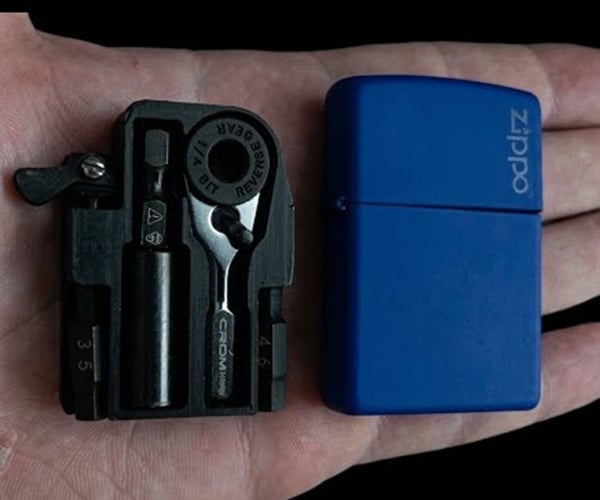
Tiny Tool Shop shows off a cool use for a Zippo lighter. Their 3D-printed insert replaces the lighter’s guts with a tool storage tray. It holds a micro ratchet and extension, along with two driver bits. They’ve got links to buy the individual items on YouTube, and plan to post an STL file for DIYers. If you like tiny tools, their MOD-GRID system is worth checking out.
The MySQL team at Oracle is excited to announce MySQL Workbench 26.7, the first of a new generation of the GUI administration and development tool for MySQL.
A New Workbench
MySQL Workbench 8 has served the community well, but it’s now old and has reached end of life. Its architecture, built on C++ and platform specific front-ends for Windows, macOS and Linux, has become increasingly difficult to extend and maintain.
MySQL Workbench 26 obsoletes MySQL Workbench 8.0. If you’re still running the old Workbench, now is the time to make the switch. MySQL Workbench 8.0 is no longer maintained and will have no new releases.
In order to better focus our efforts, the MySQL Shell for VS Code extension is discontinued as well.
Its capabilities are being carried forward into the new Workbench.
Built on MySQL Shell
The biggest change under the hood: the new Workbench is a desktop application built on top of MySQL Shell, using modern web frameworks and ElectronJS. Rather than reinventing core database functionality, Workbench now leverages the same battle-tested engine that powers MySQL Shell’s extensive scripting and admin capabilities.
From this shared foundation we get:
Functional consistency between the CLI (MySQL Shell) and the desktop app
Faster iteration on new features across the whole toolchain
A modern, HTML and JavaScript based UI that’s easier to theme, extend, and maintain
Server Compatibility
MySQL Workbench 26.7 supports MySQL 8.4 LTS and newer, MySQL 9.7 LTS, the latest MySQL 26.7 and innovation releases in between.
MySQL 8.0 and older EOL versions of MySQL may work, but are not officially supported. YMMV.
As with MySQL Shell, and unlike the MySQL server, MySQL Workbench follows a single version series model. This means there is a single latest version of MySQL Workbench, which is backwards compatible and supports all currently supported versions of the MySQL server. Users are recommended to always use the latest version.
What’s New (and What’s Coming)
The new Workbench ships with many of the features you already know from Workbench 8.0, alongside new capabilities enabled by the MySQL Shell foundation.
Development
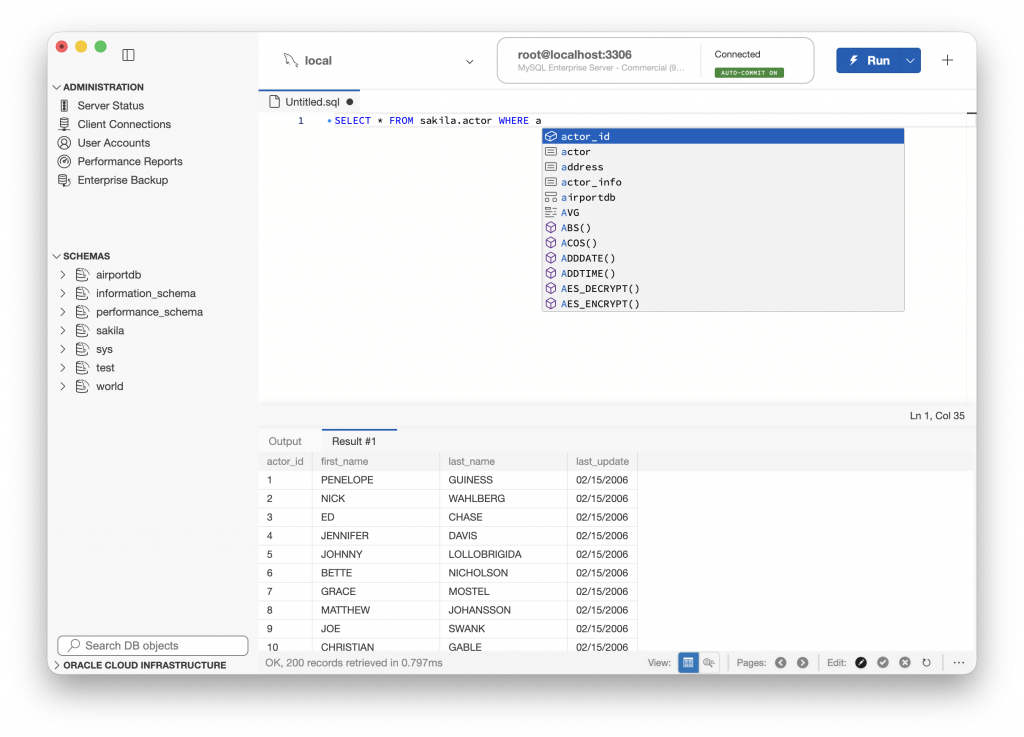
SQL Script Editor – the traditional SQL script editor, with full or step-by-step execution, syntax highlighting, code-completion, result viewer and editor view and more
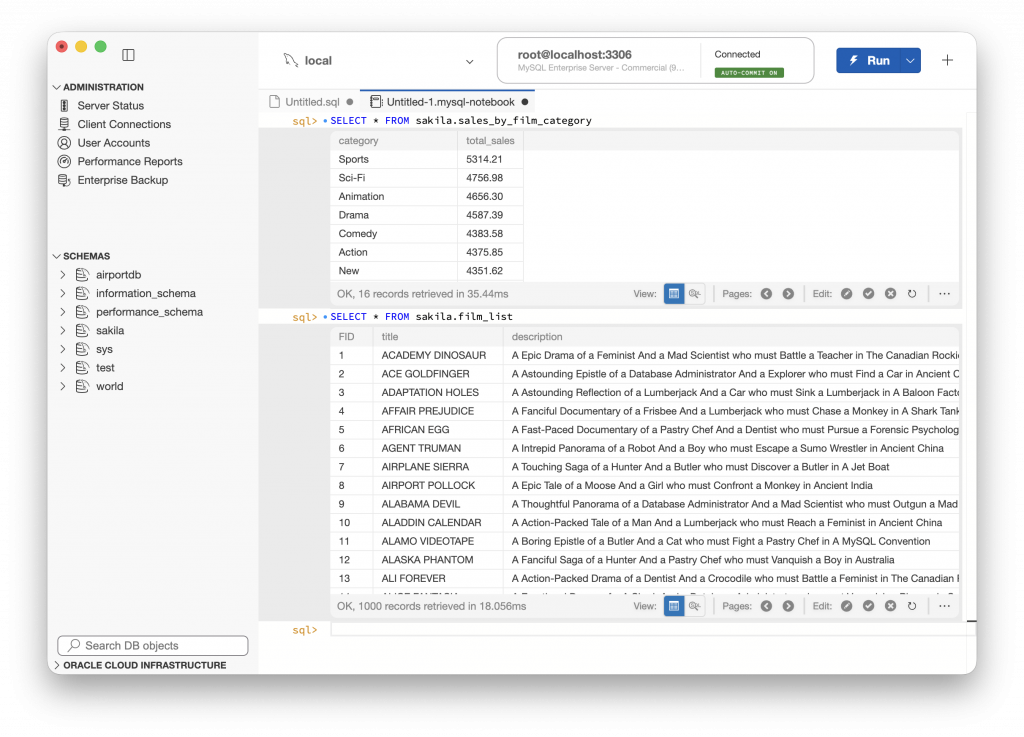
SQL Notebooks — a new, notebook-style way of working with SQL, mixing queries, results, and notes in a single interactive document
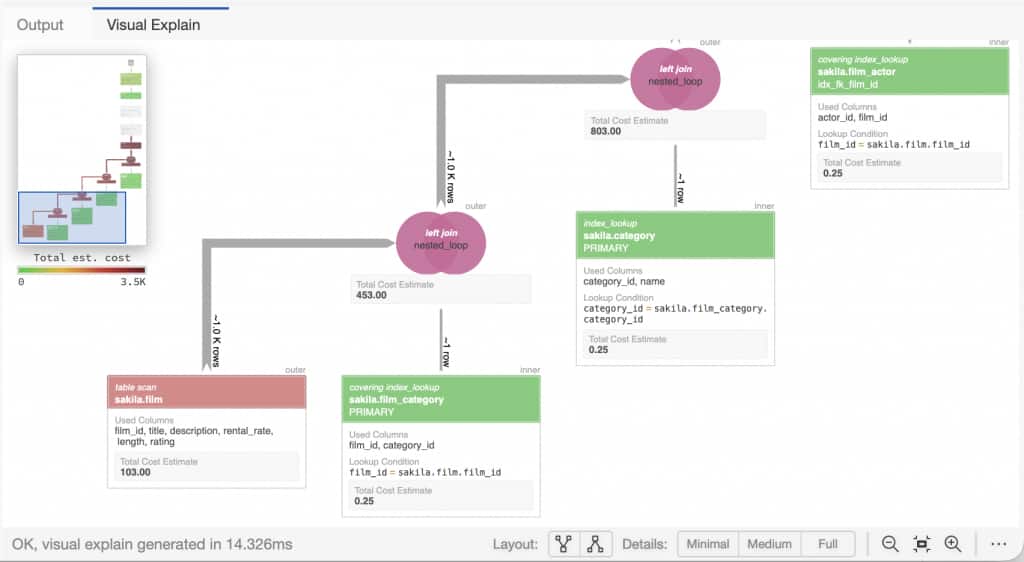
Updated Visual Explain — a redesigned graphical representation of query execution plans, supporting new MySQL features like the hyper-graph optimizer and HeatWave query plans
SQL Formatter — automatically clean up and reformat SQL into a more readable format
Auto-completion – SQL completion now supports expanding table and object names, @@variable names and more
Administration
Server Status and Overview — an at-a-glance view of your server’s status and configuration
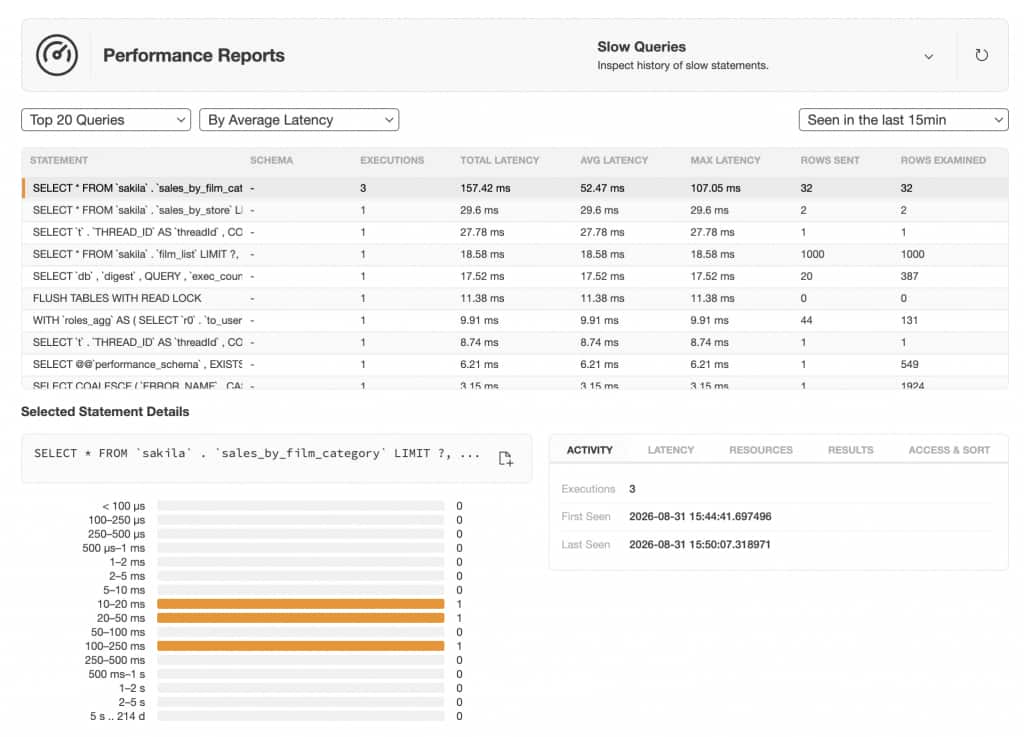
Performance Reports — including slow query analysis, memory usage, and database size reporting
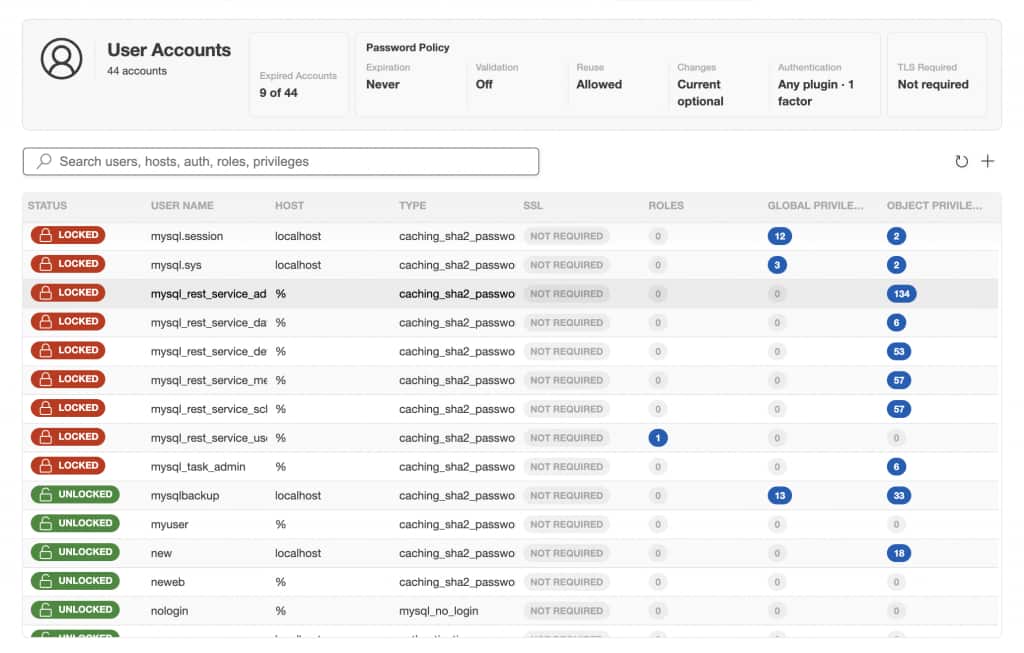
User and Grants Management — create, edit, and audit users and privileges through a visual interface
MySQL Enterprise Backup integration, for creating, scheduling and restoring full and incremental MySQL backups
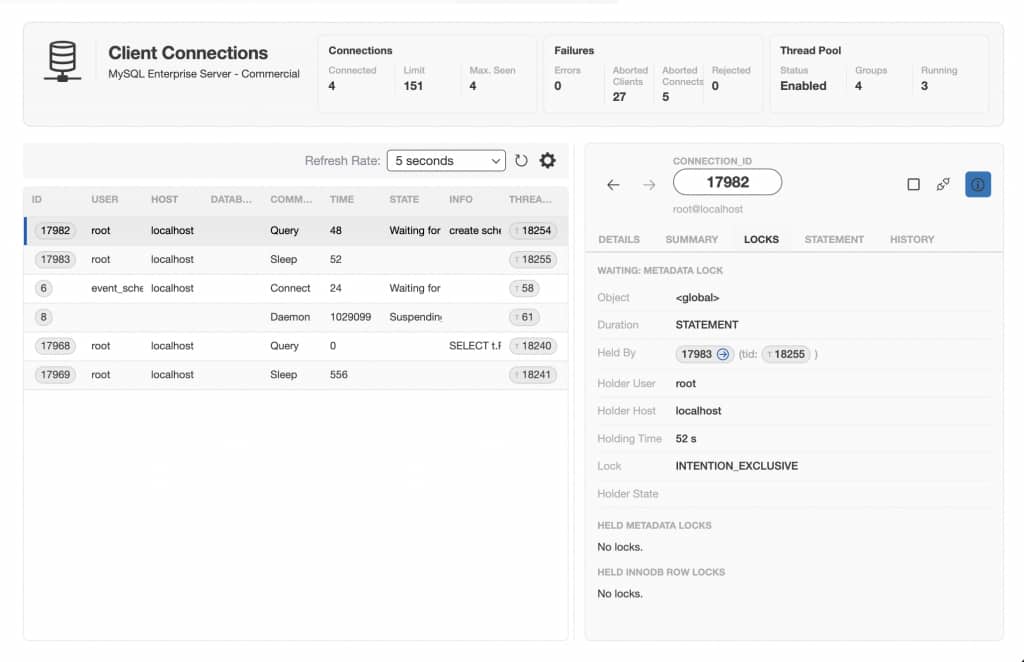
Client Connection Browser – view active MySQL client connections and dig down into what they’re doing. Inspect locks that they’re blocked on waiting or locks they’re holding themselves
Cloud Migration
HeatWave Migration Assistant — a guided, wizard-driven UI for migrating on-premises and cloud (AWS RDS, Aurora etc) databases to OCI, taking you step by step through the process of moving your data to MySQL HeatWave
Because this is a from-the-ground-up rebuild, the new Workbench is in active development. Some features found in Workbench 8 may not be available yet but the team is working to bring them to you as quickly as we can, along with entirely new functionality that wasn’t possible before.
In the following weeks we’ll be publishing more detailed posts on individual features. In the meantime, we encourage you to try the new Workbench, see what’s there today, and let us know what matters most to you as we prioritize the roadmap.
Open Source and Built to Extend
MySQL Workbench 26.7 is open source, and it’s been designed from the start to be easy to extend. Whether you want to add a new panel, integrate with another tool, or customize a workflow, the new architecture makes that far more approachable than it ever was in the old codebase.
Get Involved
This is a community effort, and we want you in it. Whether that means filing issues, contributing code, testing early features, or just telling us what you’d like to see next. Check out the project repository, join the discussion, and help shape where MySQL Workbench goes from here.
Used a couple of sheets at a time; toilet paper is incredibly weak. But as Lauri and Hanna from the Hydraulic Press Channel show, it’s possible to turn it into an incredibly strong material if you press a bunch of it into a brick. Not only is a compressed cube of toilet paper hard enough to slow down an angle grinder, but it also burns incredibly slowly.
Nvidia has launched PAIR, a free open-source tool that links compatible computers on a home network so they can pool idle processing power for local AI inference and agentic workloads. "While the compatible devices are mostly Nvidia GeForce GPUs (PAIR works with RTX 20-series cards and newer, as well as RTX Pro GPUs and DGX Spark systems), Apple’s M4 chips or newer will also work," reports The Verge. From the report: The key thing here is that PAIR uses your in-home systems when they’re idle to avoid interfering with other tasks. And this disaggregated system of computers can work in parallel to chew through lots of processing requests — which should be helpful for an agentic workflow that breaks complex tasks into smaller jobs. This should prevent large bottlenecks on a single GPU, and Nvidia says PAIR can adapt as devices join or leave the network — including if a user does something like start playing a game on their desktop PC.
[…] Nvidia says PAIR is secured by pairing all devices through a six digit code and then securing the channel via mTLS (Mutual Transport Layer Security), to create an encrypted communication line that’s trusted in both directions between computers. The Nvidia PAIR beta is available today, with support for Windows, Linux, and macOS.
NewDays founders Daniel Kelly (left) and Babak Parviz. (NewDays Photo)
NewDays, a Seattle startup using a generative AI therapy to treat people with mild dementia, has raised additional funding and closed its seed round with $16 million. The funding was led by Madrona and General Catalyst.
The company also announced on Wednesday that it has expanded its services to Nevada, joining Washington, California, Florida, Texas and New York. NewDays offers telehealth visits with human clinicians once or twice a month alongside unlimited conversations with an AI companion named Sunny.
“Our goal isn’t to add years — it’s to add quality to the years people have,” said CEO and co-founder Babak Parviz.
The startup is addressing a widespread issue: one in three Americans over 65 experiences cognitive decline, with 11% living with dementia and another 22% with mild cognitive impairment. Patients use Sunny to engage in conversational topics, memory exercises, and language or reasoning games designed to strengthen cognitive function.
While these cognitive strategies are clinically proven, they have historically lacked broad accessibility, Parviz said. NewDays aims to make treatment scalable using AI and demonstrate measurable improvement.
This past July at the annual Alzheimer’s Association International Conference, the company presented research showing that NewDays patients with dementia performed better on cognitive tests than expected historical decline curves — translating to roughly 18 months of preserved cognitive function. The study was limited to 24 patients, half of whom have dementia and the other half experiencing other cognitive impairment.
“Generative AI under the guidance of an expert human clinician is what finally lets us deliver a medically proven intervention at that scale. That’s the whole thesis of the company,” Parviz said via email.
To further validate its platform, NewDays is currently running a randomized controlled trial with Kaiser Permanente in California.
Users can try Sunny for free before opting into a 20-minute clinical assessment to evaluate suitability for the full program. Clinical sessions cost $150 each. NewDays currently accepts traditional Medicare as an out-of-network provider and is working to secure in-network status with commercial insurers and Medicare Advantage plans.
From microwave popcorn to light bulbs to Kleenex, everyday products are full of interesting backstories and features you probably never heard about. Mike from List 25 explores these hidden design secrets, planned obsolescence, the stories behind how products evolved, and cases where consumer pressure forced companies to change them.