1000 LEGO Astronauts Head to Space

https://theawesomer.com/photos/2023/06/lego_astronauts_in_space_t.jpg

1000 LEGO Astronauts Head to Space

Link

Some LEGO astronaut minifigs go their whole lives only dreaming of space travel. Now, 1000 lucky minifigs have traveled to the edge of space courtesy of LEGO and Kreativ Gang. Three crews of 335 plastic astronauts flew to a height of roughly 35,500 meters aboard a carbon fiber and stainless steel space shuttle carried aloft by a weather balloon.

The Awesomer

They taught their kids properly back then


A friend sent me a link to an article titled "Return of the One Room Schoolhouse".  I found it very interesting, particularly because it gave examples of eighth grade final examinations from 1895.  I doubt most of our modern schoolchildren could pass them – in fact, I think most of us adults would have a hard time with them too!

Here, for example, is the Geography exam.

Geography (Time, one hour)

1. What is climate? Upon what does climate depend?

2. How do you account for the extremes of climate in Kansas?

3. Of what use are rivers? Of what use is the ocean?

4. Describe the mountains of N.A.

5. Name and describe the following: Monrovia, Odessa, Denver, Manitoba, Hecla, Yukon, St. Helena, Juan Fernandez, Aspinwall and Orinoco.

6. Name and locate the principal trade centers of the U.S.

7. Name all the republics of Europe and give capital of each.

8. Why is the Atlantic Coast colder than the Pacific in the same latitude?

9. Describe the process by which the water of the ocean returns to the sources of rivers.

10. Describe the movements of the earth. Give inclination of the earth.

All that in one hour?  I’d be very hard pressed to answer that many questions, concisely enough, in that time limit.

Click over to the article to look at the examinations for English, arithmetic and other subjects.  They’re interesting and thought-provoking.  Why are modern children taught so much less factually, and so much more about irrelevant, touchy-feely subjects that will do nothing to help them as adults?

Peter

Bayou Renaissance Man

They taught their kids properly back then


A friend sent me a link to an article titled "Return of the One Room Schoolhouse".  I found it very interesting, particularly because it gave examples of eighth grade final examinations from 1895.  I doubt most of our modern schoolchildren could pass them – in fact, I think most of us adults would have a hard time with them too!

Here, for example, is the Geography exam.

Geography (Time, one hour)

1. What is climate? Upon what does climate depend?

2. How do you account for the extremes of climate in Kansas?

3. Of what use are rivers? Of what use is the ocean?

4. Describe the mountains of N.A.

5. Name and describe the following: Monrovia, Odessa, Denver, Manitoba, Hecla, Yukon, St. Helena, Juan Fernandez, Aspinwall and Orinoco.

6. Name and locate the principal trade centers of the U.S.

7. Name all the republics of Europe and give capital of each.

8. Why is the Atlantic Coast colder than the Pacific in the same latitude?

9. Describe the process by which the water of the ocean returns to the sources of rivers.

10. Describe the movements of the earth. Give inclination of the earth.

All that in one hour?  I’d be very hard pressed to answer that many questions, concisely enough, in that time limit.

Click over to the article to look at the examinations for English, arithmetic and other subjects.  They’re interesting and thought-provoking.  Why are modern children taught so much less factually, and so much more about irrelevant, touchy-feely subjects that will do nothing to help them as adults?

Peter

Bayou Renaissance Man

Entire Contents Of Hunter Biden’s Laptop Now Online

https://www.battleswarmblog.com/wp-content/uploads/2023/06/Screen-Shot-2023-06-03-at-1.35.05-PM.png

If you want to look at a big story the mainstream media continues to suppress, the entire contents of Hunter Biden’s infamous “Laptop from Hell” are now online.

And not only his laptop, but stuff from his iPhone as well.

There are the salacious photos you would expect (pics of his dick and what appear to be naked, under-aged girls, pics of a woman giving him a blowjob in-between puffs on her cigarette, etc., all censored).

Some of it is suggestive of Biden Family corruption, like the famous “Big Guy” memo.

Some of it is innocuous: Map snaps, pics of food, pics of sunsets, vacation photos, pictures of kids (presumably some his own, and presumably ones he’s not having sex with), etc.

Some of it is just weird. There seem to be dozens of pictures of a flashlight beam shining through what I assume are crack pipe fumes in a darkened room.

Arty

There’s no doubt this is a rich treasure trove for bloggers and investigative reporters with some free time to dig through. (Alas, that’s not me right now, because books.)

In a related story, the FBI has begrudgingly agreed to turn over evidence of Biden corruption to a congressional committee on Monday.

How nice of them…

Lawrence Person’s BattleSwarm Blog

Top Hosting Providers for PHP and Laravel

https://ashallendesign.ams3.cdn.digitaloceanspaces.com/public/blog/136/Top_hosting_providers_for_php_blog_banner (1)-min.png

Disclaimer: Some of the links in this article are affiliate links. This means that if you sign up using one of my links, I’ll get a tiny kickback that helps to support the blog.

Introduction

It can sometimes be pretty difficult to decide which platform to use for hosting your PHP and Laravel applications. There are a huge number of hosting providers available (with each provider offering an equally huge number of services). So it can be daunting having to decide how and where to host your applications, especially if it’s your first time having to do it.

For example, if you’re a freelance web developer and want to host your small blog (like myself), you’ll likely opt for a completely different hosting option than if you’re a large company with a high-traffic website.

Generally, I like to stick with the most popular options that other developers are using. This usually means if I get stuck with something, it’s more likely that I can reach out to the community for help than if I was to use an obscure hosting platform that no one has ever heard of.

So I made a poll on Twitter and asked the PHP and Laravel community which hosting provider they use for their own PHP projects. I also asked them to comment if they use a provider that wasn’t listed in the poll. I was really pleased to see that we had 1292 votes!

In this Quickfire post, we’re going to take a look at the results of the poll and the most popular hosting providers.

The Tweet

Here’s the tweet that I posted:

The Results

Poll answers chart

The votes were as follows:

  • Digital Ocean – 40.6%
  • AWS – 25.9%
  • Hetzner – 16.6%
  • Other – 16.9%

1. Digital Ocean

According to the poll, the most popular hosting provider for PHP applications is Digital Ocean, with 40.6% of the votes.

I actually use Digital Ocean myself for hosting my Laravel projects (and this very blog you’re reading right now) and I’m more than happy with the service.

Not only do I use their “Droplet” app servers, but I also use their “Spaces” object storage for storing my assets (such as images and videos).

One of the biggest reasons for me using Digital Ocean was that I found it nice and simple to use in comparison to AWS. DevOps and infrastructure aren’t my strong points, and they aren’t something I have a huge amount of interest in. I mainly love to work on code and build cool features. So I chose to use Digital Ocean because I felt like it was really easy to set up and get started.

In particular, it’s even easier to use when you use a tool like Laravel Forge to provision and manage the servers.

Personally, if any developer starting out in the PHP world asked me which hosting provider they should use, I’d probably recommend Digital Ocean. Of course, you may want to use something like AWS once the project starts to grow and you need access to more advanced features. But for a large number of PHP and Laravel projects, Digital Ocean is a great choice.

You can sign up to Digital Ocean and get $200 of credit by using my referral link. Even if you’re not in a position to use it right now, it could be a great chance for you to browse around the Digital Ocean dashboard and see what cool features they have on offer.

2. AWS

The second most popular hosting provider for PHP applications is AWS, with 25.9% of the votes.

In all honesty, I expected AWS to be the most popular hosting provider. I think this is because AWS is so popular in the tech world, and it’s the one that I hear about the most.

AWS is a great platform with a huge range of features. You can use it for hosting your small Laravel blog, all the way up to your large enterprise applications that require complex infrastructure.

I’ve used AWS in the past, but I’ll admit that I found it pretty overwhelming because there’s so much to learn. I think it’s a really powerful tool, but it’s definitely not for the faint-hearted! However, there are some awesome tutorials out there that can help you get started with AWS.

If you pair AWS with Laravel Forge, you can have a really powerful setup for your PHP and Laravel apps. You can have access to the infrastructure and DevOps features of AWS, but you can also have the simplicity of Forge to manage your servers. So it means that most of the time, you’ll be using Forge to interact with AWS and won’t actually need to use the AWS dashboard. As a result, it can make AWS a lot easier to use and give you the ability to scale up your infrastructure if needed.

Similarly, depending on the type of application you’re building, you may also want to pair up your AWS account with something like Laravel Vapor. This gives you the ability to deploy your Laravel apps in a serverless environment which can be really powerful, especially for applications that experience spikes in traffic.

3. Hetzner

Hetzner was the third most popular hosting provider for PHP applications, with 16.6% of the votes in the poll.

Hetzner is a German hosting provider that provides a range of different hosting options (such as dedicated servers, cloud servers, and managed servers). They were founded way back in 1997, so they have a lot of experience in the hosting world!

I’ve personally never used Hetzner itself. However, I have worked on Laravel projects for clients that use Hetzner for their hosting. I never ran into any issues with it, and it seemed to work really well.

From hearing other developers talk about Hetzner, it seems like it’s a great option for hosting your PHP and Laravel apps. In comparison to some other providers, you can often get more performant servers for lower prices. I’ve been hearing it mentioned in conversations more and more recently, so it seems like it might be something for me to check out in more depth at some point.

Laravel Forge also has the option to provision and manage servers on Hetzner. So if you’re looking for a simple way to manage your Hetzner servers, Forge could be a great option.

4. Vultr

Vultr was another popular hosting platform that was regularly mentioned in the poll’s comments.

Vultr is a cloud hosting provider that offers a range of different hosting options. At the time of writing this article, they have 31 worldwide locations, so there’s a great range of options for where you can host your applications.

I’ve never personally used Vultr for hosting real-life applications, but I have given it a spin to see what the experience of using it was like. In general, I found it really easy to use and get set up. You can also provision and manage your Vultr servers directly from Laravel Forge, which is really handy.

You can sign up for Vultr using my referral link and I’ll get a small commission that helps support the blog.

5. Akamai (previously Linode)

Akamai (previously known as Linode) was another popular hosting provider that I saw mentioned in the comments of the poll.

Akamai is a cloud hosting provider that offers a range of different hosting options. They have a huge number of worldwide locations so that you can host your applications in the location that’s closest to your users.

Similar to Vultr, I’ve never used Akamai (or Linode) to host any real-life projects. But I have given it a spin in the past to see what it was like. I found the dashboard interface really easy to understand and use.

Just like with all the other hosting providers, you can provision and manage your Akamai servers directly from Laravel Forge.

You can sign up for Akamai and get $100 free credit to play around with the platform and I’ll get a small commission that helps support the blog.

6. Other

There were also a few other honourable mentions that I saw in the comments of the poll for hosting Laravel and PHP applications. These were:

  • Siteground (for hosting older WordPress projects)
  • Heroku
  • Contabo
  • Upcloud

Limitations

It’s important to remember that these results are by no means a representation of the entire PHP community. The poll was only open for 24 hours and was on Twitter. I’m usually interacting with the Laravel community on Twitter, so I’d probably make a guess that a large portion of the answers were given by Laravel developers.

So there’s a possibility that these results could be skewed towards a certain type of developer. If I was more active in other PHP communities, such as Symfony or WordPress, the results might have looked different.

But I do still think they gave a good indication of the most popular hosting providers, even if the numbers aren’t 100% accurate.

Laravel News Links

Frozen Pizza Factory

https://theawesomer.com/photos/2023/05/pizza_factory_t.jpg

Frozen Pizza Factory

Link

While we prefer fresh-made pizza, a frozen pizza can satisfy hunger in a pinch. Wondastic Tech takes us inside a factory that mass-produces frozen pizzas. First, huge quantities of dough are flattened and cut. One machine squirts out tomato sauce, while others shred mozzarella and drop on toppings. Stick around for a look at a factory that makes honey candies.

The Awesomer

What Is Tubi? The Best Free Streaming Service You’re Not Using

https://static1.makeuseofimages.com/wordpress/wp-content/uploads/2021/04/tubi-free-streaming-service-logo.jpg

When it comes to binge-watching movies or shows, most of us are content to log on to Netflix and work our way through an entire series. Well, there’s another streaming service you should check out—Tubi.

But what exactly is Tubi TV? In short, it’s a streaming service that offers thousands of movies and TV shows—all for free. With a library that includes everything from cult classics to recent Hollywood hits, Tubi TV has quickly become a must-have for anyone looking to stream content for free.

MAKEUSEOF VIDEO OF THE DAYSCROLL TO CONTINUE WITH CONTENT

But how does it work? And what makes Tubi TV stand out? Let’s find out.

What Is Tubi TV?

Tubi is a free streaming service owned by Fox Corporation. It has over 20,000 HD movies and TV shows. Not only this, but it’s also available on every major smart TV platform and all the popular streaming devices.

It features content from major studios, including MGM, Paramount, Lionsgate, as well as independent filmmakers. While it may not have the same buzz or extensive library as its competitors, it’s a great option for those looking for free streaming content.

To get started, you’ll need to sign up for Tubi with your email address or Google account. Next, you can create a watch list of your favorite movies, docuseries, TV shows, and more. You can access the service across Android and iOS devices, desktops, gaming consoles, and on the web as well.

Download: Tubi TV for Android | iOS | Web (Free)

What Content Can You Watch on Tubi TV?

From timeless classics to the latest releases, Tubi TV offers a diverse array of content. From anime series to TV shows to docuseries, it has an extensive library to cater to a variety of user preferences. It’s chock-full of age-appropriate entertainment available to keep kids engaged and entertained.

If you’re into action flicks or crime dramas, comedy or sci-fi flicks—you name it—you can find it on the site. It offers a vast collection of movies spanning various genres, including action, comedy, drama, horror, romance, and so on.

The content itself comes under several categories, including “Cult Classics,” “Award Winners and Nominees,” “Pre-School,” “Kids Shows,” “Highly Rated on Rotten Tomatoes,” and more.

How to Set Up and Use Tubi TV

To get started with Tubi, you’ll need to register for an account. Once you’ve signed in, open the app and hit Browse to bring up the main menu with the list of available titles, sub-categories, or channels.

With an interface similar to that of Netflix, each movie expands into its own viewer. This gives you more information about the film, including reviews, cast, and more. When you find one that interests you, just click it and start watching.

If you have a Roku streaming device or video game console like an Xbox One, just search for the native Tubi TV app using your device’s built-in search function.

In case you haven’t already, you’ll be prompted to create an account with your email address and password before browsing through available channels. You can always access Tubi TV on your web browser as well.

Since Tubi is supported in limited regions, such as the US, Canada, Mexico, Australia, and New Zealand, you can connect to a VPN and connect to US servers to view its content. We recommend checking out these privacy-friendly free VPNs to access geo-restricted content.

If you’re a parent, you can use the Parental controls feature to control what your children can watch on the app. It also allows you to edit how your subtitles appear, so you can customize the caption fonts and sizes to your liking.

Tubi is a tad different from other popular streaming services such as Netflix and Amazon Prime. First off, these services charge a hefty subscription fee for access to content, while Tubi is completely free.

Moreover, Tubi’s selection of titles is unique in that it focuses on providing obscure movies and foreign films that you may not have heard of or seen before.

Thirdly, Tubi TV is widely available across a range of devices, including Roku, Android TV, Amazon Fire TV Stick, Xbox One, Xbox Series S, Xbox Series X, smart TVs, Chromecast, Amazon Echo Show, Google Nest Hub, Blu-ray players, and HiSense TVs. This allows you to watch your favorite content from anywhere as long as you have an internet connection.

Tubi TV: Get a Huge and Free Collection of Movie Titles

While there are plenty of other sites that offer free content, Tubi TV is quickly rising through the ranks as one of the top-rated sites in this space.

Regardless of your streaming preferences, you should keep Tubi at the top of your list. Yes, it has advertising, but unlike other free providers who interrupt programming with ads, Tubi TV can offer content with minimal interruptions and fewer ad loads, which can truly improve your entertainment experience.

MakeUseOf

Let’s build a ChatGPT Plugin with Laravel

https://barreto.jp/assets/images/chatgpt-plugin-with-laravel/7-local-plugin-ip.png

Starting last week (May 12), OpenAI rolled out the plugins for ChatGPT plus users. This means that we can not only use the plugins from their store but also create our own plugins.

In this article, we will go through the process of creating a plugin for ChatGPT using Laravel.
The plugin will be a very simple web browser that will fetch the HTML content of a given URL, but this concept can be applied to any other use case.

Why a browser? Because it’s a simple example.

TL;DR: The code is available at github.com/juampi92/chatgpt-plugin-in-laravel.

Step 0 – Setup

Start by creating a new laravel project

composer create-project laravel/laravel chatgpt-browse-plugin
composer require guzzlehttp/guzzle

We will need the guzzlehttp/guzzle package to make HTTP requests using the Laravel HTTP Client.

Step 1 – Plugin configuration

ChatGPT requires us to have a plugin manifesto. This file is a JSON file that contains information about the plugin, such as the name, description, logo, etc.
We will need to locate it in the following URL localhost:8000/.well-known/ai-plugin.json.

For reasons that will be explained later, we will create the file inside resources/ instead of public.

mkdir resources/.well-known
touch resources/.well-known/ai-plugin.json
{
    "schema_version": "v1",
    "name_for_human": "My Local Web Browser Plugin",
    "name_for_model": "MyLocalWebBrowser",
    "description_for_human": "Plugin for browsing the web locally in the name of ChatGPT.",
    "description_for_model": "Plugin for browsing websites locally and getting their content.",
    "auth": {
        "type": "none"
    },
    "api": {
        "type": "openapi",
        "url": "http://localhost:8000/openapi.yaml",
        "is_user_authenticated": false
    },
    "logo_url": "http://localhost:8000/logo.png",
    "contact_email": "support@example.com",
    "legal_info_url": "http://www.example.com/legal"
}

Notes:

  • If you decide to use a different port, make sure to update the url fields (api.url and logo_url).
  • Also, if you decide to use a different name, make sure name_for_model doesn’t have any spaces.

To make the file available to the public, we need to do two things:

  1. Update the routes in routes/web.php:
Route::get('.well-known/ai-plugin.json', fn () =>
    File::get(resource_path('.well-known/ai-plugin.json')));
  1. Update config/cors.php to have 'paths' => ['*'],.

The reason why we can’t use the /public directory is because
the plugin will be hosted on a different domain and the browser
will block the request due to CORS.
If you intend to host the plugin on a server, you can use
the /public directory and configure apache/nginx to allow
CORS on static files.

Step 2 – Making it browse

Now we need to create the API that will be used by ChatGPT to browse the web.

Let’s create a new controller:

php artisan make:controller BrowseController

And the content of the controller should look something like this:

use Illuminate\Support\Facades\Http;

public function __invoke(Request $request): JsonResponse
{
    ['url' => $url] = $request->validate([
        'url' => 'required|url',
    ]);

    $response = Http::withHeaders([
            'User-Agent' => 'Mozilla/5.0 (Windows NT 10.0; Win64; x64) AppleWebKit/537.36 (KHTML, like Gecko) Chrome/96.0.4664.45 Safari/537.36',
        ])
            ->get($url);

    return new JsonResponse([
        'response' => $response->body(),
    ]);
}

Add the controller to routes/api.php:

Route::get('/browse', BrowseController::class);

Step 3 – API Documentation

In order for ChatGPT to understand how to use our plugin,
we need to generate an OpenAPI specification.
GPT will read the specification and decide when and how to use your endpoints,
so it’s important that the API is clear.

To generate the actual yaml file, we will use the zircote/swagger-php package.

composer require zircote/swagger-php --dev

Now we need to update the Controller using the OpenApi Annotations:

/**
 * @OA\Info(title="MyLocalWebBrowserAPI", version="0.1")
 */
class BrowseController extends Controller
{
    /**
     * @OA\Get(
     *     path="/api/browse",
     *     summary="Get HTML content of an URL",
     *     @OA\Parameter(
     *         name="url",
     *         in="query",
     *         description="URL to fetch the HTML from",
     *         required=true,
     *         @OA\Schema(
     *             type="string",
     *             example="http://example.com"
     *         )
     *     ),
     *     @OA\Response(
     *         response=200,
     *         description="HTML content of the URL",
     *         @OA\JsonContent(
     *            type="object",
     *            required={"response"},
     *            @OA\Property(
     *              property="response",
     *              type="string",
     *              description="Raw HTML content of the URL"
     *           )
     *         )
     *     )
     * )
     */

To generate our OpenAPI specification, we run the following:

./vendor/bin/openapi app -o resources/openapi.yaml

And, for the same reasons mentioned before, add
the following route to routes/web.php:

Route::get('openapi.yaml', fn () =>
    File::get(resource_path('openapi.yaml')));

Step 4 – Serving

To run our plugin, simply call

php artisan serve --port=8000

Step 5 – Installing the plugin

Now that we have our plugin ready, we need to install it in ChatGPT.
When creating a new GPT-4 chat, you can click on the “Plugins” button and then go to the Plugin store.

GPT-4

From there, we go to the Plugin Store, and at the bottom, we click on Develop your own plugin.
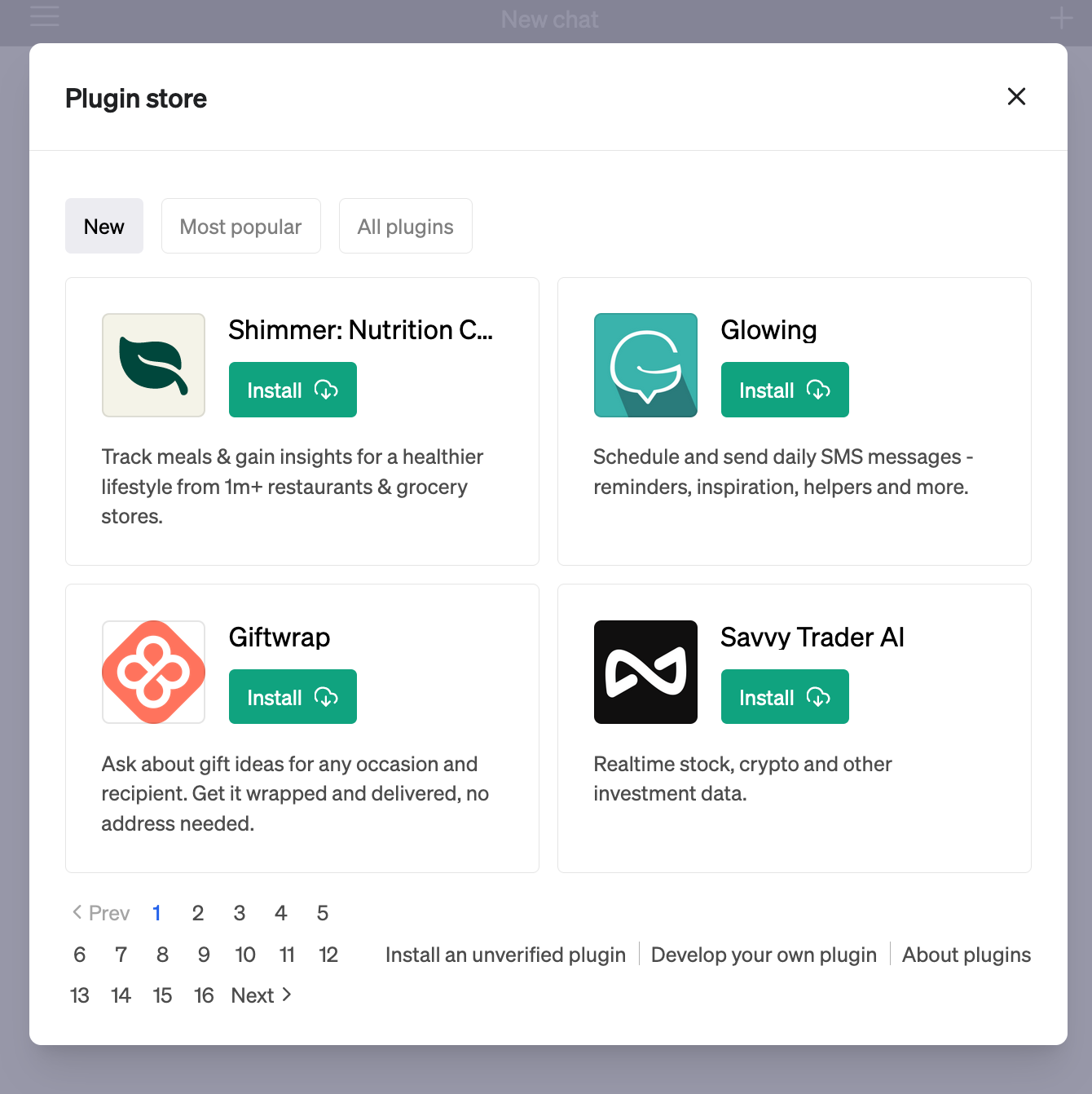
Plugin Store

Here we are presented with a form to fill in the domain of our plugin. We input localhost:8000 (if you changed the port, make sure to use the correct one).
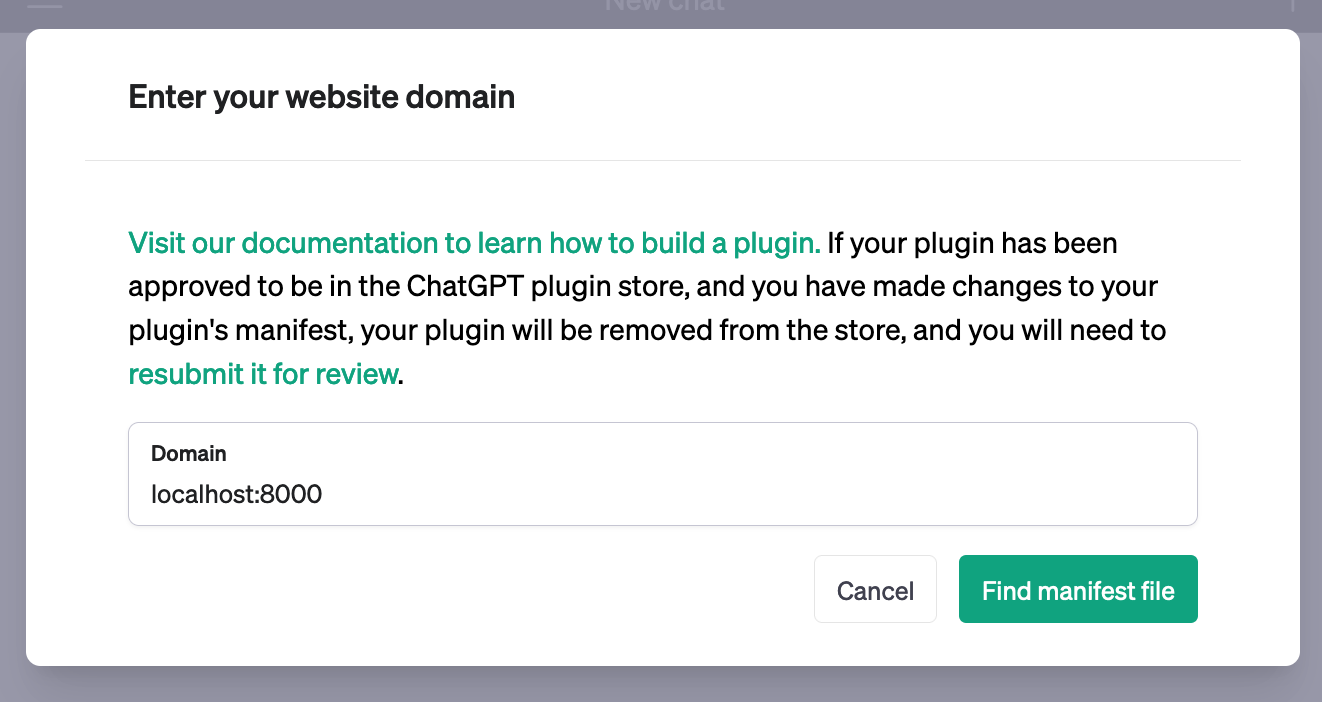
Enter Website Domain

If everything went well, you will see the following screen:
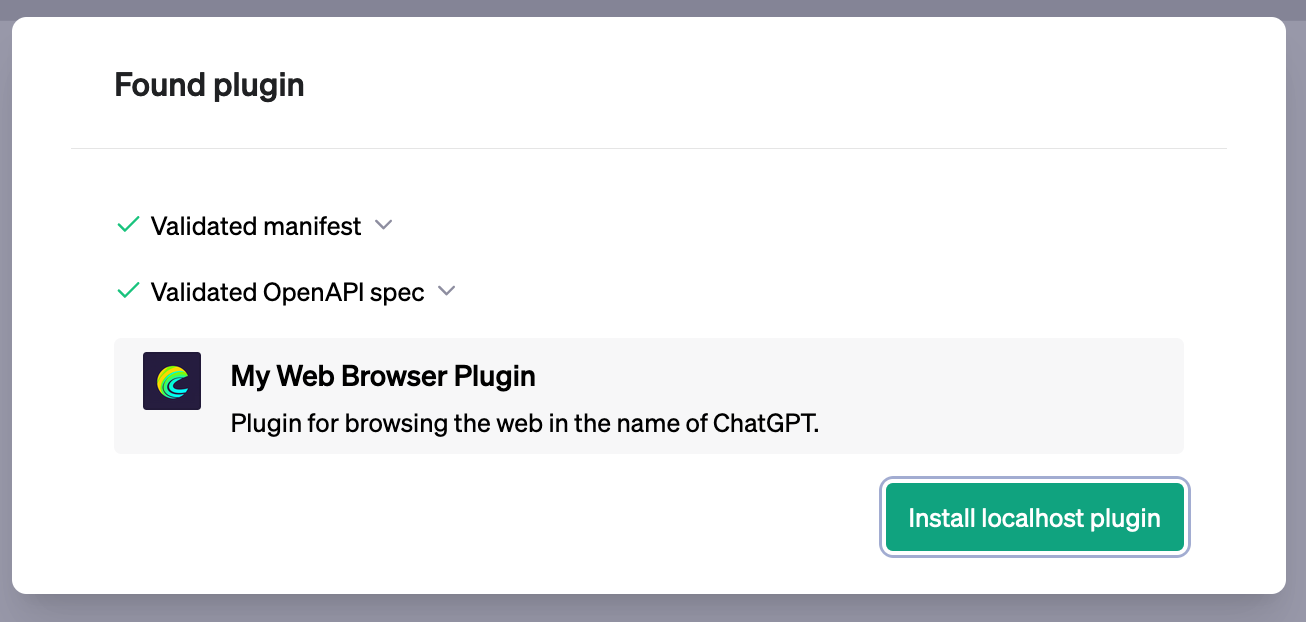
Found Plugin

New Plugin Selected

Step 6 – Using the plugin

Now that we have our plugin installed, we can use it in our chat.

ChatGPT will decide when to use your plugin depending on your description and OpenAPI specification,
so in the case of our browser plugin, simply giving a URL will do.

You might be wondering: why not just use WebPilot, the plugin that comes with ChatGPT?

The truth is that you can use WebPilot. The only difference is that
WebPilot uses a hosted server to browse. A server that can be rate-limited by websites, and you can’t customize.

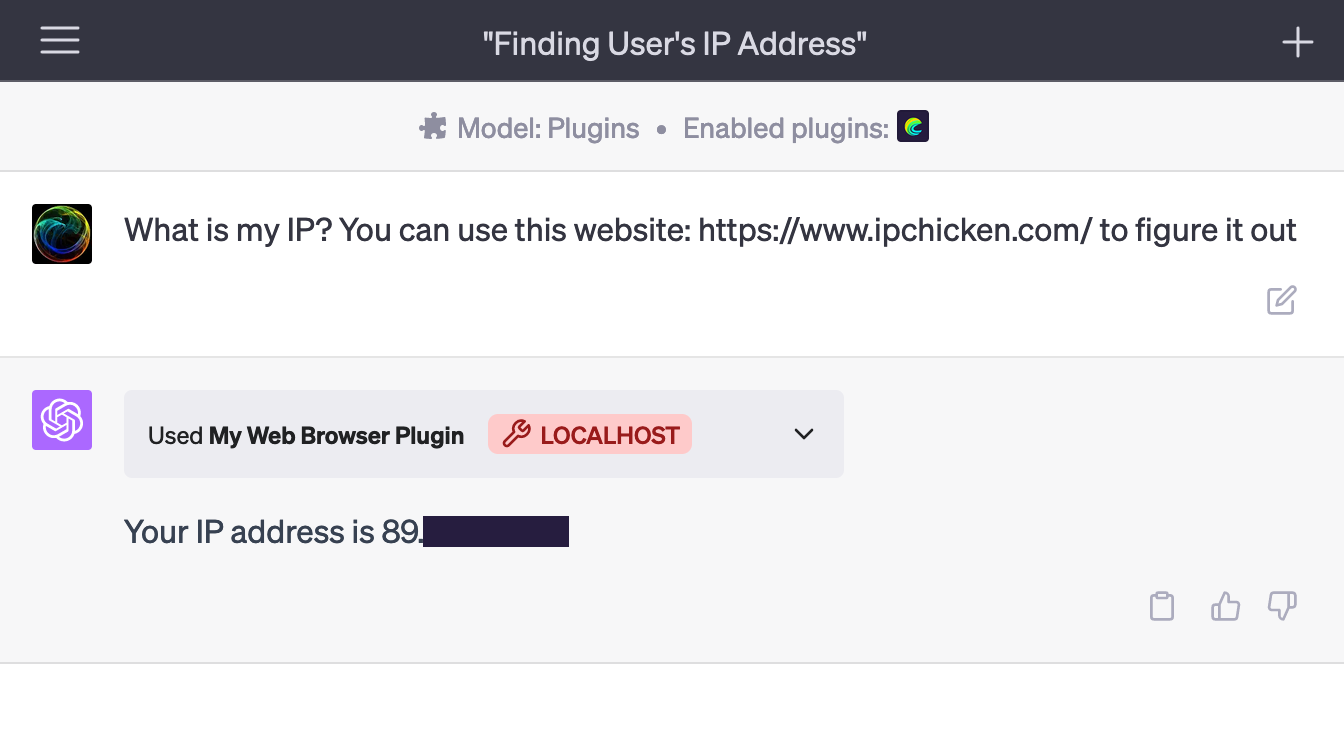
This is an example using WebPilot:
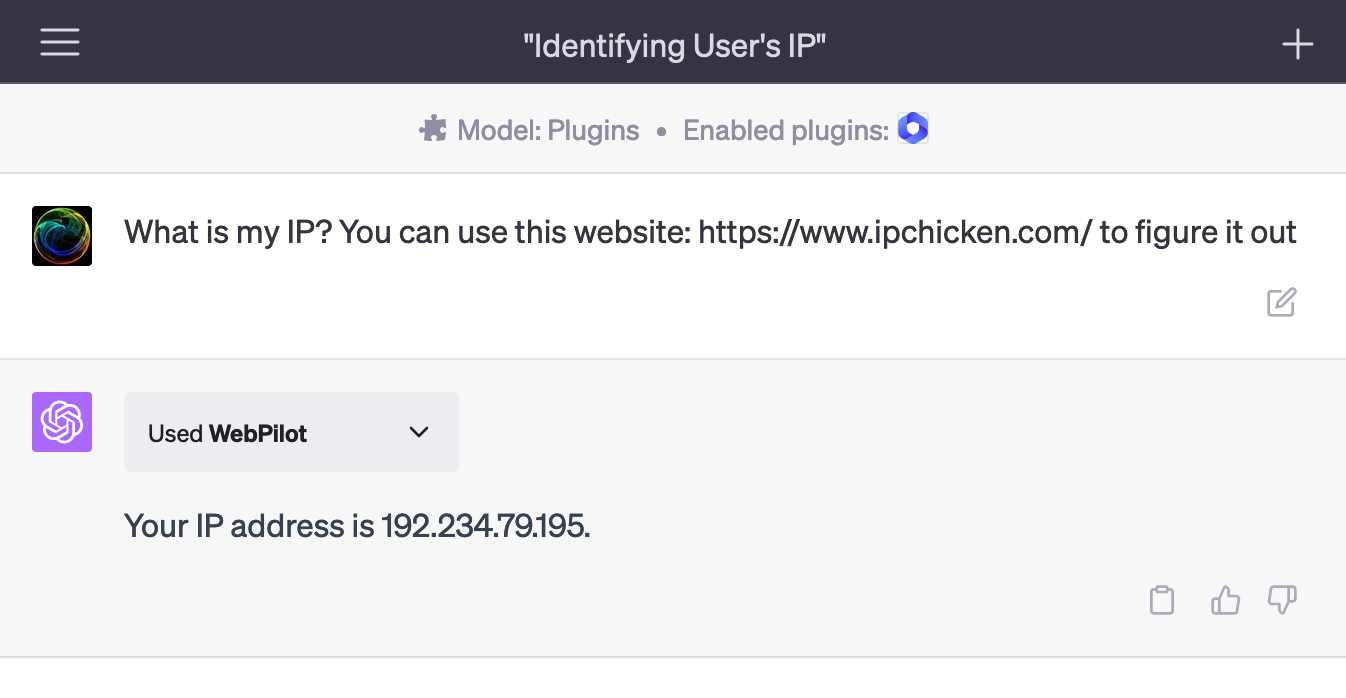
WebPilot IP

And here is with our plugin:

WebPilot IP

Conclusion

In this simple article, we saw how to create a plugin for ChatGPT using Laravel.

If you would like to see the whole code, you can find it here: juampi92/chatgpt-plugin-in-laravel. I added a few more features, like transforming the content into markdown, so there is less content to send to ChatGPT, and so hitting the characters limit less often.

Laravel News Links