https://madewithlove.com/static/6649432301f833e8feabf4984fd5d3ae/laravel-performance-1.jpgThis is a story from the trenches on how we optimized the performance of a Laravel application using Eloquent.Laravel News Links
WOW! These Dudes Recreated The Helm’s Deep Movie Scene From Lord Of The Rings Using Legos And The Details Are Unreal
https://media.notthebee.com/articles/61dc79c228b2761dc79c228b28.jpg
If you’re a Lord of the Rings movie nerd like I am, you will absolutely love this recreation of the Helm’s Deep battle scene from The Two Towers movie.
Not the Bee
Pandas DataFrame Methods equals(), filter(), first(), last(), head(), and tail()
https://blog.finxter.com/wp-content/uploads/2022/01/image-6.png
The Pandas DataFrame has several Re-indexing/Selection/Label Manipulations methods. When applied to a DataFrame, these methods evaluate, modify the elements and return the results.
This is Part 7 of the DataFrame methods series:
- Part 1 focuses on the DataFrame methods
abs(),all(),any(),clip(),corr(), andcorrwith(). - Part 2 focuses on the DataFrame methods
count(),cov(),cummax(),cummin(),cumprod(),cumsum(). - Part 3 focuses on the DataFrame methods
describe(),diff(),eval(),kurtosis(). - Part 4 focuses on the DataFrame methods
mad(),min(),max(),mean(),median(), andmode(). - Part 5 focuses on the DataFrame methods
pct_change(),quantile(),rank(),round(),prod(), andproduct(). - Part 6 focuses on the DataFrame methods
add_prefix(),add_suffix(), andalign(). - Part 7 focuses on the DataFrame methods
at_time(),between_time(),drop(),drop_duplicates()andduplicated(). - Part 8 focuses on the DataFrame methods
equals(),filter(),first(),last(), head(), andtail()
Getting Started
 Note: To follow along with the examples below, click here to download the
finxters.csv file of auto-generated dummy user data. Move this file to the current working directory.
Remember to add the Required Starter Code to the top of each code snippet. This snippet will allow the code in this article to run error-free.
Required Starter Code
import pandas as pd
Before any data manipulation can occur, this library will require installation:
- The
pandaslibrary enables access to/from a DataFrame.
To install these libraries, navigate to an IDE terminal. At the command prompt ($), execute the code below. For the terminal used in this example, the command prompt is a dollar sign ($). Your terminal prompt may be different.
$ pip install pandas
Hit the <Enter> key on the keyboard to start the installation process.
Feel free to check out the correct ways of installing the library here:
If the installations were successful, a message displays in the terminal indicating the same.
DataFrame equals()
The equals() method compares two (2) DataFrames/Series against each other to determine if they have an identical shape and elements. If identical return True, otherwise return False.
The syntax for this method is as follows:
DataFrame.equals(other)
| Parameter | Description |
|---|---|
other |
A DataFrame or Series to compare. |
For this example, we have two (2) DataFrames containing grades for three (3) students.
df_scores1 = pd.DataFrame({'Micah': [91, 58, 73],
                           'Bob':     [53, 87, 46],
                           'Chloe':  [60, 54, 61]})

df_scores2 = pd.DataFrame({'Micah': [91, 58, 73],
                           'Bob':     [53, 87, 46],
                           'Chloe':  [60, 54, 61]})

result = df_scores1.equals(df_scores2)
print(result)
print(df_scores1.shape)
print(df_scores2.shape)
- Line [1-2] creates two (2) DataFrames.
- Line [3] compares
df_scores1againstdf_scores2testing the shape and elements. The outcome saves toresult(True/False). - Line [4] outputs the result to the terminal.
- Line [5-6] confirms the shape of the DataFrames is equal by outputting the results to the terminal.
Output:
True
(3, 3)
(3, 3)
DataFrame filter()
The filter() method returns a subset of a DataFrame/Series rows/columns based on index label(s). This method does not filter a DataFrame/Series on the contents. The filter applies to the specific label(s) of the selected index. The return value is a subset of the callable.
The syntax for this method is as follows:
DataFrame.filter(items=None, like=None, regex=None, axis=None)
| Parameter | Description |
|---|---|
items |
A filter list of columns to include in the result. |
like |
A filter string of columns (ex: like='FID') to include in the result. |
regex |
A regex string to filter columns (ex: regex='e$') to include in the result. |
axis |
If zero (0) or index is selected, apply to each column. Default is None. If one (1) is selected, apply to each row. |
For this method, various scenarios below highlight its capabilities.
This example uses the items parameter to filter the DataFrame and return the result.
Code – Example 1:
df_fxs = pd.read_csv('finxters.csv')
result = df_fxs.filter(items=['Username', 'Rank'])
print(result.head())
- Line [1] reads in the comma-separated CSV file and saves it to
df_fxs. - Line [2] filters
df_fxsto include only the columns matching theitemlabels (Username and Rank). These columns (and associated values) save toresult. - Line [3] outputs the first five (5) rows (
head()) to the terminal.
Output:
| Username | Rank | |
| 0 | wildone92 | Authority |
| 1 | AmyP | Beginner |
| 2 | 1998_pete | Basic Knowledge |
| 3 | TheCoder | Experienced Learner |
| 4 | AliceM | Authority |
This example uses the like parameter to filter the DataFrame and return the result.
Code – Example 2:
df_fxs = pd.read_csv('finxters.csv')
result = df_fxs.filter(like='FID', axis=1)
print(result.head())
- Line [1] reads in the comma-separated CSV file and saves it to
df_fxs. - Line [2] filters
df_fxsto include only the columns matching thelikelabel ('FID'). This column (and associated values) save toresult. - Line [3] outputs the first five (5) rows (
head()) to the terminal.
Output:
| FID | |
| 0 | 30022145 |
| 1 | 30022192 |
| 2 | 30022331 |
| 3 | 30022345 |
| 4 | 30022359 |
This example uses the regex parameter to filter the DataFrame and return the result.
Code – Example 3
df_fxs = pd.read_csv('finxters.csv')
result = df_fxs.filter(regex='e$', axis=1)
print(result.head())
- Line [1] reads in the comma-separated CSV file and saves it to
df_fxs. - Line [2] filters
df_fxsto include only the columns matching theregexlabel (First_Name, Last_Name and Username). These columns (and associated values) save toresult. - Line [3] outputs the first five (5) rows (
head()) to the terminal.
Output:
| First_Name | Last_Name | Username | |
| 0 | Steve | Hamilton | wildone92 |
| 1 | Amy | Pullister | AmyP |
| 2 | Peter | Dunn | 1998_pete |
| 3 | Marcus | Williams | TheCoder |
| 4 | Alice | Miller | AliceM |
Note: Each column name in the output ends with the letter e.
DataFrame first()
The first() method retrieves and returns the first set number of rows (periods) based on the value entered. The index must be a date value to return the appropriate results.
The syntax for this method is as follows:
DataFrame.first(offset)
| Parameter | Description |
|---|---|
offset |
This parameter is the date period of the data to display (ex: 1M, 2D). |
For this example, the blood pressure for three (3) patients over a two (2) month period is retrieved.
r = pd.date_range('2021-01-01', periods=3, freq='1M')
df = pd.DataFrame({'Patient-1': [123, 120, 144],
                   'Patient-2': [129, 125, 90],
                   'Patient-3': [101, 95,  124]},index=r)

result = df.first('1M')
print(result)
- Line [1] sets up the following:
- The date range start date (
'2021-01-01'). - The number of periods (
3). - The frequency (
'1M'). This statement equates to 1 Month.
- The date range start date (
- Line [2] creates a DataFrame containing:
- Three (3) patient names containing three (3) elements of data for each patient.
- Line [3] saves the first month period to
result. - Line [4] outputs the result to the terminal.
Output:
| Patient-1 | Patient-2 | Patient-3 | |
| 2022-01-31 | 123 | 129 | 101 |
| 2022-02-28 | 120 | 125 | 95 |
Note: The date range for the selected frequency references the last day of the month.
DataFrame last()
The last() method retrieves and returns the last set number of rows (periods) based on the value entered. The index must be a date value for this method to return the expected results.
The syntax for this method is as follows:
DataFrame.last(offset)
| Parameter | Description |
|---|---|
offset |
This parameter is the date period of the data to display (ex: 1M, 2D). |
For this example, the blood pressure for three (3) patients over a two (2) month period is retrieved.
r = pd.date_range('2021-01-01', periods=3, freq='1M')
df = pd.DataFrame({'Patient-1': [123, 120, 144],
                   'Patient-2': [129, 125, 90],
                   'Patient-3': [101, 95,  124]},index=r)

result = df.last('1M')
print(result)
- Line [1] sets up the following:
- The
daterange start date ('2021-01-01'). - The number of periods (
3). - The frequency (
'1M'). This statement equates to 1 Month.
- The
- Line [2] creates a DataFrame containing:
- Three (3) patient names containing three (3) elements of data for each patient.
- Line [3] saves the output to
result. - Line [4] outputs the result to the terminal.
Output:
| Patient-1 | Patient-2 | Patient-3 | |
| 2022-03-31 | 144 | 90 | 125 |
Note: The date range for the selected frequency references the last day of the month.
DataFrame head() and tail()
These methods display n numbers of records (top or bottom). These methods are useful when you are accessing large amounts of data.
If no parameter is entered, by default, five (5) rows display.
- The
head()method returns the top five (5) rows of the DataFrame. - The
tail()method returns the bottom five (5) rows of the DataFrame
If a parameter is entered in one of the above methods, n number of rows (top/bottom) will display.
As you will note, the head() method was accessed many times during this article. Both methods are must-haves in your knowledge base.
The syntax for these methods is as follows:
DataFrame.head(n=5)
DataFrame.tail(n=5)
| Parameter | Description |
|---|---|
n |
An integer value indicating the number of rows to display. By default, five (5) rows display. |
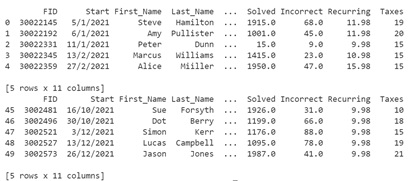
For this example, the first five (5) records from the DataFrame and the last five (5) records (tail) from the same DataFrame display.
df_fxs = pd.read_csv('finxters.csv')
print(df_fxs.head())
print(df_fxs.tail())
Output:
Finxter
MySQL 8.0 Functional Indexes
https://www.percona.com/blog/wp-content/uploads/2022/01/MySQL-8.0-Functional-Indexes.png
 Working with hundreds of different customers I often face similar problems around running queries. One very common problem when trying to optimize a database environment is index usage. A query that cannot use an index is usually a long-running one, consuming more memory or triggering more disk iops.
A very common case is when a query uses a filter condition against a column that is involved in some kind of functional expression. An index on that column can not be used.
Starting from MySQL 8.0.13 functional indexes are supported. In this article, I’m going to show what they are and how they work.
The Well-Known Problem
As already mentioned, a very common problem about index usage is when you have a filter condition against one or more columns involved in some kind of functional expression.
Let’s see a simple example.
You have a table called products containing the details of your products, including a create_time TIMESTAMP column. If you would like to calculate the average price of your products on a specific month you could do the following:
mysql> SELECT AVG(price) FROM products WHERE MONTH(create_time)=10;
+------------+
| AVG(price) |
+------------+
| 202.982582 |
+------------+
The query returns the right value, but take a look at the EXPLAIN:
mysql> EXPLAIN SELECT AVG(price) FROM products WHERE MONTH(create_time)=10\G
*************************** 1. row ***************************
           id: 1
  select_type: SIMPLE
        table: products
   partitions: NULL
         type: ALL
possible_keys: NULL
          key: NULL
      key_len: NULL
          ref: NULL
         rows: 99015
     filtered: 100.00
        Extra: Using where
The query triggers a full scan of the table. Let’s create an index on create_time and check again:
mysql> ALTER TABLE products ADD INDEX(create_time);
Query OK, 0 rows affected (0.71 sec)
Records: 0  Duplicates: 0  Warnings: 0
mysql> explain SELECT AVG(price) FROM products WHERE MONTH(create_time)=10\G
*************************** 1. row ***************************
           id: 1
  select_type: SIMPLE
        table: products
   partitions: NULL
         type: ALL
possible_keys: NULL
          key: NULL
      key_len: NULL
          ref: NULL
         rows: 99015
     filtered: 100.00
        Extra: Using where
A full scan again. The index we have created is not effective. Indeed any time an indexed column is involved in a function the index can not be used.
To optimize the query the workaround is rewriting it differently in order to isolate the indexed column from the function.
Let’s test the following equivalent query:
mysql> SELECT AVG(price) FROM products WHERE create_time BETWEEN '2019-10-01' AND '2019-11-01';
+------------+
| AVG(price) |
+------------+
| 202.982582 |
+------------+
mysql> EXPLAIN SELECT AVG(price) FROM products WHERE create_time BETWEEN '2019-10-01' AND '2019-11-01'\G
*************************** 1. row ***************************
           id: 1
  select_type: SIMPLE
        table: products
   partitions: NULL
         type: range
possible_keys: create_time
          key: create_time
      key_len: 5
          ref: NULL
         rows: 182
     filtered: 100.00
        Extra: Using index condition
Cool, now the index is used. Then rewriting the query was the typical suggestion.
Quite a simple solution, but not all the times it was possible to change the application code for many valid reasons. So, what to do then?
MySQL 8.0 Functional Indexes
Starting from version 8.0.13, MySQL supports functional indexes. Instead of indexing a simple column, you can create the index on the result of any function applied to a column or multiple columns.
Long story short, now you can do the following:
mysql> ALTER TABLE products ADD INDEX((MONTH(create_time)));
Query OK, 0 rows affected (0.74 sec)
Records: 0  Duplicates: 0  Warnings: 0
Be aware of the double parentheses. The syntax is correct since the expression must be enclosed within parentheses to distinguish it from columns or column prefixes.
Indeed the following returns an error:
mysql> ALTER TABLE products ADD INDEX(MONTH(create_time));
ERROR 1064 (42000): You have an error in your SQL syntax; check the manual that corresponds to your MySQL server version for the right syntax to use near 'create_time))' at line 1
Let’s check now our original query and see what happens to the EXPLAIN
mysql> SELECT AVG(price) FROM products WHERE MONTH(create_time)=10;
+------------+
| AVG(price) |
+------------+
| 202.982582 |
+------------+
mysql> EXPLAIN SELECT AVG(price) FROM products WHERE MONTH(create_time)=10\G
*************************** 1. row ***************************
           id: 1
  select_type: SIMPLE
        table: products
   partitions: NULL
         type: ref
possible_keys: functional_index
          key: functional_index
      key_len: 5
          ref: const
         rows: 182
     filtered: 100.00
        Extra: NULL
The query is no longer a full scan and runs faster. The functional_index has been used, with only 182 rows examined. Awesome.
Thanks to the functional index we are no longer forced to rewrite the query.
Which Functional Indexes are Permitted
We have seen an example involving a simple function applied to a column, but you are granted to create more complex indexes.
A functional index may contain any kind of expressions, not only a single function. The following patterns are valid functional indexes:
INDEX( ( col1 + col2 ) )
INDEX( ( FUNC(col1) + col2 – col3 ) )
You can use ASC or DESC as well:
INDEX( ( MONTH(col1) ) DESC )
You can have multiple functional parts, each one included in parentheses:
INDEX( ( col1 + col2 ), ( FUNC(col2) ) )
You can mix functional with nonfunctional parts:
INDEX( (FUNC(col1)), col2, (col2 + col3), col4 )
There are also limitations you should be aware of:
- A functional key can not contain a single column. The following is not permitted:
INDEX( (col1), (col2) ) - The primary key can not include a functional key part
- The foreign key can not include a functional key part
- SPATIAL and FULLTEXT indexes can not include functional key parts
- A functional key part can not refer to a column prefix
At last, remember that the functional index is useful only to optimize the query that uses the exact same expression. An index created with nonfunctional parts can be used instead to solve multiple different queries.
For example, the following conditions can not rely on the functional index we have created:
WHERE YEAR(create_time) = 2019
WHERE create_time > ‘2019-10-01’
WHERE create_time BETWEEN ‘2019-10-01’ AND ‘2019-11-01’
WHERE MONTH(create_time+INTERVAL 1 YEAR)
All these will trigger a full scan.
Functional Index Internal
The functional indexes are implemented as hidden virtual generated columns. For this reason, you can emulate the same behavior even on MySQL 5.7 by explicitly creating the virtual column. We can test this, starting by dropping the indexes we have created so far.
mysql> SHOW CREATE TABLE products\G
*************************** 1. row ***************************
       Table: products
Create Table: CREATE TABLE `products` (
  `id` int unsigned NOT NULL AUTO_INCREMENT,
  `description` longtext,
  `price` decimal(8,2) DEFAULT NULL,
  `create_time` timestamp NULL DEFAULT NULL,
  PRIMARY KEY (`id`),
  KEY `create_time` (`create_time`),
  KEY `functional_index` ((month(`create_time`)))
) ENGINE=InnoDB AUTO_INCREMENT=149960 DEFAULT CHARSET=utf8mb4 COLLATE=utf8mb4_0900_ai_ci
mysql> ALTER TABLE products DROP INDEX `create_time`, DROP INDEX `functional_index`;
Query OK, 0 rows affected (0.03 sec)
We can try now to create the virtual generated column:
mysql> ALTER TABLE products ADD COLUMN create_month TINYINT GENERATED ALWAYS AS (MONTH(create_time)) VIRTUAL;
Query OK, 0 rows affected (0.04 sec)
Create the index on the virtual column:
mysql> ALTER TABLE products ADD INDEX(create_month);
Query OK, 0 rows affected (0.55 sec)
mysql> SHOW CREATE TABLE products\G
*************************** 1. row ***************************
       Table: products
Create Table: CREATE TABLE `products` (
  `id` int unsigned NOT NULL AUTO_INCREMENT,
  `description` longtext,
  `price` decimal(8,2) DEFAULT NULL,
  `create_time` timestamp NULL DEFAULT NULL,
  `create_month` tinyint GENERATED ALWAYS AS (month(`create_time`)) VIRTUAL,
  PRIMARY KEY (`id`),
  KEY `create_month` (`create_month`)
) ENGINE=InnoDB AUTO_INCREMENT=149960 DEFAULT CHARSET=utf8mb4 COLLATE=utf8mb4_0900_ai_ci
We can now try our original query. We expect to see the same behavior as the functional index.
mysql> SELECT AVG(price) FROM products WHERE MONTH(create_time)=10;
+------------+
| AVG(price) |
+------------+
| 202.982582 |
+------------+
mysql> EXPLAIN SELECT AVG(price) FROM products WHERE MONTH(create_time)=10\G
*************************** 1. row ***************************
           id: 1
  select_type: SIMPLE
        table: products
   partitions: NULL
         type: ref
possible_keys: create_month
          key: create_month
      key_len: 2
          ref: const
         rows: 182
     filtered: 100.00
        Extra: NULL
Indeed, the behavior is the same. The index on the virtual column can be used and the query is optimized.
The good news is that you can use this workaround to emulate a functional index even on 5.7, getting the same benefits. The advantage of MySQL 8.0 is that it is completely transparent, no need to create the virtual column.
Since the functional index is implemented as a hidden virtual column, there is no additional space needed for the data, only the index space will be added to the table.
By the way, this is the same technique used for creating indexes on JSON documents’ fields.
Conclusion
The functional index support is an interesting improvement you can find in MySQL 8.0. Some of the queries that required rewriting to get optimized don’t require that anymore. Just remember that only the queries having the same filter pattern can rely on the functional index. Then you need to create additional indexes or other functional indexes to improve other search patterns.
The same feature can be implemented on MySQL 5.7 with the explicit creation of a virtual generated column and the index.
For more detailed information, read the following page:
https://dev.mysql.com/doc/refman/8.0/en/create-index.html#create-index-functional-key-parts
Planet MySQL
The CDC director just admitted over 3 in 4 Covid deaths were people with “at least four comorbidities” who were “unwell to begin with”
https://media.notthebee.com/articles/61dc70bcbbdad61dc70bcbbdae.jpg
When do the "conspiracy theorists" and "misinformation actors" get their social media accounts back?
Not the Bee
Thundercats Redrawn in HD
https://theawesomer.com/photos/2022/01/thundercats_redrawn_t.jpg

Animator xtremee_ghost loves the 1980s cartoon Thundercats so much that they created a remastered version of the show’s intro sequence. The new version features crisp, clean lines and vibrant colors in high-definition, versus the grainy old VHS transfers we’re used to seeing. Here’s the original for comparison.
The Awesomer
Comic for January 09, 2022
https://assets.amuniversal.com/d5abc33036a5013a89b9005056a9545d
Thank you for voting.
Hmm. Something went wrong. We will take a look as soon as we can.
Dilbert Daily Strip
Friday Funnies
https://gunfreezone.net/wp-content/uploads/2022/01/2022-here-we-go.jpg












A tongue-in-cheek look at an Air Force veteran
http://img.youtube.com/vi/kzLUcP6eTqQ/0.jpg
Here’s what its creator terms "A Hastily Created Documentary on the A-10 Warthog". I had to laugh. It’s only about 3 minutes long, but it’s fun.
A few grunts of my acquaintance, who relied on the Warthog to pull their butts out of trouble in the sandbox over several tours, also laughed as they watched it. I daresay even the A-10’s pilots will enjoy it.
Peter
Bayou Renaissance Man
New Lava-Like Coating Can Stop Fires In Their Tracks
sciencehabit shares a report from Science.org: It takes a lot of science to stop a fire. To prevent homes and workplaces from going up in smoke, manufacturers have added flame retardants to plastic, wood, and steel building materials for decades. But such additives can be toxic, expensive, and sometimes ineffective. Now, researchers in Australia and China have come up with a new flame retardant that, when exposed to extreme heat, forms a ceramic layer akin to hardened lava, squelching the flames before they spread. "This is very good work," says David Schiraldi, a chemist at Case Western Reserve University, who has developed other flame retardants. He notes that the ceramic’s starting materials aren’t particularly expensive or toxic, making it more likely to see widespread use. "[This] could impact public safety in the long run."
[The researchers] used three components. First, they created a mixture of several metal oxide powders — including oxides of aluminum, silicon, calcium, and sodium. That mix begins to melt at about 350C (below the temperature of most flames), forming a glasslike sheet. Next, the researchers added tiny flakes of boron nitride, which flow easily and help fill any spaces between the metal oxides as the glass forms. Finally, they added a fire-retardant polymer, which they described in ACS Nano in 2021. The polymer acts as a binder to glue the rest of the mixture to whatever it’s coating. That mix dissolved in water into a milky-white solution, which they then sprayed on a variety of surfaces, including rigid foam insulation, wood, and steel. After it dried, they blasted each coated material for 30 seconds with an 1100C butane torch. In each case, the coating melted into a viscous liquid, covering the material in a continuous glassy sheet.
When heated by the torch, coating spewed out nonflammable gases, such as carbon dioxide. As it did, it became more dense and formed a uniform, noncombustible char layer, which blocked flames from spreading to the materials underneath. The novel flame retardant protected rigid polymer foam — the kind used to insulate homes — better than more than a dozen commonly used retardants, the researchers report today in Matter. The new coating also excelled at protecting wood and steel. If sprayed on building materials during construction, the new coating could prevent disasters like the 2017 Grenfell Tower fire in London, where 72 people died, the researchers say.


Read more of this story at Slashdot.
Slashdot