https://death.andgravity.com/_file/query-builder-how/join-operator.svg
This is the fourth article in a series about
writing an SQL query builder for my feed reader library.
Today, we’ll dive into the code by rewriting it from scratch.
Think of it as part walk-through, part tutorial;
along the way, we’ll talk about:
- API design
- knowing when to be lazy
- worse (and better) ways of doing things
As you read this, keep in mind that it is linear by necessity.
Development was not linear:
I tried things out, I changed my mind multiple times,
and I rewrote everything at least once.
Even now, there may be equally-good â or better â implementations;
the current one is simply good enough.
Contents
- What are we trying to build?
- A minimal plausible solution
- Separators
- Aliases
- Subqueries
- Joins
- Distinct
- More tests
- More init
- Things that didn’t make the cut
What are we trying to build? #
We want a way to build SQL strings that takes care of formatting:
>>> query = Query()
>>> query.SELECT('one').FROM('table')
<builder.Query object at 0x7fc953e60640>
>>> print(query)
SELECT
 one
FROM
 table
… and allows us to add parts incrementally:
>>> query.SELECT('two').WHERE('condition')
<builder.Query object at 0x7fc953e60640>
>>> print(query)
SELECT
 one,
 two
FROM
 table
WHERE
 condition
While not required,
I recommend reading the previous articles
to get a sense of the problem we’re trying to solve,
and the context we’re solving it in.
In short, whatever we build should:
- support SELECT with conditional WITH, WHERE, ORDER BY, JOIN etc.
- expose the names of the result columns (for scrolling window queries)
- be easy to use, understand and maintain
Trade-offs #
Our solution does not exist in a void;
it exists to be used by my feed reader library.
Notably, we’re not making a general-purpose library with external users
whose needs we’re trying to anticipate;
there’s exactly one user with a pretty well-defined use case,
and strict backwards compatibility is not necessary.
This allows us to make some upfront decisions to help with maintainability:
- No needless customization. We can change the code directly if we need to.
- No other features except the known requirements.
We’ll add feature as needed. - No effort to support other syntax than SQLite.
- No extensive testing.
We can rely on the exising comprehensive functional tests. - No SQL validation. The database does this already.
- However, it would be nice to get at least a little error checking.
No need for custom exceptions, any type is acceptable â
they should come up only during development and testing anyway.
- However, it would be nice to get at least a little error checking.
A minimal plausible solution #
Data representation #
As mentioned before,
my prototype was based on the idea that
queries can be represented as plain data structures.
Looking at a nicely formatted query,
a natural representation may come to mind:
SELECT
    one,
    two
FROM
    table
WHERE
    condition AND
    another-condition
See it?
It’s a mapping with a list of strings for each clause:
{
    'SELECT': [
        'one',
        'two',
    ],
    'FROM': [
        'table',
    ],
    'WHERE': [
        'condition',
        'another-condition',
    ],
}
Let’s use this as our starting model, and build ourselves a query builder 🙂
Classes #
We start with a class:
|
|
We use a class because most of the time
we don’t want to interact with the underlying data structure,
since it’s more likely to change.
We’re not subclassing dict,
since that would unintentionally expose its methods (and thus, behavior),
and we may need those names for something else.
Also, a class allows us to reduce verbosity:
# we want
query.SELECT('one', 'two').FROM('table')
# not
query['SELECT'].extend(['one', 'two'])
query['FROM'].append('table')
We store various data as class variables
instead of hardcoding it or using module variables
as a cheap way to customize things (more on that later).
Also, using a variable makes it clearer what those things are.
For now, we refrain from any customization in the initializer;
if we need more clauses, we can add them to keywords directly.
We add all the known keywords upfront to get free error checking â
we can rely on data[keyword] raising a KeyError for unknown keywords.
We could use dataclasses,
but of the generated magic methods, we’d only use the __repr__(),
and most of the time it would be too long to be useful.
Adding things #
Next, we add code for adding stuff:
|
|
add() is roughly equivalent to data[keyword]â.extend(args).
The main difference is that we first dedent the arguments and remove trailing whitespace.
This is an upfront decision: we clean everything up and make as many choices when adding things,
so the part that generates output doesn’t have to care about any of that,
and error checking happens as early as possible.
Another difference is that it returns self,
which enables method chaining: queryâ.add(...)â.add(...).
__getattr__() gets called when an attribute does not exist,
and allows us to return something instead of getting the default AttributeError.
What we return is a KEYWORD(*args) callable made on the fly
by wrapping add() in a partial (this is the metaprogramming part);
a closure would be functionally equivalent.1
Requiring the keywords to be uppercase is mostly a stylistic choice,
but it does advantages:
it signals to the reader these are special "methods",
and avoids shadowing dunder methods like __deepcopy__() with no extra code.
We don’t even bother raising AttributeError explicitly,
we just let getattr() do it for us.
We could store the partial on the instance,
which would side-step __getattr__() on subsequent calls,
so we only make one partial per keyword;
we could do it upfront, in the constructor;
we could even generate actual methods,
so there’s only one per keyword per class!
Or we can do nothing â they’re likely premature optimization, and not worth the effort.
I said error checking error checking happens as early as possible;
that’s almost true:
if you look carefully at the code,
you may notice queryâ.ESLECT doesn’t raise an exception
until called, queryâ.ESLECT().
Doing most of the work in add() does some benefits, though:
it allows it to be used with partial,
and it’s an escape hatch for when we want
to use a "keyword" that’s not a Python identifier
(it’ll be useful later).
Output #
Finally, we turn what we have back into an SQL string:
|
|
|
|
The main API is str();
this requires almost zero effort to learn,
since it’s the standard way of turning things into strings in Python.
str(query) calls __str__, which delegates the work to the _lines() generator.
We use a generator mainly because it allows writing
yield line instead of rv.append(line),
making for somewhat cleaner code.
A second benefit of a generator is that it’s lazy:
this means we can pass it around
without having to build an intermediary list or string;
for example, to an open file’s writelines() method,
or in yield from in another generator
(e.g. if we allow nested subqueries).
We don’t need any of this here,
but it can be useful when generating a lot of values.
We split the logic for individual clauses into a separate generator, _lines_keyword(),
because we’ll keep adding stuff to it.
(I initially left everything in _lines(),
and refactored when things got too complicated;
no need to do that now.)
Since we’ll want to indent things in the same way in more than one place,
we make it a static "method" using partial.
You may notice we’re not sorting the clauses in any way;
dicts guarantee insertion order in Python 3.6 or newer2,
and we add them to data upfront,
so the order in keywords is maintained.
Tests #
To make sure we don’t break stuff that’s already working,
let’s add a simple test:
|
|
We’ll keep adding to it at the end of each section,
but since it’s not all that interesting feel free to skip that.
For a minimal solution, we’re done; we have 62 lines / 38 statements.
The code so far:
builder.py,
test_builder.py.
Separators #
At this point, the WHERE output doesn’t really make sense:
>>> print(Query().WHERE('a', 'b'))
WHERE
 a,
 b
We fix it by special-casing the separators for a few clauses:
|
|
|
|
We could’ve used defaultdict and gotten rid of default_separator,
but then we’d have to remember that the non-comma separators need a space (' AND');
it’s clearer to put it directly in code.
Also, we could’ve put the special separator on a new line ('one\nâAND two' vs. 'one AND\nâtwo').
While this is recommended by some style guides,
it makes the code a bit more complicated for little benefit,
and (maybe) makes it less obvious that AND is just another separator.
We add WHERE to the test.
|
|
The code so far:
builder.py,
test_builder.py.
Aliases #
One of the requirements is making it possible to implement on top of our builder
scrolling window queries.
For this to happen,
code needs to get the result column names
(the SELECT expressions or their aliases),
so it can use them in the generated WHERE condition.
The output of the following looks OK, but to extract alias programmatically,
we’d need to parse column AS alias:
>>> query = Query().SELECT('column AS alias')
>>> query.data['SELECT'][0]
'column AS alias'
Passing a pair of strings when we want an aliased column seems like an acceptable thing.
Since the column expression might be quite long,
we’ll make the alias the first thing in the pair.
>>> print(Query().SELECT(('alias', 'one'), 'two'))
SELECT
 one AS alias,
 two
As mentioned earlier, we’ll store the data in cleaned up and standard form,
so the output code doesn’t have to care about that.
A 2-tuple is a decent choice,
but to make the code easier to read,
we’ll depart a tiny bit from plain data structures,
and use a named tuple instead.
|
|
Conveniently, this also gives us a place where to convert the string-or-pair,
in the form of the from_arg() alternate constructor.
We could’ve made it a stand-alone function,
but this makes clearer what’s being returned.
Note that we use an empty string to mean "no alias".
In general, it’s a good idea to distinguish this kind of absence by using None,
since the empty string may be a valid input,
and None can prevent some bugs â e.g. you can’t concatenate None to a string.
Here, an empty string cannot be a valid alias, so we don’t bother.
Using it is just a one-line change to add():
|
|
On output, we have two concerns:
- there may or may not be an alias
- the order differs:
you haveSELECT expr AS column-alias,
butWITH table-name AS (stmt)
(we treat the CTE table name as an alias)
We can model this with mostly-empty defaultdicts with per-clause format strings:
|
|
To choose between "has alias" and "doesn’t have alias",
we take advantage of True and False being equal to 1 and 0
(this may be too clever for our own good, but eh).
|
|
We add an aliased expression to the test.
|
|
The code so far:
builder.py,
test_builder.py.
Subqueries #
Currently, WITH is still a little broken:
>>> print(Query().WITH(('table-name', 'SELECT 1')))
WITH
 table-name AS SELECT 1
Since common table expressions always have the SELECT statement paranthesized,
we’d like to have that out of the box, and be indented properly:
WITH
    table-name AS (
        SELECT 1
    )
A simple way of handling this is to change the WITH format string to
'{alias} AS (\n{indented}\n)',
where indented is the value, but indented.3
This kinda works, but is somewhat limited in usefulness;
for instance, we can’t easily build something like this on top:
Query().FROM(('alias', 'SELECT 1'), is_subquery=True)
Instead, let’s keep refining our model about values,
and indicate something is a subquery using a flag:
|
|
We can then decide if a clause always has subqueries,
and set it accordingly:
|
|
|
|
Using it for output is just an extra if:
|
|
We add WITH to our test.
|
|
The code so far:
builder.py,
test_builder.py.
Joins #
One clause that’s missing is JOIN.
And it’s important, changing your mind about what you’re selecting from
happens quite often.
JOIN is a bit more complicated,
mostly because it has different forms â JOIN, LEFT JOIN and so on;
SQLite supports at least 10 variations.
I initially handled it by special-casing,
considering any keyword that contained JOIN a separate keyword.
This has a few drawbacks, though;
aside from making the code more complicated,
it reorders some of the tables:
queryâ.JOIN('a')â.LEFT_JOIN('b')â.JOIN('c')
results in JOIN a JOIN b LEFT JOIN c.
A better solution is to continue refining our model.
Take a look at these railroad diagrams for the SELECT statement:
select-core (FROM clause)


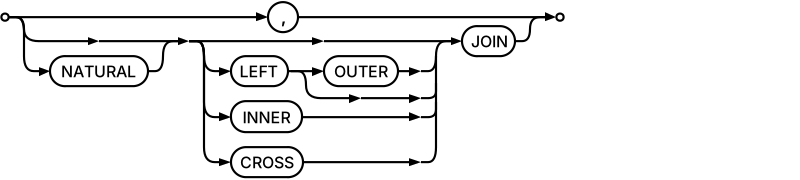
You may notice the table-or-subquery followed by comma in FROM
is actually a subset of the table-or-subquery followed by join-operator in join-clause.
That is, for SQLite, a comma is just another join operator.
Put the other way around, a join operator is just another separator.
First, let’s record which join operator a value has:
|
|
|
|
|
|
We could’ve probably just hardcoded this in add()
(if 'JOIN' in keyword: ...),
but doing it like this makes it easier to see at a glance that
"JOIN is a fake FROM".
Using keyword as a separator is relatively straightforward:
|
|
We add a JOIN to the test.
|
|
The code so far:
builder.py,
test_builder.py.
Distinct #
The final adjustment to our model is to support SELECT DISTINCT.
DISTINCT (or ALL) is like a flag that applies to the whole clause;
we’ll model it as such:
|
|
|
|
Since most of the time we’re OK with the default value of flag,
we don’t bother using an instance variable in __init__;
instead, we use a class variable;
setting flag on an instance will then shadow the class variable.
We set the flag based on a known list of keywords for each clause;
like with fake keywords, we pull the flag "parsing" logic into a separate method:
|
|
|
|
|
|
Using the flag for output is again straightforward:
|
|
We add a SELECT DISTINCT to our test.
|
|
The code so far:
builder.py,
test_builder.py.
More tests #
Since now the simple test isn’t that simple anymore, we split it in two:
one with a really simple query, and one with a really complicated query.
Like so.
|
|
The code so far:
builder.py,
test_builder.py.
More init #
One last feature:
I’d like to reuse the cleanup and indent logic to write paranthesized lists.
Good thing __init__ doesn’t do anything yet,
and we can add such conveniences there:
|
|
Using it looks like:
>>> print(Query({'(': ['one', 'two'], ')': ['']}, separators={'(': 'OR'}))
(
 one OR
 two
)
We could’ve required the data argument to have the same structure as the attribute;
however, that’s quite verbose to write,
and I’d have to instantiate _Things and clean up strings myself;
that’s nor very convenient.
Instead, we take it to mean "here’s some strings to add() for these keywords".
Note that if we ever do want to set the entire data structure,
we still can, with a tiny detour: q = Query(); qâ.dataâ.update(...).
We add a separate test for the fancy __init__.
|
|
We’re done; we have 148 lines / 101 statements.
Throughout this, even with the most basic of tests, coverage did not drop below 96%.
The final version of the code:
builder.py,
test_builder.py.
Things that didn’t make the cut #
When talking about trade-offs,
I said we’ll only add features as needed;
this may seem a bit handwavy â
how can I tell adding them won’t make the code explode?
Because I did add them;
that’s what prototyping was for.
But since they weren’t actually used, I removed them.
There’s no point in them rotting away in there.
They’re in git, we can always add them back later.
Here’s how you’d go about implementing a few of them.
Insert / update / delete #
Make them flag keywords, to support the OR $ACTION variants.
To make VALUES bake in the parentheses, set its format to ({value}).
That’s to add one values tuple at a time.
To add one column at a time, we could do this:
- allow
add()ing INSERT with arbitrary flags - make
INSERT('column', into='table')
a synonym ofadd('INSERT INTO table', 'column') - classify INSERT and VALUES as
parens_keywords
â likesubquery_keywords, but they apply once per keyword, not per value
It’d look like this:
# first insert sets flag
query.INSERT('one', into='table').VALUES(':one')
# later we just add stuff
query.INSERT('two').VALUES(':two')
Arbitrary strings as subqueries #
Allow setting add(..., is_subquery=True); you’d then do:
query.FROM('subquery', is_subquery=True)
query.FROM('not subquery')
Query objects as subqueries #
Using Query objects as subqueries
without having to convert them explicitly to strings
would allow changing them after being add()ed.
To do it, we just need to allow _Thing.value to be a Query,
and override its is_subquery based on an isinstance() check.
Union / intersect / except #
This one goes a bit meta:
- add a "virtual" COMPOUND keyword
- add a new
compound(keyword)method,
which moves everything except WITH and ORDER BY to a subquery,
and then appends it todata['COMPOUND']with the appropriate fake keyword - make
__getattr__return acompound()partial for compound keywords - special-case COMPOUND in
_lines()
That’s it for now. 🙂
Learned something new today? Share this with others, it really helps!
Want more? Get updates via email
or Atom feed.
This is my first planned series, and still a work in progress.
This means you get a say in it.
Email me your questions or comments,
and I’ll do my best to address them in one of the future articles.
-
I’m sorry. [return]
-
The guaranteed insertion order was actually added
to the language specification in 3.7,
but in 3.6 both CPython and PyPy had it as an implementation detail. [return] -
That’s what I did initially. [return]
Planet Python
 If you go through all the various blog sites, there are a ton of articles about various tips and tricks you can take away from concealed carry courses. In the past, I’ve written everything from my favorite carry handguns to accessories and even mindset articles, but I’ve never really talked about the certain tricks you […]