Liven Up Social Isolation With a G.I. Joe Marathon, Courtesy of Hasbro
https://ift.tt/39sfaWC
G.I Joeis both one of the cheesiest and one of the most fondly remembered of the ‘80s wave of toyetic action cartoons. Does it hold up to your nostalgia? Well, now, during this period of widespread social distancing amidst the novel coronavirus pandemic, is certainly the time to find out.
And knowing is half the battle, so here’s some good info for you: Hasbro has uploaded fifteen full episodes of the classic show to YouTube. You can find them here. That’s almost seven hours of G.I. Joejoy, from the saga of The M.A.S.S. Device to the Pyramid of Darkness arc, because, apparently, this show had arcs? Lasting like five episodes each? I’m going to be real with you, I’m a ‘90s kid, I’m not nearly as much of a Joe expert as some of our other staffers.
But I know that this is the perfect time to watch a lot of television, especially television that imagines a government-like organization that’s both heroic and competent. The world is a scary, complicated place, but in the bastion of cartoons there are simple problems and simple solutions, solutions that often involved buying action figures. And since, for most of us, the most helpful thing we can do right now is just stay home, it seems entirely appropriate to indulge that sort of escapism.
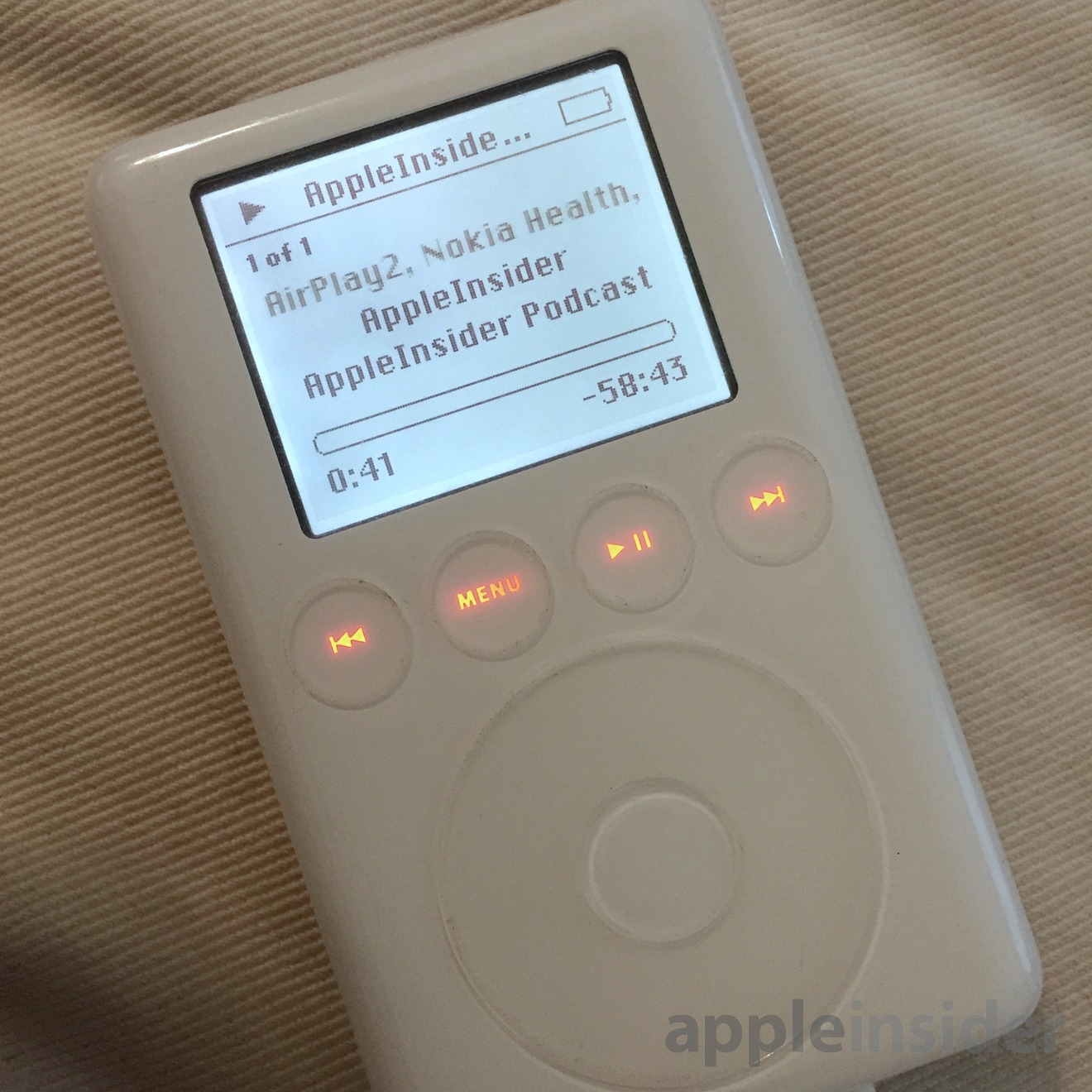
How to revive an iPod with a hard drive using flash storage
https://ift.tt/3bz9o6O
Even now, years after the hard drive-based iPod was discontinued, apps have attempted to recreate its interface, movies have featured it as major character props — and there are a small number of people continuing to use them. Here are the details for how you can revive yours, too.
Duke University uses vaporized hydrogen peroxide to clean N95 face masks for reuse
https://ift.tt/2UrtsCF
With shortages of N95 face masks persisting nationwide, healthcare facilities are scrambling to find ways to clean and treat the masks for reuse to protect doctors and nurses most at risk of exposure to COVID-19.
Duke University thinks it has found a solution using vaporized hydrogen peroxide to decontaminate the masks.
The process uses specialized equipment to vaporize hydrogen peroxide, which can then infuse all the layers of the mask to kill germs (including viruses) without degrading mask material.
“This is a decontamination technology and method we’ve used for years in our biocontainment laboratory,” said Scott Alderman, associate director of the Duke Regional Biocontainment Laboratory, in a statement.
The University said it has proven effective and will begin using the technology at all three of its hospitals, according to Matthew Stiegel, the director of the Occupational and Environmental Safety Office at Duke.
Ideally, the hospitals would be able to use fresh masks and not need to try to decontaminate their masks, but these are not ideal times.
Duke’s decision to use hydrogen peroxide to decontaminate N95 masks is based on published studies conducted in 2016, but the practice wasn’t widespread, because the industry wasn’t facing shortages. Those earlier studies also didn’t include fit-testing — or the resizing of masks for individual wearers — after cleaning. Duke has now done that efficacy testing in the real world, the university said.
“The ability to reuse the crucial N95 masks will boost the hospitals’ ability to protect frontline health care workers during this time of critical shortages of N95 masks,” said Cameron Wolfe, M.D., associate professor of medicine and infectious disease specialist.
Monte Brown, M.D., vice president at Duke University Health System, said the Duke team is working to spread the word about the technique, making the protocols widely available. He said several health systems and many pharmaceutical companies already have the needed equipment, which is currently used in different ways, and could ramp up operations to come to the aid of their local hospitals.
“We could stand up in front of our staff and state with confidence that we are using a proven decontamination method,” Brown said. “It has been a proven method for years. While this alone will not solve the problem, if we and others can reuse masks even once or twice, that would be a huge benefit given the current shortages.”
While supplies last, you can snag them and mute the entire world around you for $238, which is $60 less than usual, and the cheapest we’ve ever seen on Amazon.
And, sure, that’s is still a big investment, but if you spend a lot of time in noisy planes and trains, or if you work in an open, or even need to focus while working from home you won’t find a better set of headphones.
Aukey 7-in-1 USB C Hub | $26 | Amazon | Clip the on-page coupon and use the promo code PCWW5MPOGraphic: Tercius Bufete
Use your laptop like an absolute pro with this incredibly affordable Aukey 7-in-1 USB C Hub. If you find that your fancy new MacBook Pro’s ports aren’t quite versatile enough, this would go a long way in fixing that.
For $26, you can connect a ton of stuff your laptop. Thanks to this hub, you’ll add two standard USB ports, a micro-SD and SD card reader, and HDMI port. Better still, it offers USB-C 100W PD pass-through.
Just make sure clip the on-page coupon and use the promo code PCWW5MPO at checkout to see the $26 price.
Cats and dogs are great, but they can’t quite do what robot vacuums like this $110 Goovi can (after clipping an Amazon coupon). It will undoubtedly be your best friend once you realize how much time and effort it’s saving you on cleanup day. You can give it a cute pet name, and it even goes to do its business (charge, not poop) without you having to train it.
It seems like you can’t sneeze or cough these days without drawing a death stare. An air purifier may not protect you from something like, say, an airborne virus, but it can at least suck up all the tiny dust particles and pollen that keep you allergies in check. This Hamilton Beach TrueAir Purifier with HEPA filter is usually $60, but you can take 15% off with coupon code TRUEAIR15.
Like most other purifiers, it claims to capture 99% of anything as small as three microns, but unlike a lot of others, it has a permanent filter that doesn’t need replacing. If you’re tired of your daily dose of Benadryl, then this could save you a ton of headache and money in the long run.
Get ready for your social distancing-appropriate hike with a discounted Stanley White Adventure Shot Glass And Flask Set. This particular set includes: an 8 oz. flask, four 2 oz. shot glasses, and a stainless steel carrying case. Typically selling for about $34, this is the lowest price we’ve ever seen on this particular set.
Each part is made with BPA-free 18/8 stainless steel, so they’re built to last. Order yours now, while supplies last.
Real talk, now is the time to spring clean your wardrobe. Think about it, everyone is stuck inside with no one to impress. Naturally, the deals are gonna be real cheap. And with our exclusive promo code KINJA15, this includes Cashmere Boutique where you can get the already discounted men’s cashmere polo sweater for an additional 15% off.
Normally sold for $259, this plus the 67% markdown already in place, brings your total cost down to $110. But that’s not all. Until midnight tonight, you can save 40-50% on all cashmere products, no checkout code required. Shop men’s cardigans, ladies’ cashmere coats, scarves, throws and blankets, and even pure cashmere dog clothes in case your pupper gets nippy.
Tech Shirt Sale | $35-$39 | JACHS NY | Use the promo code TECH at checkout.
Dress to impress everyone (from six feet away) with this awesome Tech Shirt Sale from JACHS NY. Use the promo code TECH at checkout to drop the price on a number off spring-ready button-ups starting at a low $35.
JACHS says their 4-way ultra-stretch fabric is “designed to keep you comfortable and move with you. Moisture wicking properties will keep you cool and dry all season long.”
While no one out there will be judging how you look (considering… everything,) it never hurts to be ready with a fresh new look for when you are allowed to hang with all of your cool friends again.
Anthropologie, as you may know, is one of our faves, and right now they’re kicking off the weekend early with an additional 50% off already marked-down sale items. Shop clothing, home and furniture, plus-size items, petite, shoes and accessories, and *lets out breath* beauty and wellness.
That’s a whole lot of sales from a store that normally caters first and foremost to affluent taste. Feeling militant right now? You can get this badass camo sweatshirt, for instance, for just $20 at checkout. In the mood to relax in a comfy bed with a good book and mood lighting? Consider pairing this $8 candle with a Helen Dealtry velvet garden quilt and a set of color-tipped pillows.
No matter your style or preference, you’re bound to find something for you in Anthropologie’s weekend-long extra 50% off discounted items sale. Get off to an early start and peruse all the offerings before they’re gone.
You may not be able to travel right now, but you sure can walk. Don the Rhodes Footwear “Huxley” Chelsea Boots—$176 at 22% off. Strut down your neighborhood sidewalk, six feet away from the nearest person, and watch them seethe with envy as you undergo your transformation into the Coolest Kid in town.
Described by Huckberry themselves as “the perfect blend of style and function,” the Huxley boots are designed for the everyday wearer looking to sport the weekend look. When every day is the weekend, this premium calf lather shoe is comfortable and long-lasting, kinda like what you’d want to wear out to the park for 30 minutes to an hour of allotted exercise per day.
REI membership is required to take advantage of this deal. Not a member? A lifetime membership is available for just $20. That’s a great deal, when you consider how often REI sales occur and all the perks it has.
This sale lasts until the first week of April, so you have time to shop around. But remember, the best stuff always disappears early. So get yours before some ruggedly handsome rando takes your stuff.
Ladies, Spring is here and Summer is right behind it, so now is the perfect time to find your new look. PUR is taking up to 35% off all purchases depending on how much money you spend. Every order gets 20% off with code SAVEMORE20. From there, the savings jump the more you spend:
25% Off $50 or more (SAVEMORE25)
30% Off $75 or more (SAVEMORE30)
35% Off $100 or more (SAVEMORE35)
Your money might go furthest with the 4-in-1 collection, which features products that promise multiple side benefits beyond setting your perfect tone.
Need help sleeping? No judgement here. Luckily for you, Amazon dropped the price on a 90-count bottle of Natrol Melatonin Time Release Tablets down to a low $2 to help you catch more Z’s.
Natrol says that Melatonin “helps you fall asleep faster, stay asleep longer, and wake up feeling refreshed.” So, all good things.
In fact, it’s amazing that anyone could possibly sleep soundly in these circumstances. This is the lowest price we’ve ever seen on this particular bottle, so you won’t lose sleep because of it.
There’s a shaky history behind antivirus software, mostly due to high cost, obtrusive ads, spyware, and a knack to gorge on system resources. Lots of programs have improved in all of those areas over time, such as Webroot, which makes an antivirus app designed specifically for gamers that’s $10 off at Amazon today. You’ll get a full year of coverage for one computer for that price.
Webroot combines its deep threat definitions and scanning with a lightweight UI, faster scans, and a system optimizer that helps keep your operating system running its best.
If you’re a student who needs internet access to keep up with studies, Comcast wants to woo you with a $150 Visa gift card. All you’ll need to do is prove you’re a student, and you’ll get the free money as long as you’re on the Performance Starter+ Internet, Choice TV Select Double Play, or Choice TV Select Double Play+ packages. Note that this offer only extends to students who have been forced to live off-campus. Those still firmly entrenched in dorm life need not apply. The deal is on through June 1, 2020.
Whether you’re into food, travel, fashion, tech features, or anything in between, Amazon has a year-long digital magazine subscription to sell you for as little as $5. Your options include Bon Apetit, Allrecipes, WIRED (congrats Alan!), Popular Mechanics and a whole lot more.
It’s pretty likely you have some spare time on your hands, so why not load your Kindle with a few magazines, and learn some new recipes?
Buying a new laptop—in this economy!?!?! I don’t think so. Back Market’s got what you want, certified refurbed, environmentally friendly, and still downright sexy. And right now, they’re offering $10 off your first purchase with the promo code SPRING2020 to celebrate their new dedicated Remote Work shop.
Looking for trustworthy editorial recommendations of the best laptops? You could check with Gizmodo (open link in new tab and come back pls!). Or, Back Market themselves have curated a list of older laptops that are still just as good for working at home. Their number one pick is the MacBook Air ($329), followed closely by the Microsoft Surface (Pro 4; $379).
Razer makes some of the best gaming keyboards on the market, including this BlackWidow TE Chroma v2 Mechanical Gaming Keyboard, which is down to just $70. You can choose from three distinct Razer proprietary switch types: green (tactile and clicky,) orange (tactile and silent,) and yellow (linear and silent.)
I love that Razer includes a magnetic wrist rest to keep you comfy even during the competitive grind. Oh and, of course, this tenkeyless keyboard glows in all of Razer’s Chroma RGB lighting. It’s fun!
It’s back! Right now, Amazon and Target are selling Pokemon Sword for just $49. I’ve spent 75 130 hours on Pokemon Sword, and I can tell you that it’s the Pokemon game I’ve been waiting years for. And this a dollar off the best deal we’ve seen on this incredibly good Nintendo Switch game.
As it often does for hot new games, Amazon is taking $10 off pre-orders for Cyberpunk 2077, the ambitious open-world game by CD Projekt Red, makers of the critically acclaimed The Witcher 3: Wild Hunt. Your total is $50 with the deal, and that goes whether you buy on PlayStation 4, Xbox One, or PC.
Unlike Geralt of the ancient (and totally fictitious) land of Rivia, Cyberpunk takes us into a not-so-distant future where guys good and bad are yoked up with cybernetic enhancements. Life is generally fine until it’s discovered there’s a prototypical component that grants immortality to whoever has it installed, and, of course, all hell breaks loose to secure it.
Cyberpunk 2077 was originally set to be out this Spring, but it has since been delayed to September 17, 2020. Pre-order now, and Amazon will offer you the lowest price if it drops again before release date.
TECH
HOME
LIFESTYLE
GAMING
DEALS YOU MAY HAVE MISSED
Need more space? You’ll save a lot more money buying mechanical hard drives, but if you’re ready to commit to solid-state on a bigger level, today is the perfect time to upgrade. Newegg has the 1TB HP EX950 M.2 solid-state drive for $130. Not feeling HP? Western Digital’s track record in reliability is unmatched, and its 1TB WD Black M.2 SSD is also discounted with promo code EMCDEFM34, though you’ll be paying handsomely for that brand safety at a final price tag of $180.
These M.2 solid-state drives interface with PCIe 3.0 x4 via an NVMe interface. For those who don’t speak Klingon, that just means they’ll load your files, games, and operating system faster than just about anything else out there right now. You’ll need to make sure your motherboard is compatible, though. Just look for an M.2 slot, and chances are you’ll be good to go.
With so much more in-home traffic to contend with, you’re probably tired of sweeping all the excess dirt and dust that’s accumulating. Let Anker help with its eufy Boost IQ 11S robot vacuum, which has roughly twice the power of its predecessor and sits on Amazon with a $70 discount down to $180 right now. It can go for over an hour and a half before needing to recharge, and you don’t even need to touch it for that—the little fella finds its own way to the charging base, thank you very much.
Walmart is clearing out all of their Ferrero Rocher gift boxes and, of course, you should consider picking a couple up. You’ve got two options: a standard one with the Ferrero Rocher Hazelnut that you’re super familiar with for $13 and the one with dark chocolate and coconut added in for $16. Personally, I think the standard 42-count is the better option. I mean, why mess with perfection?
The downside? Walmart is basically forcing you to buy two (tragic, no?) to get free shipping. Regardless, it’s a great option.
And, for what it’s worth, I think I’ll be ordering a few myself to send to a few friends during this crappy time.
Summer barbecue season is inching closer and closer, so it might be time to invest in a truly great meat thermometer, and you can score a rare 20% discount on one of the the best one today.
Our readers love the Thermapen because it displays the temperature in 2 – 3 seconds, has a 3,000 hour battery, is waterproof, and is accurate to within 0.7°F.
Here are just a few readers gushing over it:
Thermapen Classic (or really any of the Thermapens). Bar none the best thermometer for cooking I have ever bought — accept no substitutes.
Somewhat expensive at ~$70-$120 range, but I’ve been using mine for years and years, and it still gives me an accurate reading in less than three seconds. Well, well worth the price. Especially excellent for the grill. – theburners
Without a doubt. No other thermometer comes close. I’ve said it before on Kinja that the Thermapen is the best piece of kitchen equipment I’ve ever bought. – the-return-of-samba00
This model is actually the newer Mk 4., which unlike the Thermapen classic includes a backlit screen, better waterproofing, better battery, and a motion sensor that automatically puts it to sleep and wakes it up.
Tear those Amazon boxes a new one with this discounted pocket knife. Despite it’s diminutive build, this steel blade packs a lot of useful features including a bottle opener, lanyard hole and a liner lock. Plus it’s only $7.
Just because you’re stuck inside doesn’t mean you shouldn’t be practicing your skincare routine. If you haven’t already tried them yet, Purlisse is offering its full-sized creams, balms, and moisturizers for 30% off, and all you’ll need to do is use code FACE30 at checkout. Buy $50 or more in product, and you’ll get free shipping, too. Some choice highlights include this Watermelon Aqua Balm, plus the Blue Lotus and Perfect Glow BB moisturizers, both of which include SPF 30 sunscreen (not that you’ll need it much right now). You can buy once or subscribe to regular shipments, and you can pay for it over four months’ time with Afterpay.
Want to relive classics like The King of Fighters, Fatal Fury, and Metal Slug 3? Then break out that Ulysses S. Grant, because the international edition of the arcade cabinet-fashioned SNK NeoGeo Mini is $50 on Amazon right now. It’s small enough that you can carry it around on walks out to the park. The instant save/load function makes it easy to pick up and put down on a whim.
With a 3.5-inch screen, 40 classics from one of the golden eras of gaming, and a built-in joystick and stereo speakers, it’s a fun little system to play at home or on the go. HDMI-out makes it possible to bring your session to the big screen, and a USB power supply means you can hook it up to your portable charger of choice for a truly wall outlet-free experience.
Wireless charging isn’t always the way to go in a pinch—you’ll still be yearning for the speed of wires in dire times—but you can’t argue with the convenience. If you haven’t already littered your car and home with them, Anker presents a perfect opportunity to try its PowerWave fast wireless charging pad for a hair less than $10. It provides up to 10W charging speeds for Samsung Galaxy smartphones and iPhones, plus anything else with standard Qi wireless charging contacts, such as Apple AirPods or the Apple Watch.
Whether you’re setting up a makeshift home theater or you’re looking for fun ways to shake up your work-from-home setup, a projector can change where and how you view everything, and we have an exclusive deal for one of Anker’s best. For a limited time (through March 31), you can take 35% off the Anker Nebula Prizm II when using promo code KINJA2240 at Amazon. Your final damages come to $170.
The Nebula Prizm II supports 1080p HD for picture sizes ranging anywhere between 40″ and 120″. There are also built-in speakers for your convenience, and your connection possibilities should be endless with HDMI and USB Lightning ports on the rear.
“They sound terrific, with a U-shaped EQ pattern that emphasizes the highs and lows for a punchy, lively soundscape,” said our own Shep McAllister of the Status BT One headphones just last year. “It’s a surprising approach [from] the company that made its name on the purposely flat-tuned CB-1s, but it works.”
At the time of that writing, the BT Ones were sold at an MSRP of $99. Now, they’re $59 with our exclusive promo code KINJA20. Plug it in at checkout for 40% off the going rate, and know that 10% of that sale is being donated to the Musicians Foundation COVID-19 fund. Maybe buy a second pair for a for a family member or roommate—even a friend if you’re willing to ship.
Whatever you do, your ears will be pleased and your conscious clear with this high-fidelity and highly philanthropic discount on one of the best-sounding, not to mention comfortable and aesthetically restrained, on-ear Bluetooth headphones you can get for under a hundred bucks.
Instant Pots were thekitchen appliance of the past few years, and now Instant Pot also makes a blender. The Instant Pot Ace 60 Cooking Blender can heat and puree at the same time, which will make cooking up soups, bisques, and rice milks really simple. Plus it can even make cold desserts, too!
… of course, it can still function like a regular blender, too. If you’re into smoothies, or something.
This is one of the best prices we’ve seen on this particular blender. So if you’re looking for a cool blender with a ton of added features, this is the one to get. And it’s $60—that’s basically an impulse buy.
Keep your leftovers and store non-perishables with this 42-piece set of Rubbermaid storage containers, which is usually $40, but Walmart is letting it all go for just $18. You’ll get multiple containers in each capacity, from half a cup right on up to seven, each with a matching blue top. These containers are more vertical than horizontal, they’re freezer and dishwasher safe, and the lids can snap onto each other and onto the base of the containers, which, quite frankly, might be a bonafide killer feature.
Today might feel hopeless. Hell, these last couple weeks have been tough for all of us. You might be in isolation, but you’re not alone. Because now you have 17% off all CBD oil tinctures from CBDistillery using the promo code KINJA17, bringing the total cost down to $50.
One tincture gives you 33mg of CBD oil per serving and 3mL in total, just enough to catch a vibe and fall asleep free of socioeconomic distress. It’s recommended that, when taking CBD, you only consume about 30-60mg a day, so this is a good way to get your dose in.
Clear your mind and free up some of that bandwidth currently occupied by stress with some much-needed CBD oil. Maybe mix it up a bit and add it to your tea along with butter or whole milk so it properly dissolves.
While you’re sitting at home waiting for this entire COVID-19 thing to blow over, you’d be glad you invested in a pair of Spring Stretch Dock Pull On Shorts from JACHS NY. Perfect for sitting on the couch, working on the computer or staring outside the window, these shorts are a serious upgrade from those ratty old sweatpants or gym shorts you’ve been faffing around in.
These shorts come in a variety of patterns and styles and start at a low $29.
Mountain Hardwear sells clothes that outdoorsy people love, and today through April 5, you can take up to 65% off select items when using promo code SPRING65. You’ll find lots of compression hoodies, insulated jackets and pants, gloves, and even a few flannel shirts to speak to you inner Al Borland. There are styles for both men and women, and the advertised prices dip even further with the promo code, such as this $236 jacket that gets $70 cheaper following the discount, so get what you need before your next big hiking trip.
In times like these, stress can creep up on you like stink after a weekend of nonstop gaming. Take it from someone who has greys at the ripe age of 31—you should do everything you can to destress. If you’re having trouble, why not give these Bekno hemp oils a try? Right now, you can get a 3-pack of 30,000mg oils for $40 after clipping the coupon at Amazon.
Unlike many other hemp oils, these are infused with healthy vitamins and fats to promote good mental health, metabolism, and a strong immune system. They also have pain-relieving properties. Take a few drops and you might be able to get that deep night of sleep that has long conspired to elude you.
Now’s as good a time as ever to finally live out your High Fidelity dreams and buy that record player you’ve been talking your friends’ ears off about for years now. (No, I’m not projecting!) Why? Because this Victrola 3-in-1 Bluetooth suitcase turntable which is ~portable~ mind you, is 30% off with the promo code VICTROLA30, bringing the total cost down to $37.
Whether from your phone or your authentic vinyl record collection, you can bump classics to your heart’s desire until the sun comes up. Who cares, we’re all stuck at home anyway! And while you’re at it, maybe peruse some new records too. You never know when your song of the summer will touch down.
These days, few joys exist outside of TV. Myself, I can’t help myself. I’ve been binge-watching Friday Night Lights on Starz every night until my eyes hurt. Join me, friends, and sign up for Sling TV today. Pay for 2 months upfront and you’ll be treated to a complimentary Amazon Fire TV Stick.
Whether you want to watch the news and cower in fear like the rest of us, or escape into fictitious worlds in which things are bad in different ways, Sling TV’s got you covered. Stream channels like CNN, HGTV, Comedy Central, and more on virtually any smart device you’ve got lying around your house collecting dust. Or, you know, that free Fire TV Stick I told you about.
Some games just can’t be played on anything other than a GameCube controller. We’re looking at you, Super Smash Bros. Ultimate. If you can’t find an adapter for your old GameCube controller to use on the Nintendo Switch and you’re not an insufferable purist, give PowerA’s wireless controller a shot, which sits at $40 on Amazon right now.
It’s all gold, and PowerA does well to preserve the classic GameCube feel by staying true to the buttons’ original colors. Plus, it lasts 30 hours on just two AA batteries, so you should never have to suffer gaming downtime with a set of rechargeables rotating in and out. The only downside is you’ll be missing out on rumble and any features that require NFC, such as amiibo.
If you’re uninterested in Doom or don’t think Animal Crossing is quite your things, well, there’s always Borderlands 3. And right now, you can own a copy on PS4 and Xbox One for just $20. That’s a pretty sweet deal.
It’s a really fun co-op game. In fact, I played it with three other friends and it was a beautifully, messy hoot and well worth $20. This is the best price we’ve seen on the standard edition.
If you’ve stocked up on a lot of Nintendo Switch Joy-Cons for some big family fun, a charging dock is almost mandatory. HyperX’s Chargeplay Quad offers you such a solution from a tried and true brand for 50% off the list price, bringing your final total down to $15. As the name implies, you can throw four Joy-Cons onto the thing. Combine that with the two that’ll charge when connected directly to your Switch, and your Mario Party sessions should never be derailed by the dreaded low battery warning.
Control is one of the best (and most talked about ) games of last year, is down to just $30 for PS4 or Xbox One at Best Buy. This is the lowest price we’ve seen on this particular game and a tremendous deal to boot.
In their review, Kotaku says:
Control is the latest game from the makers of Max Payne, Alan Wake, and Quantum Break. It’s a twisted, haunting odyssey through an old post-WWII office building under siege by parasitic beings from another dimension. Control has all the standard elements of a regular third-person shooter, but its exhaustive world building and all-consuming eeriness make it much more.
Canceled conferences will force startups to focus on scalable lead generation
https://ift.tt/2Jk2VR7
Dan Wheatley Contributor
Dan Wheatley is CEO/co-founder of StraightTalk Consulting, a SaaS operations and growth consultancy that works with B2B founders to implement long-term, data-driven growth strategies.
Described by Sequoia Capital as the black swan event of 2020, the long-term economic fallout of the COVID-19 pandemic on startups is still to be seen. However, one effect which is sure to disrupt the MO of many early-stage startups is the cancellation of events and conferences.
According to Forbes, more than 35.3 million people who were planning to attend an event have been forced to change their plans in recent months. And while some might lament being forced to leave their Metallica T-shirts and 2020 Summer Olympics flags in the cupboard, many startup founders are biting their nails at the prospect of lost leads and connections from events and conferences.
The silver lining: Forcing founders to wean themselves off conferences and events as a “go-to” business development tactic might not be a bad thing in the long run.
Based on my experience, many early-stage startups waste lots of time and resources doing the rounds at events without clear aims, using up lots of the founder’s time, without driving much business value. At an early stage in a startup’s journey, every tactic used needs to drive real ROI and ultimately be driving new business opportunities.
So let’s look at why missing out on events might not be the end of the world, and how startups can focus their time, energy and resources on more scalable and consistent lead-gen activities.
What’s my beef with startup events and conferences?
Once again our dear Sliding Into Oblivion Actress Alyssa Milano shows why Hollywood treat their women as disposable furniture:
That was yesterday and it would not have been so bad in her quest for the ultimate Trump Hate Tweet if it wasn’t because rather than trying to spend millions retrofitting buildings not designed to be hospitals, the president had announced 2 days earlier that the USNS Comfort was to be deployed to New York City and it is arriving next Monday.
That is a 1,000 bed hospital with all the goodies of a modern land-based brethren and staffed with 956 fully trained Navy hospital personnel. And if that was not enough, it just finished having a full retrofit so basically what you have is a fully ready hospital that will start taking care of sick New Yorkers once it is anchor is dropped and the lines tied.
If Alyssa Milano wants to do something useful in this time of quarantine, she should do livestreaming strip teases and pole dancing in PornHub and have people send the dollar “tips” to their local homeless shelter. Other than that, she is pretty useless.
PA Sheriff, NRA Team Up To Offer Online Training For New Gun Owners
https://ift.tt/39hPrjr
While gun control activists are using the current coronavirus pandemic to push for the closure of gun stores and scolding Americans who’ve purchased a firearm for the first time, Second Amendment organizations are pushing a true gun safety agenda. In the Philadelphia suburbs of Bucks County, for instance, Sheriff Milton Warrell recently offered a free online training course for new gun owners with the help of the NRA.
After some technical difficulties were sorted out, hundreds of people tuned in to the Facebook livestream for the training.
Sheriff Milton Warrell of the Bucks County Sheriff’s Office says recently, their daily number of licenses to carry issuance have doubled.
“A large percentage of the ones we are issuing are brand new carrying licenses to people that have never had one before in their life. That’s a brand new issuance,” Warrell said.
This pushed him to organize the training in partnership with the NRA to help new gun owners get educated on proper gun safety.
“Gun safety, gun storage, how to clean your weapon, proper storage of it,” he said.
Kudos to Sheriff Warrell for doing this instead of wringing his hands and ordering gun stores to close over the prospect of a lot of Americans exercising their rights for the first time, which was the reaction of Los Angeles County Sheriff Alex Villanueva in California. Warrell’s being proactive and protective of the rights of residents, and it sounds like the virtual training course was well-attended and well-received.
Of course there were a few technical issues, especially at the beginning of the online course (which you can watch here), but the sheriff’s office says they plan on hosting another virtual class for those who had any problems accessing the live stream.
I know sheriffs around the country are likely pretty busy at the moment, but the more we see of training events like this, the better. Not only is it a valuable service to ensure that new gun owners get the basics of safely handling, storing, and cleaning their firearms, but it’s a great opportunity for local sheriffs to engage with their constituents as well as show support for their Second Amendment rights.
Just as some gyms are bringing their classes online, we need to be looking at ways to do the same with basic firearms safety courses. Whether it’s offered by the local sheriff or the local range, there are likely hundreds of thousands of new gun owners around the country, and it’s important that they have access to the basics of gun ownership. Not all of them will be able to reach out to a long-time gun owner for advice. Heck, a lot of these new gun owners may not know any other gun owners at all. An online course isn’t a perfect substitute for a few hours at the range and in-person instruction, but it’s definitely better than simply telling people not to buy a gun, which is the only kind of “training” that gun control groups are offering.
Cam Edwards has covered the 2nd Amendment for more than 15 years as a broadcast and online journalist, as well as the co-author of “Heavy Lifting: Grow Up, Get a Job, Start a Family, and Other Manly Advice” with Jim Geraghty. He lives outside of Farmville, Virginia with his family.
#TrumpPills and an Easter date for economy resurrection
Pelosi’s explanation for her pork-laden bill
People dying because 5 day test required to get meds
Texas LT Governor Dan Patrick is wrong
CNN FAKE NEWS on mask sterilization
If you would like my channel to have a wider audience and higher production quality, please donate via my startup (Whenhub.com) at this link:
I use donations to pay for the daily conversions of the original Periscope videos into Youtube and podcast form, and to improve my production quality and search results over time.
‘Picard’ finally shows us how ‘Star Trek’s’ technology evolves
https://ift.tt/2QKjzgR
This article contains spoilers for the first season of ‘Star Trek: Picard’ up to episode nine.
Star Trek: Picard is the show I’ve been looking forward to for 17 years. Not because I was particularly interested in finding out what happened to Picard, Troi, Riker and the rest. (But don’t get me wrong, it’s nice to check in with old friends.) Instead, it’s because we finally get to see what happens next in the Star Trek universe. We finally get to see it grow, both ideologically and technologically.
Star Trek at its core is a series of themes and ideas. A post-scarcity economy where the members of the Federation are free from hunger and poverty. A society of people focused on bettering themselves. Part of that focus is the desire is to see what’s out there and explore the universe. We’ve seen variations on that idea throughout the different series, but the core has always been there, even when things get dark (and this season of Picard has been particularly grim).
But behind those abstract themes is a more practical one: the role of technological progress. People can be free from want because there are replicators to make whatever they need. They can explore the galaxy because they’ve invented starships that can travel at warp speed and transporters that can beam them to alien surfaces in the blink of an eye.
The different series have embraced these technologies not just as tools, but as devices around which to build entire plots. How many episodes involve transporter malfunctions? Or a holodeck on the fritz? How often is an exploding warp core a problem? (The answer to all of these from a safety standpoint is "too much.") Technology is a huge concern in the Star Trek universe, and as the overall story arc of the franchise moves forward, so has its technology.
Concepts introduced in one episode may be used again later, and even iterated on. The time-travel technique Spock used in the fourth film, The Voyage Home, was introduced in the original series (TOS) episode ‘Tomorrow is Yesterday.’ In season six of The Next Generation (TNG) we see a Ferengi scientist invent "metaphasic shielding" so ships can journey into a star’s corona, and one season later the Enterprise-D employs this very technology to escape from an enemy.
Sometimes those technological concepts go beyond just one or two episodes and become more of an ongoing theme, with each appearance building on the technology and its societal effects. The original series introduced the idea of transporters, which convert matter to energy and back, allowing for the transportation of people and objects without needing a ship. (It was originally intended by the writers and producers as a money-saving plot device, to avoid having to build a shuttle set.) When TNG started up it explored the question, if we can convert matter to energy, why can’t we convert energy to matter? And thus we got replicators and the holodeck, with the latter able to build people. It wasn’t long until we met a self-aware hologram (Minuet) in season one, and then the fully sentient Professor Moriarty in season two.
Over seven seasons various TNG episodes continued to explore what the holodeck could do. Deep Space Nine (DS9) even gave us a recurring holographic character, lounge singer Vic Fontaine. But it was Voyager that made a sentient hologram part of the main cast and spent the next seven years exploring the concept of having a hologram as a full-time crew member — from his mobility limitations (he was confined to the ship until he obtained a mobile emitter in season three), his relations with his fellow officers and eventually, his legal rights as a synthetic being.
There were plenty of questions left to explore; plenty of ideas that could be iterated on. What happened to the Doctor when he got back to the Federation? Would he fight for the rights of fellow holograms? Would holograms continue to be used on ships? Would the Doctor’s mobile-emitter technology become widespread? All of these questions would not, and could not, be answered because, after the release of Nemesis in 2003, the universe stopped moving forward. Star Trek: Enterprise was set 200 years earlier in the 22nd century, and Star Trek: Discovery put us back in the 23rd. The NX-01 Enterprise barely had transporters, much less sentient holographic lifeforms. (And the three Abrams films were not only set in the past, but in a different reality with its own tech!)
The choice to place new series in the past not only kept them from continuing technological threads introduced in other shows, but it kept them from introducing new ones lest they break the logic of the shared timeline. Discovery‘s spore drive was a pretty unique piece of technology, allowing travel across vast distances in a matter of seconds — way beyond warp capabilities — but ultimately it had to be kept secret with all records of it erased, since such technology didn’t line up with what we’d seen in TOS, TNG and DS9. It would have made the entire premise of Voyager, that of a ship stranded 70,000 light-years away from home, completely moot.
Now, with Star Trek: Picard, we’re back in the 24th century. And we can now start following up on these technological threads again. If Voyager asked what happens when you make a holographic being a full-time officer, Picard asks what happens if the entire crew of its ship, La Sirena, was made up of holograms. (Hilarity, apparently.) But Picard is more a continuation of TNG than Voyager, and so its raison d’être is one of its parent series’ continuing plot threads: sentient android life.
In the pilot of TNG we met Data, where we were immediately told he was a sentient android. In fact, he was the only sentient android, as his creator, Noonian Soong, never published the details of his work. Many of Data’s plots revolved around his desire to be more human and his role as the sole Soong-type android in existence. There were minor points of character development — Data developing an interest in Sherlock Holmes stories or getting a cat that he wrote poems about — but there were also huge leaps forward, like that time he built himself a daughter. Over the course of the show, Data would build strong friendships with his fellow crew and eventually develop the ability to feel (thanks to a chip which was first revealed in season four but not implanted in Data until the first film, Generations, four years later).
Data was killed in Nemesis and that was the end of it. Since the next two series were set in the past, where sentient androids didn’t even exist yet, they couldn’t address questions like, "Did anyone try to build more androids like Data? What happened to that scientist, Bruce Maddox, who was working on building one and wanted to take Data apart for research? What happened to the other Soong-type androids we met, B-4 and Lore?" The entire plotline was as dead as Data.
That is, until Picard, when the show finally returned us to that century. Set in 2399, we finally get answers to some of these questions. Bruce Maddox did continue his research, and eventually, we ended up with an entire cadre of androids being used for labor on Mars — essentially a worker class, just as Guinan warned us about back on TNG (‘The Measure of a Man’). Those androids, now called "synths," rebelled, for reasons unknown at the start of the series. Further research on synthetic lifeforms was banned. Maddox left the Federation as a result, developing other, more human-looking androids that didn’t even know they were synthetic: Soji and Dahj. Since Soji is one of our lead characters, we get to spend a lot of time with her as she investigates her own humanity.
As intriguing as that all was, the biggest technological reveal came in this season’s penultimate episode, ‘Et in Arcadia Ego Part 1.’ Jean-Luc Picard and crew land in an entire village of synthetics, created by Maddox and Altan Inigo Soong, Noonian Soong’s presumed biological son (assuming he’s not lying). Some look fully human, like Soji, while others have a more golden hue like Data and his brothers. Unlike Data, however, they can feel emotion; one has even figured out how to do a Vulcan mind-meld.
This village lets us see what would happen if synthetic beings were left to their own devices instead of being treated as no better than mindless workers. From a synth’s perspective, the Federation is a nightmare where their existence is illegal and other synthetic lifeforms (like holograms) are reduced to service jobs. When Data was alive and the only android around, we got to see the universe from his perspective; Picard has shown us what an android society might be like and how it might think, something we couldn’t have imagined 20 years ago.
Now we — and the writers — are free to imagine anything we want and explore it in detail. Of course, with one more episode in this season, there are still some plot threads to be resolved and things could be shaken up a lot in a span of an hour. We’ve already been promised a second season — which can either build on the ideas of the first, revisit other technological threads from throughout the franchise or introduce brand new ones. The one thing we’re sure of is that it’s finally a future we’ve never seen before on Star Trek: the 25th century.