Replacing web sockets with Livewire
https://ift.tt/34DS5PW
Up until a few days ago, the real-time UI of Oh Dear (an uptime monitoring SaaS I run) was powered with web sockets. We recently replaced this with Livewire components.
In this blog post, I’d like to explain why and how we did that.
I’m going to assume that you already know what Livewire is. If not, head over to the Livewire docs. There’s even a short video course on there. In short, Livewire enables you to create dynamic UIs using server-rendered partials.
Why ditch web sockets #
There are hundreds of uptime checking services, but most of them look pretty crappy. When my buddy Mattias and I created Oh Dear, we set out the goal to create a beautiful service that is easy to use. We believe that our service doesn’t necessarily has to be unique. By providing a good design, UX, and docs, you can get ahead of a large part of the competition.
One of the things we decided on very early on was that our UI needed to be real-time. We don’t want users to refresh to see the latest results of their checks. When a new user adds their first site to our service, we wanted the whole process to be snappy and display results fast.
This is what that looks like in Oh Dear. After signing up, users can fill out this form. When pressing enter, it gets added to the list, and results are immediately displayed as they come in.
This behavior used to be powered by web sockets. Whenever Oh Dear started and completed a check, it would broadcast events to the front end. The broadcasting itself would be done using Laravel’s native broadcasting features and the Laravel WebSockets package that Marcel and I created. On the front end, we used Laravel Echo to receive the events and a couple of Vue components.
It all worked fine, but it sure added some complexity to our stack. Also, most of the time, once users have set up their sites, they won’t visit our website often again. But we’d still keep broadcasting events. We could avoid this by tracking presence in some way, but this would complicate things even further.
By moving to Livewire, we can ditch all of the things mentioned above entirely. There’s no need for a web sockets server, Echo, and Vue to create the experience in the movie above. In fact, in that movie, Livewire is already being used.
Let’s take a look at these Livewire components.
Displaying the list of sites #
This is what the list of sites looks like.
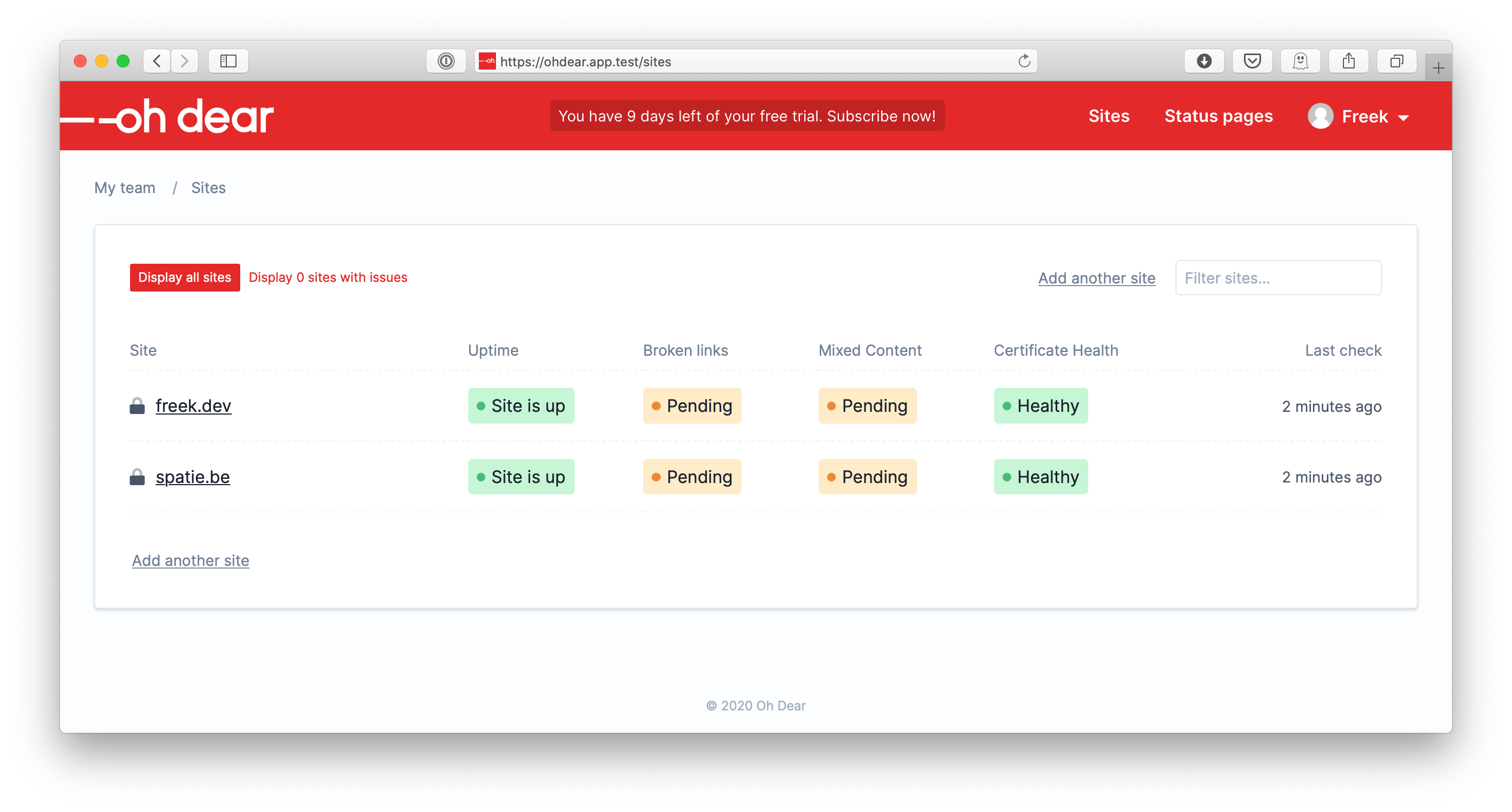
Here is the Blade view that is used to render that screen.
<x-app-layout title="Dashboard" :breadcrumbs="Breadcrumbs::render('sites')"> <div class="wrap"> <section class="card pb-8 cloak-fade" v-cloak> @include('app.sites.list.partials.notificationsNotConfigured') <livewire:site-list /> <div class="flex items-center mt-8" id="site-adder"> <livewire:site-adder /> </div> </section> </div> </x-app-layout> So we have two Livewire components going on: site-list and site-adder. In the LivewireServiceProvider you can see
namespace App\Providers; use App\Http\App\Livewire\Sites\SiteListComponent; use App\Http\App\Livewire\SiteSettings\SiteAdderComponent; use Illuminate\Support\ServiceProvider; use Livewire\Livewire; class LivewireServiceProvider extends ServiceProvider { public function boot() { Livewire::component('site-list', SiteListComponent::class); Livewire::component('site-adder', SiteAdderComponent::class); // other components } } Next, let’s take a look at the SiteListComponent class and its underlying view. You don’t have to understand it all now. After the source code, I’m going to explain some parts, but I think it’s good that you already take a look at the component as a whole, so you have some context.
namespace App\Http\App\Livewire\Sites; use Livewire\Component; use Livewire\WithPagination; class SiteListComponent extends Component { use WithPagination; protected $listeners = ['siteAdded' => '$refresh']; public int $perPage = 30; public string $search = ''; public bool $onlySitesWithIssues = false; public bool $showSiteAdder = false; public function showAll() { $this->search = ''; $this->onlySitesWithIssues = false; } public function showOnlyWithIssues() { $this->search = ''; return $this->onlySitesWithIssues = true; } public function showSiteAdder() { $this->showSiteAdder = true; } public function hideSiteAdder() { $this->showSiteAdder = false; } public function render() { return view('app.sites.list.components.siteList', [ 'sites' => $this->sites(), 'sitesWithIssuesCount' => $this->sitesWithIssuesCount(), ]); } protected function sites() { $query = currentTeam()->sites()->search($this->search); if ($this->onlySitesWithIssues) { $query = $query->hasIssues(); } return $query ->orderByRaw('(SUBSTRING(url, LOCATE("://", url)))') ->paginate($this->perPage); } protected function sitesWithIssuesCount(): int { return currentTeam()->sites()->hasIssues()->count(); } } And this is the content of the view that is being rendered in that render function: app.sites.list.components.siteList.
<div> <div wire:poll.5000ms> <section class="flex items-center justify-between w-full mb-8"> <div class="text-xs"> <div class="switcher"> <button wire:click="showAll" class="switcher-button ">Display all sites </button> <button wire:click="showOnlyWithIssues" class="switcher-button "> Display with issues </button> </div> </div> <div class="flex items-center justify-end"> <a href="#site-adder" wire:click="$emit('showSiteAdder')" class="button is-secondary mr-4">Add another site</a> <input wire:model="search" class="form-input is-small w-48 focus:w-64" type="text" placeholder="Filter sites..."/> </div> </section> <table class="site-list-table w-full"> <thead> <th style="width: 27%;">Site</th> <th style="width: 14%;">Uptime</th> <th style="width: 14%;">Broken links</th> <th style="width: 14%;">Mixed Content</th> <th style="width: 14%;">Certificate Health</th> <th style="width: 17%;">Last check</th> </thead> <tbody> @forelse($sites as $site) <tr> <td class="pr-2"> <div class="flex"> <span class="w-6"><i class="fad text-gray-700 "></i></span> <a href="" class="flex-1 underline truncate"></a> </div> </td> <td class="pr-2"> <x-check-result :site="$site" check-type="uptime"/> </td> <td class="pr-2"> <x-check-result :site="$site" check-type="broken_links"/> </td> <td class="pr-2"> <x-check-result :site="$site" check-type="mixed_content"/> </td> <td class="pr-2"> <x-check-result :site="$site" check-type="certificate_health"/> </td> <td class="text-sm text-gray-700"> @if($site->latest_run_date) <a href=""> <time datetime="" title=""></time> </a> @else No runs yet @endif </td> </tr> @empty <tr><td class="text-center" colspan="6">There are no sites that match your search...</td></tr> @endforelse </tbody> </table> @if ($sites->total() > $perPage) <div class="flex justify-between mt-4"> <div class="flex-1 w-1/2 mt-4"> </div> <div class="flex w-1/2 text-right text-muted text-sm text-gray-700 mt-4"> <div class="w-full block"> Showing to out of sites </div> </div> </div> @endif </div> </div> In the render function, you probably have noticed that the component itself is responsible for getting the sites.
public function render() { return view('app.sites.list.components.siteList', [ 'sites' => $this->sites(), 'sitesWithIssuesCount' => $this->sitesWithIssuesCount(), ]); } protected function sites() { $query = currentTeam()->sites()->search($this->search); if ($this->onlySitesWithIssues) { $query = $query->hasIssues(); } return $query ->orderByRaw('(SUBSTRING(url, LOCATE("://", url)))') ->paginate($this->perPage); } Filtering sites #
Notice that $this->onlySitesWithIssues check? Let’s see how that variable is being set. If you take a look at the screenshot of the site list, you’ll notice a little filter on the top with “Display all sites” and “Display sites with issues”.
This is the part of the view that renders that.
<div class="switcher"> <button wire:click="showAll" class="switcher-button ">Display all sites </button> <button wire:click="showOnlyWithIssues" class="switcher-button "> Display with issues </button> </div> Notice that wire:click="showOnlyWithIssues". When the user clicks an element with wire:click the method whose name is in the attribute value will be executed, and the component will be re-rendered. So, in this case, showOnlyWithIssues is executed.
public function showOnlyWithIssues() { $this->search = ''; return $this->onlySitesWithIssues = true; } So, here our onlySitesWithIssues instance variable is changed, causing our component to re-render. Because onlySitesWithIssues is now set to true, the sites() method will now filter on sites having issues.
if ($this->onlySitesWithIssues) { $query = $query->hasIssues(); } When the component gets rendered, only sites with issues are displayed. Under the hood, Livewire takes care of a lot of things, most notably calling the method on the component when that wire:click element is called, and replacing the HTML of the component on the page when the HTML of the re-rendered version.
Searching sites #
In the top right corner of the site list, you see a search box. When you type something there, you will only see sites who’s name contain your query. Here’s how that works.
In the Blade view, this is the relevant HTML.
<input wire:model="search" class="form-input is-small w-48 focus:w-64" type="text" placeholder="Filter sites..." /> Here, another Livewire directive is used: wire:model. This directive will make sure that each time you type something in that element, Livewire will update the instance variable with the same name in the component and re-render the component. By default, this behavior is debounced, meaning that when you type fast, only one request will be made every 150ms.
So, because the search instance variable is changed on the component, it will re-render. In the first line of the sites() method, the value is being used.
$query = currentTeam()->sites()->search($this->search); And with this in place, searching sites works. I think it’s kinda amazing that you can have this behavior by merely adding livewire:model in your view, and using that value to scope your query. Sure, you could do this with Vue, but this is way simpler.
For completeness, here’s the scopeSearch that’s on the Site model.
public static function scopeSearch(Builder $query, string $searchFor): void { if ($query === '') { return; } $query->where('url', 'like', "%{$searchFor}%"); } Paginating sites #
Laravel natively has excellent support for paginating query results. You only have to call paginate on your query, which we have done in the sites() method.
// in the sites() method return $query ->orderByRaw('(SUBSTRING(url, LOCATE("://", url)))') ->paginate($this->perPage); Calling $sites->links() in the view will render URLs with a page parameter. Under the hood of the paginate() method, that query parameter is used to fetch the results of that page. That’s in short how pagination works in Laravel.
Adding pagination support to a Livewire component is super easy with Livewire. You just have to use the Livewire\WithPagination trait on your component. This trait does some magic so the render links don’t contain a URL to your page, but to an internal Livewire route. This is the output of $sites()->links() in the view of Livewire component.
<ul> <li class="page-item active" aria-current="page"><span class="page-link">1</span></li> <li class="page-item"><a class="page-link" href="https://ohdear.app/livewire/message/site-list?page=2">2</a></li> <li class="page-item"><a class="page-link" href="https://ohdear.app/livewire/message/site-list?page=3">3</a></li> <li class="page-item"><a class="page-link" href="https://ohdear.app/livewire/message/site-list?page=4">4</a></li> <li class="page-item"> <a class="page-link" href="https://ohdear.app/livewire/message/site-list?page=2" rel="next" aria-label="Next »">›</a> </li> </ul> When clicking such a link, Livewire will set the page query parameter in the URL and re-render the component. It’s an elegant solution, and I like that it hooks in so nicely with Laravel’s default pagination.
As a Livewire user, the only thing you needed to do extra was to apply that WithPagination trait. Beautiful.
Updating the list #
As stated earlier, want to have our UI to display the current state, without users having to refresh. If one of the sites displayed in the list goes down, the list should get updated automatically.
The solution for this is straightforward: we’re just going to poll for changes. Livewire comes with support for polling out of the box. At the top of the view you might have noticed this:
<div wire:poll.5000ms> This will make Livewire refresh the component automatically every five seconds. To re-render the component in the browser, Livewire makes use of morphdom. This will compare the HTML of the component with the HTML of the re-rendered version. Only the changes will get updated in the DOM, making the cost for re-rendering in the browser very low.
While typing this blog post, I can already feel the screams of some readers: “Freek, what are you doing!?!? This is highly inefficient: it will perform queries and make requests the whole time…”. And yes, that is true.
Using Livewire with polling is a trade-off. One the one hand, we have some more requests/queries, but this only happens when users are looking at their site lists. This won’t happen often. To know the state of their sites, the vast majority of our users rely on the alerts we sent out (via Slack, Mail, Telegram, …), and they won’t be staring at the site list the whole time.
It’s also very nice that Livewire only polls if the browser is displaying the page. When a browser tab is in the background, polling is paused.
By using a little bit of polling, we don’t need to set up web sockets or Vue, and we don’t need to broadcast events the whole time, … It vastly simplifies our tech stack. I think in this case, the trade-off that Livewire / polling brings to the table is worth it.
In closing #
I hope you enjoyed this dissection of our site list Livewire component. Other place in our UI, where realtime info is being displayed, was refactored in a similar fashion.
Working with Livewire was a pleasure. The API makes sense, the docs are well written, and it’s easy to create powerful components in a short amount of time.
If you want to see the Livewire components discussed in this blogpost in action, head over to Oh Dear and start your ten-day trial (no credit card needed).
After ten days, you might want to get a subscription. What sets Oh Dear apart from the competition is that we not only monitor your homepage, but your entire site. We can alert you when a broken link, or mixed content, is found on any pages of your website. And we also monitor certificate health and provide beautiful status pages like this one.
Should you have questions about these Livewire components, or Oh Dear in general, let me know in the comments below.
programming
via Laravel News Links https://ift.tt/2dvygAJ
April 16, 2020 at 09:06AM




 The other day on a call, a client asked me an interesting question. We were discussing some testing they were doing in Amazon Relational Database Service (RDS). The question came up “since RDS is managed, how can I prove to my security team that the data is actually encrypted?” We’ve all read whitepapers and blogs that talk about encryption in the cloud, but it is something I’ve not needed to validate before. Instead, I just enable encryption when I create an RDS instance and move along to the next steps of the setup. This discussion really got me thinking – what is the best way to enable and test encryption at rest in my RDS instance?