https://webyog.com/wp-content/uploads/2026/07/MySQL-performance-tuning.png
Slow MySQL queries are one of the most common database problems — and one of the most solvable. Most performance issues don’t require new hardware or a rewrite. They require knowing where to look and what to fix first.
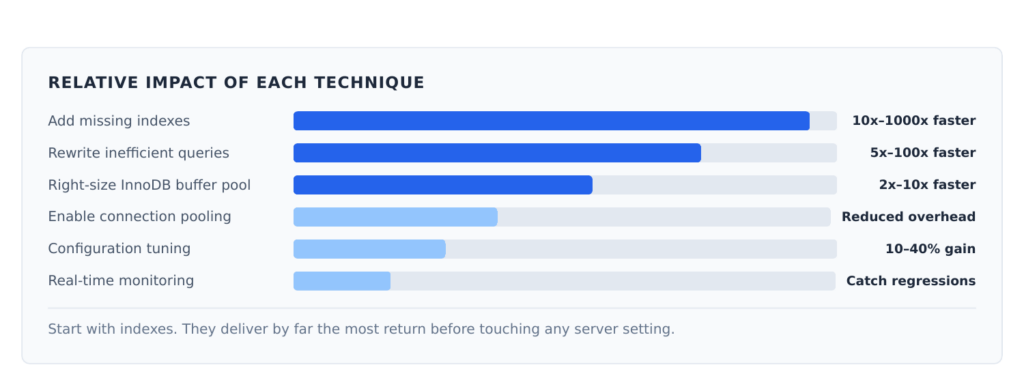
These eight techniques cover the most impactful improvements, ordered by how quickly they tend to deliver results.
Start With a Map, Not a Guess
The biggest mistake in performance tuning is skipping straight to server configuration changes without knowing where the actual bottleneck is. A misconfigured server running well-optimized queries will outperform a perfectly tuned server running terrible ones.
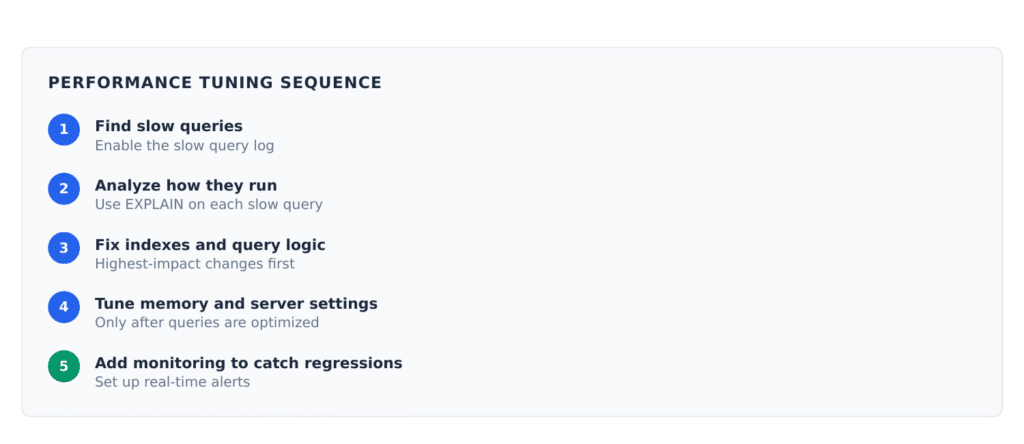
Skipping steps 1–3 and jumping to step 4 is how teams waste weeks tuning a server without improving anything meaningful.
1. Find Slow Queries First
Enable the MySQL slow query log to capture every query that takes longer than a threshold you define.
SET GLOBAL slow_query_log = ‘ON’;
SET GLOBAL long_query_time = 1;
This creates a log of every query that takes more than one second. Review it with mysqldumpslow (bundled with MySQL) to find your worst offenders.
Fix the top 10 slowest queries before doing anything else. In most databases, a handful of bad queries account for the majority of performance problems.
2. Read EXPLAIN Before Writing a Single Index
Run EXPLAIN before any slow SELECT query to see how MySQL plans to execute it. The most
important column is type .
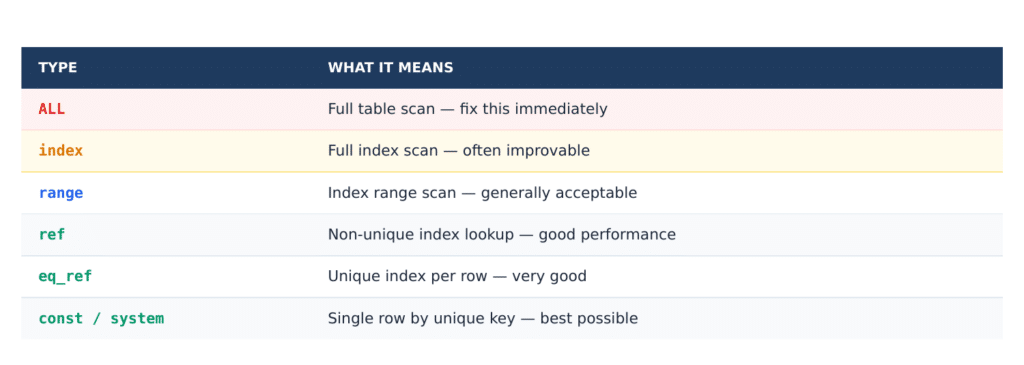
If you see ALL on a table with meaningful data, there is almost certainly a missing index.
3. Add the Right Indexes
Adding an index on a column you filter by frequently is the single highest-return change you can make in most databases. It can turn a 10-second query into a millisecond one.
At the same time, every index adds overhead to writes. Review indexes regularly and remove ones that are no longer used:
SELECT * FROM sys.schema_unused_indexes;
A table with 15 indexes will have noticeably slower writes. Keep only what you use.
4. Fix the Queries Themselves
Before adjusting any server setting, look at the query logic. A few common patterns that cause avoidable slowness:
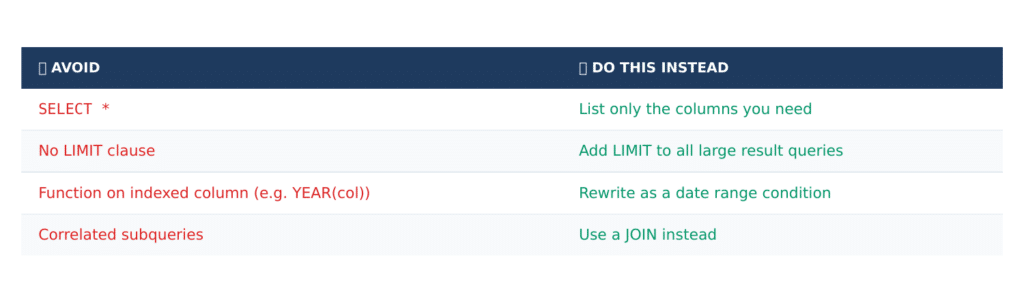
These changes require no schema modifications and often improve performance significantly on their own.
5. Size the InnoDB Buffer Pool Correctly
The InnoDB buffer pool is MySQL’s memory cache for data and indexes. If it is too small, MySQL reads from disk on every query — and disk is orders of magnitude slower than memory.
On a server dedicated to MySQL, allocate 70–80% of total RAM to the buffer pool. Check whether your current setting is adequate by looking at the buffer pool hit rate in SHOW ENGINE INNODB STATUS . If the hit rate is below 99%, the buffer pool is likely undersized.
6. Use Connection Pooling
Every time an application opens a fresh MySQL connection, there is overhead — authentication, session setup, memory allocation. For applications handling many concurrent requests, this adds up quickly.
Connection pooling maintains a set of open connections that are reused across requests. The application borrows a connection, uses it, and returns it. MySQL sees a small, stable number of connections regardless of application traffic.
Most application frameworks include built-in connection pooling. Enable it if you have not.
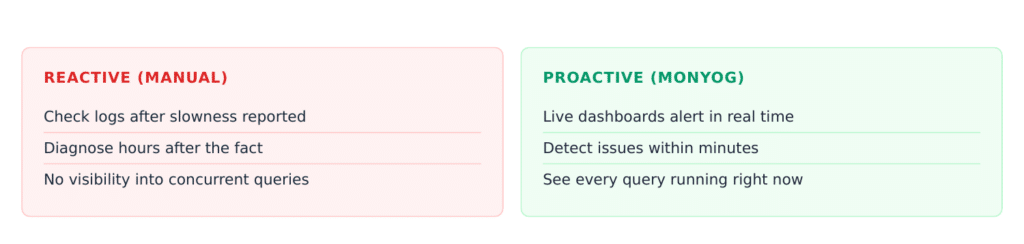
7. Monitor Query Execution in Real Time
Performance problems in production often appear under load — not during development or testing. You need visibility into what your database is doing right now, not just after the fact.
MONyog provides live dashboards showing active sessions, running queries, lock waits, and thread state. Its built-in advisors surface configuration issues and query patterns that commonly cause problems before they become incidents.
8. Tune Configuration Variables
Once queries and indexes are optimized, server configuration adjustments can provide additional gains. Key settings to review:
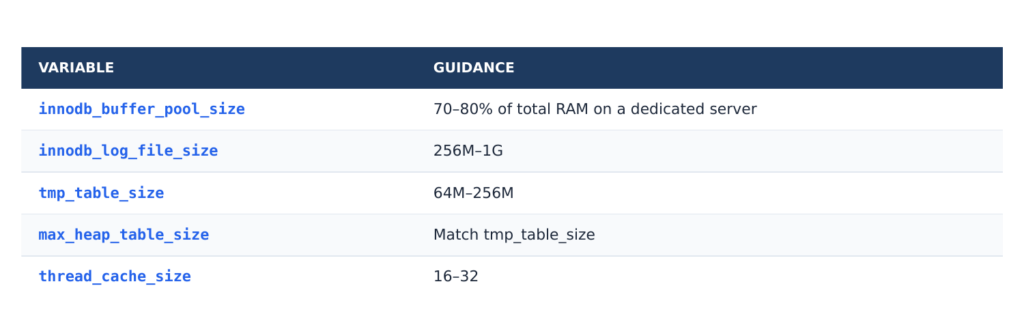
Always benchmark before and after configuration changes. A setting that helps one workload can hurt another.
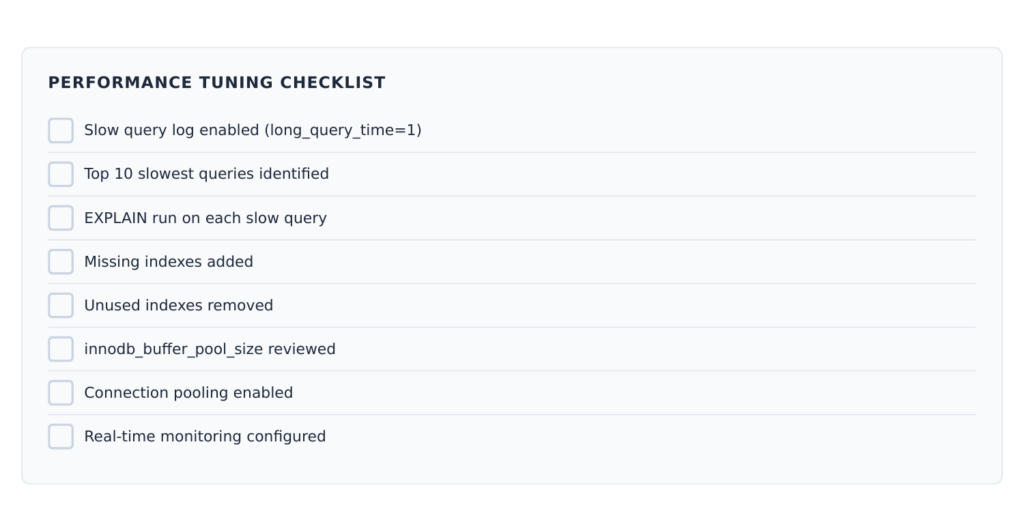
Quick-Start Checklist
Want real-time visibility into your MySQL performance? Try MONyog free — monitor query performance, sessions, and server health in minutes. No agents, no overhead
Frequently Asked Questions
Enable the slow query log with long_query_time = 1 and let it run for a few hours. Find your ten slowest queries, run EXPLAIN on each one, and look for type: ALL in the output. In most environments, fixing a handful of queries with missing indexes will resolve the majority of the problem.
On a dedicated MySQL server, 70–80% of total available RAM. On a shared server, start at 50% and monitor. The goal is to keep your working dataset — the data and indexes accessed most frequently — in memory rather than on disk.
No. Every index adds overhead to writes. Too many indexes will slow INSERT, UPDATE, and DELETE operations noticeably. Add indexes based on actual slow query patterns, and remove unused ones regularly using sys.schema_unused_indexes .
Run SHOW ENGINE INNODB STATUS and look for the buffer pool hit rate. Below 99% typically indicates the buffer pool is undersized relative to your working dataset. Also monitor Innodb_buffer_pool_reads versus Innodb_buffer_pool_read_requests .
Usually because production has significantly more data, making table scans that were tolerable in testing very slow at scale. Or production has concurrent load creating lock contention. Enable the slow query log in production and run EXPLAIN — the execution plan can differ from what you saw in testing.
MONyog is Webyog’s MySQL monitoring tool. It provides real-time dashboards showing active queries, session activity, lock waits, and server health metrics. Its 600+ built-in advisors surface configuration issues and performance patterns automatically, alerting your team before users notice a problem.
Most improvements — adding indexes, optimizing queries — can be done on a live production database without downtime. MySQL 5.6+ supports online index creation for InnoDB tables. Configuration changes typically require a MySQL restart, though some can be applied dynamically. Plan configuration changes during low-traffic windows.
Review the slow query log weekly in active development periods and monthly in stable production environments. Set up real-time monitoring so you are alerted to performance regressions immediately rather than discovering them during manual reviews.
Planet for the MySQL Community