https://webyog.com/wp-content/uploads/2026/08/Backup-best-practices.png
Most teams believe they have a solid backup strategy. In practice, many have a backup process they set up once, have not tested recently, and would discover is broken only when they actually needed it most.
This guide covers how to build a MySQL backup strategy that works reliably — not just in theory, but when it counts.
The One Rule That Matters Most
An untested backup is not a backup. It is a file you hope works.
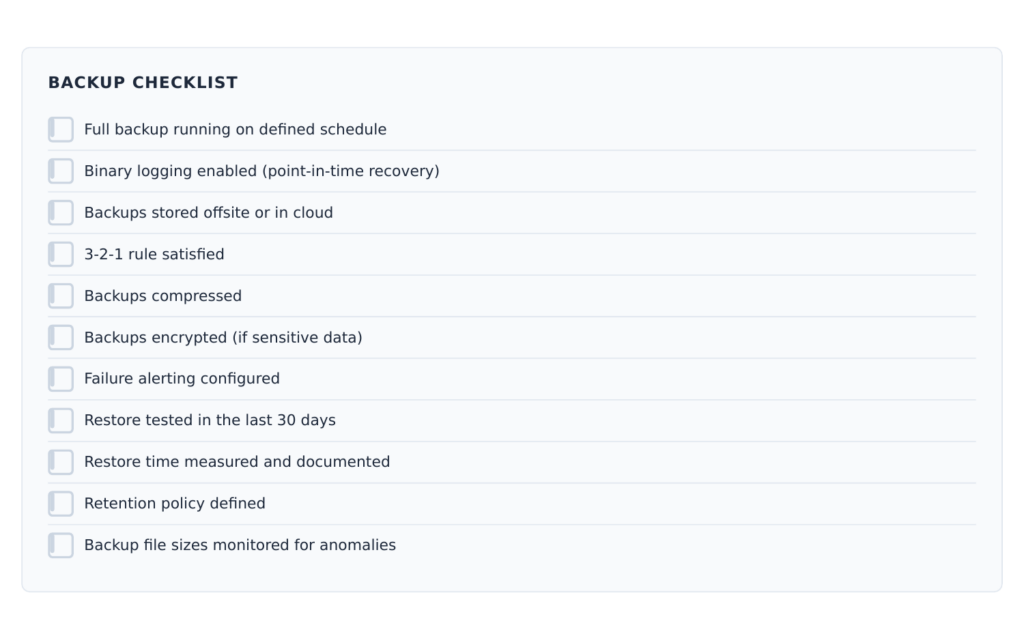
Before anything else, commit to testing your restore process at least once a month. Everything in this guide supports that goal.
Your Three Backup Options
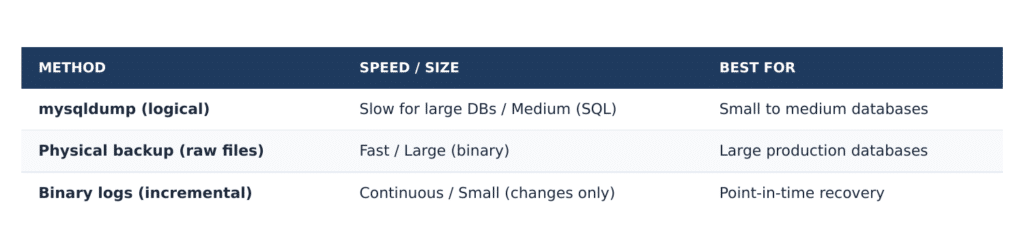
Logical backup (mysqldump) exports your database as SQL statements. It is portable, straightforward, and easy to restore individual tables or databases from. Use –single transaction with InnoDB tables to avoid locking:
mysqldump –single-transaction mydb > mydb_backup.sql
Physical backup copies the raw database files. Faster for large databases, but must be restored to the same MySQL version and platform. Minimal locking, supports incremental backups.
Binary log backup records every change to the database continuously. Combined with a full backup, binary logs let you restore to any point in time — not just the last full backup snapshot.
Designing Your Strategy
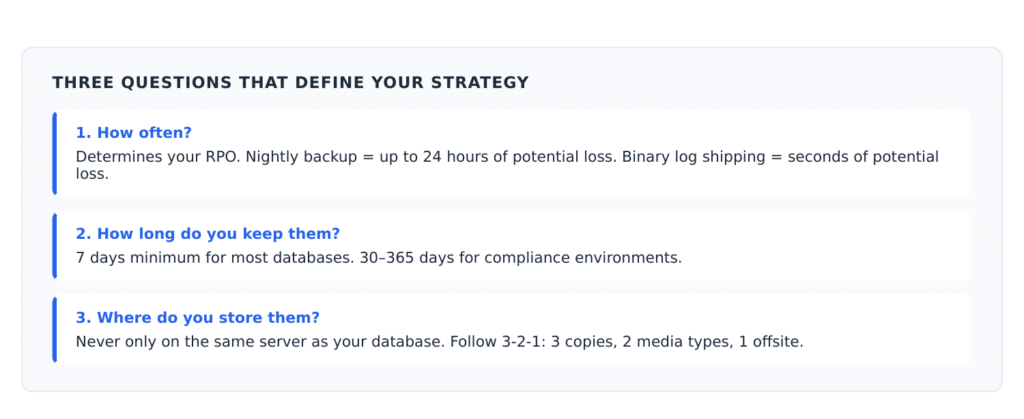
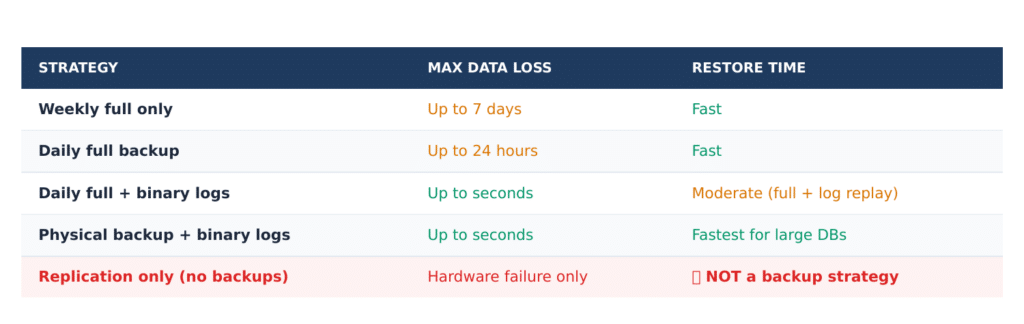
Three questions define your backup strategy:
RPO and RTO Explained
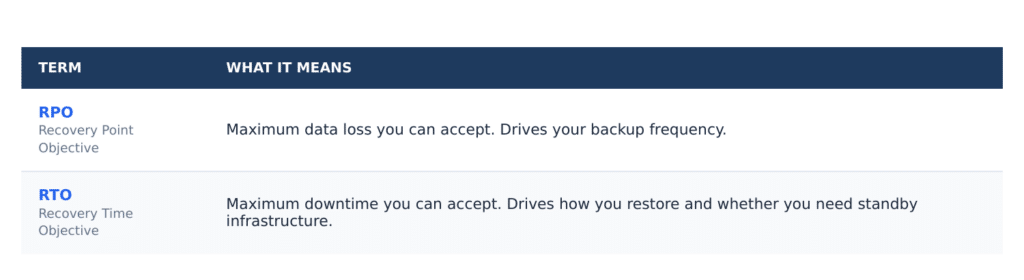
Know both numbers before an incident, not during one. If restoring a full backup takes 6 hours and your RTO is 2 hours, you have a problem to solve before it becomes an emergency.
Automate Your Backups
Manual backups fail when people are sick, busy, or on vacation. Automation removes the dependency on memory.
Linux Automation
A basic automated backup script using cron and mysqldump:
#!/bin/bash
DATE=$(date +%F)
mysqldump –single-transaction –all-databases \
| gzip > /backups/mysql/backup_$DATE.sql.gz
if [ $? -ne 0 ]; then
echo “Backup failed on $(hostname)” \
| mail -s “ALERT: MySQL Backup Failed” [email protected]
fi
Scheduled via cron to run nightly at 2 AM:
0 2 * * * /usr/local/bin/mysql_backup.sh
Windows Automation with SQLyog
On Windows, SQLyog provides built-in backup scheduling with no scripting required. Configure the databases, output location, and schedule through the GUI. SQLyog handles execution and can send email notifications on completion or failure.
Compress and Protect Backups
Compress every backup before storing it. SQL dumps compress extremely well — typically 70–90% size reduction. Pipe mysqldump output through gzip:
mysqldump mydb | gzip > mydb_backup.sql.gz
For backups stored offsite or in cloud storage, encrypt them. A backup file containing sensitive data is a liability if storage access is ever misconfigured.
The Backup Checklist
Monitor Backup Health
Automated backups still need oversight. Common failure modes to watch for:
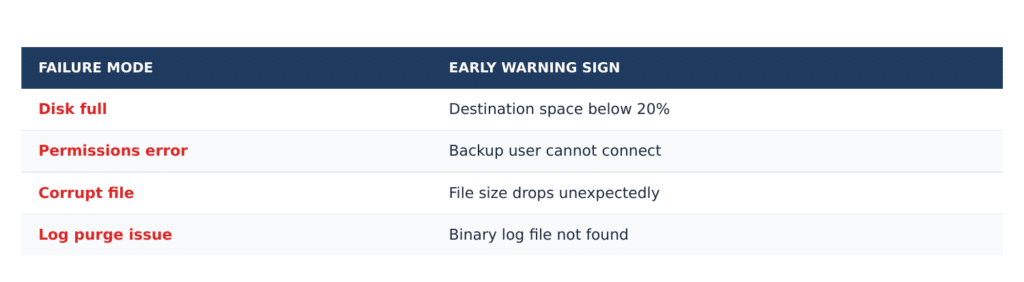
MONyog can alert you when disk space on monitored servers approaches a critical threshold — catching the “disk full” failure mode before your next backup runs.
Want to automate MySQL backups without writing scripts? Try SQLyog free and set up your first scheduled backup in minutes.
Frequently Asked Questions
Depends on your RPO — how much data loss is acceptable in a worst case. Nightly full backups with binary log shipping in between gives you both a daily recovery point and the ability to restore to any specific moment. For lower-stakes databases, weekly full backups may suffice.
RPO (Recovery Point Objective) defines how much data you can afford to lose — it drives backup frequency. RTO (Recovery Time Objective) defines how quickly you must restore — it drives how you set up your restore process and whether you need standby infrastructure.
Yes, if you use –single-transaction with InnoDB tables. This creates a consistent snapshot without locking tables during the backup. Avoid lock-based options in production — they block writes for the duration of the dump.
The only way to know for certain is to restore it. File size monitoring catches obvious failures, but a file that looks correct can still be corrupt. Schedule regular restore tests to a staging instance.
At minimum, 7 days of daily backups. For regulated industries, compliance may require 30, 90, or 365 days. Compressed MySQL backups are inexpensive to store in cloud object storage, so err on the side of longer retention.
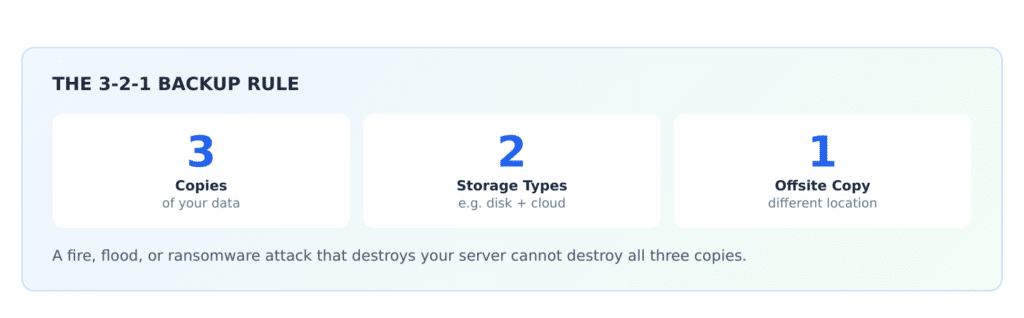
Never only on the same server as the database — disk failure, ransomware, or an accidental deletion can destroy both simultaneously. Use a separate server or cloud storage (AWS S3, Azure Blob Storage, Google Cloud Storage). Follow the 3-2-1 rule.
Yes. SQLyog’s backup scheduler lets you select individual databases or all databases on the server, schedule the job at your preferred time, and send notifications on completion or failure — all from a single interface.
No. Replication copies changes from your source to replicas in near real time — including accidental DELETE statements or schema changes that break your application. Replication protects against hardware failure. Backups protect against human error and logical data corruption. You need both.
Planet for the MySQL Community