https://webyog.com/wp-content/uploads/2026/08/Index-optimization.png
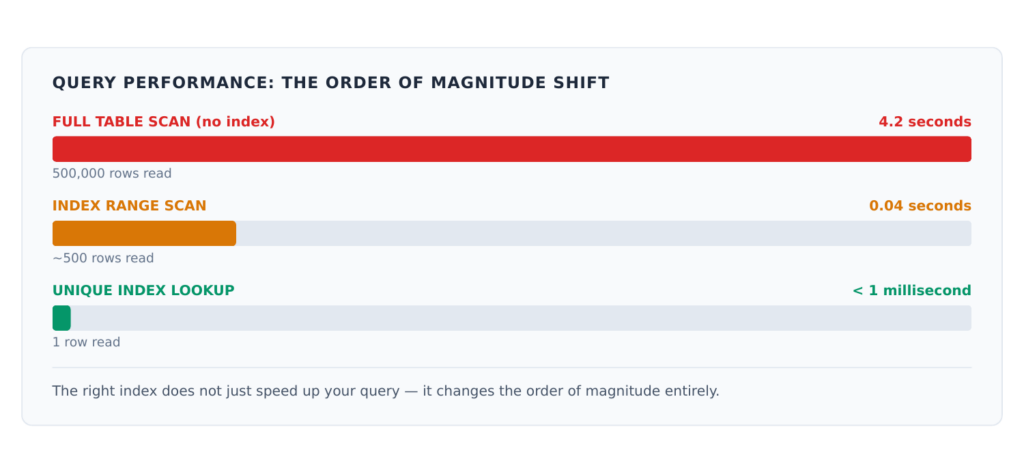
If there is one change that can turn a 10-second MySQL query into a millisecond one, it is adding the right index. And if there is one change that can quietly slow down your write heavy database over time, it is adding too many.
Indexes are the most powerful performance tool in MySQL. Understanding how they work — and how they fail — is foundational to managing database performance at any scale.
How Indexes Work
An index is a separate data structure MySQL maintains alongside your table. Think of it like a book’s index: instead of reading every page to find a topic, you go directly to the right page number.
Without an index on a filtered column, MySQL reads every row in the table on every query. With the right index, it locates matching rows in a fraction of the reads.

Reading EXPLAIN
EXPLAIN is your primary tool for understanding whether MySQL is using an index and how.
EXPLAIN SELECT * FROM customers WHERE email = ‘[email protected]’;
The most important column in the output is type.
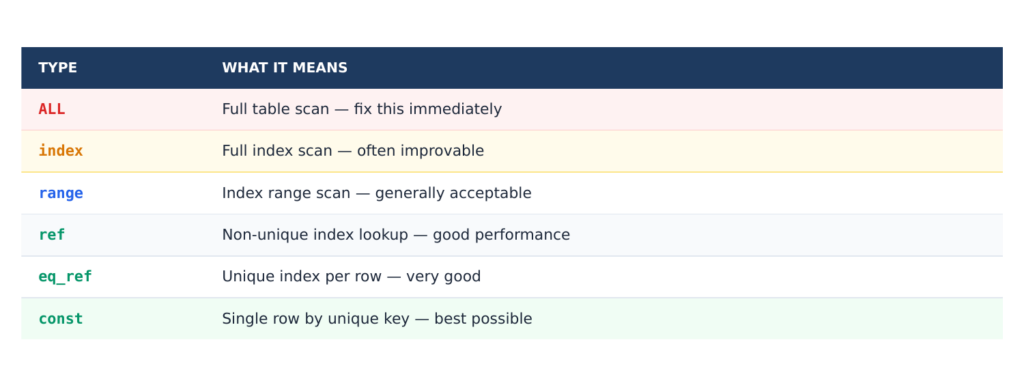
Other columns to watch:
• key — which index MySQL chose. NULL means no index used.
• rows — estimated rows MySQL will examine. Lower is better.
• Extra: Using filesort — sorting without an index. Can be expensive on large result sets.
• Extra: Using index — the query was satisfied entirely from the index. Very efficient.
Index Types

Creating Effective Indexes
Single-Column Indexes
The simplest case: a column you filter on frequently.
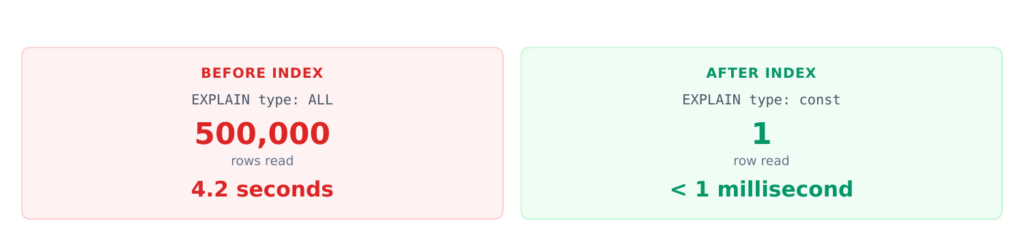
ALTER TABLE customers ADD UNIQUE INDEX idx_email (email);
Before and after:
Composite Indexes and the Left-Prefix Rule
When queries filter on multiple columns, a composite index is usually more effective than separate single-column indexes.
ALTER TABLE orders ADD INDEX idx_status_created (status, created_at);
MySQL can use this index for queries that start with the leftmost column:
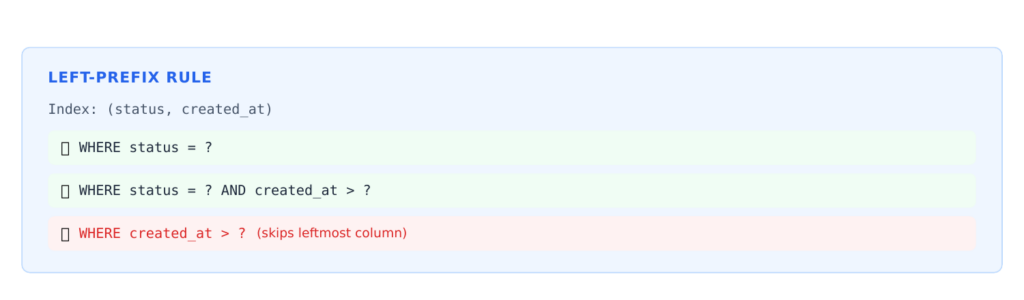
Order composite index columns by how they appear in your most common queries, with the most selective column first.
Covering Indexes
A covering index includes all the columns a query needs. MySQL satisfies the entire query from the index without reading the table at all — shown as Using index in EXPLAIN’s Extra column.
— Query only needs these three columns
SELECT id, email, status FROM customers WHERE status = ‘active’;
— Covering index includes all three
ALTER TABLE customers ADD INDEX idx_covering (status, id, email);
On large tables, the performance difference between a regular index lookup and a covering index can be significant.
Common Mistakes
Over-Indexing
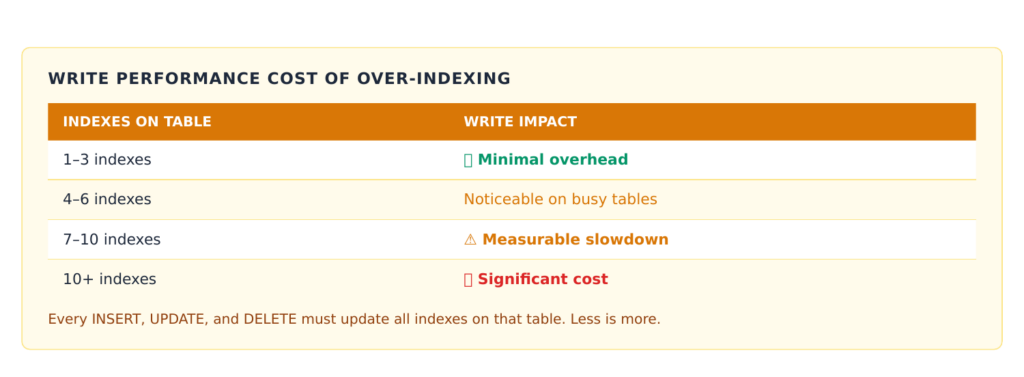
Every index you add slows down writes. MySQL updates all indexes on every INSERT, UPDATE, and DELETE.
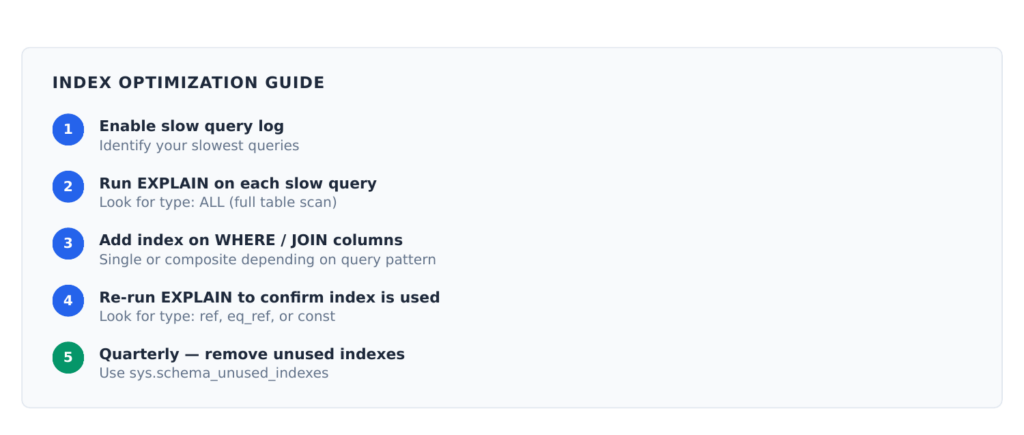
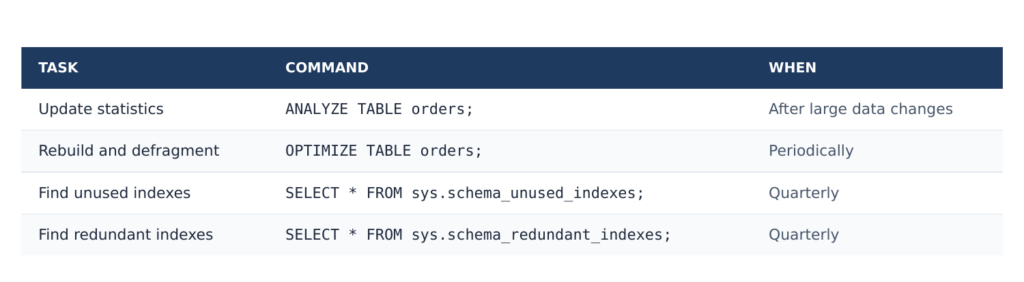
Find and remove unused indexes regularly:
SELECT * FROM sys.schema_unused_indexes;
SELECT * FROM sys.schema_redundant_indexes;
Functions on Indexed Columns
Using a function on an indexed column prevents MySQL from using the index:

Low-Cardinality Columns
Columns with very few distinct values (such as a boolean or a status with three possible values) are rarely worth indexing on their own. MySQL may choose a full table scan if it estimates the index would return a large fraction of rows anyway.
Maintaining Indexes
Want to analyze query performance visually? SQLyog’s Query Profiler shows detailed index usage and execution metrics for every query you run. Try SQLyog free.
Frequently Asked Questions
Check your slow query log for queries with type: ALL in EXPLAIN. Any column that appears frequently in WHERE, JOIN, or ORDER BY clauses is a candidate. The test is always: run EXPLAIN before and after adding the index to confirm it is being used.
There is no universal number, but most well-optimized tables have 3–8 indexes. Start with the primary key, add indexes for your most common query patterns, and stop before you over-index. Audit unused indexes quarterly.
In MySQL 5.6+ with InnoDB, most index additions are online and do not block reads or writes during the build. There is a brief metadata lock at the start and end. For very large tables, run the operation during low-traffic windows as a precaution.
A few possibilities: the index has low cardinality and MySQL still reads many rows through it; you need a covering index (MySQL uses the index for filtering but reads full table rows for each match); or there is a Using filesort in EXPLAIN’s Extra column indicating additional sorting work after the index lookup.
A composite index on (col1, col2) allows MySQL to filter on both columns in a single index lookup. Two separate indexes on col1 and col2 require MySQL to use one or perform a merge operation. For queries filtering on multiple columns together, a composite index almost always performs better.
Query sys.schema_redundant_indexes . It shows indexes made unnecessary by another index on the same table — for example, if you have indexes on (a) and (a, b) , the first is redundant because all queries it can satisfy can also be satisfied by (a, b) .
MySQL automatically indexes the primary key and any column declared with the UNIQUE constraint. It does not create indexes on foreign key columns or frequently queried columns automatically — those you must add manually based on your query patterns.
It means MySQL satisfied the entire query from the index without reading the actual table rows. This is called a covering index and is one of the most efficient query execution patterns. When you see Using index , the query is well-optimized for index usage.
Planet for the MySQL Community